


My Quick Verdict
★★★★★ 4.5 / 5
Best For
Faceless channel builders
Price
$37 one-time
Refund
30-day guarantee
A faceless video app that runs the whole channel instead of just making clips. At $37 the math is easy.
Hi, this is Darius, and welcome to my MagicFlixAI 2.0 review. If you’ve ever tried to run a faceless channel on your own, you know the part nobody talks about. Making one video is fine. Making sixty is the problem.
I burned out on this exact thing last year. Script in one tab, an AI image tool in another, a voice app in a third, then an editor, then thumbnails, then the upload schedule. Six tools to publish one clip. And YouTube’s own creator guidance keeps saying the same thing: post consistently. That’s hard when a single video eats your afternoon.
So when Ben Murray put out a tool that claims to run the whole channel instead of just the video, I wanted to poke at it. Here’s my honest take in this MagicFlixAI 2.0 review.
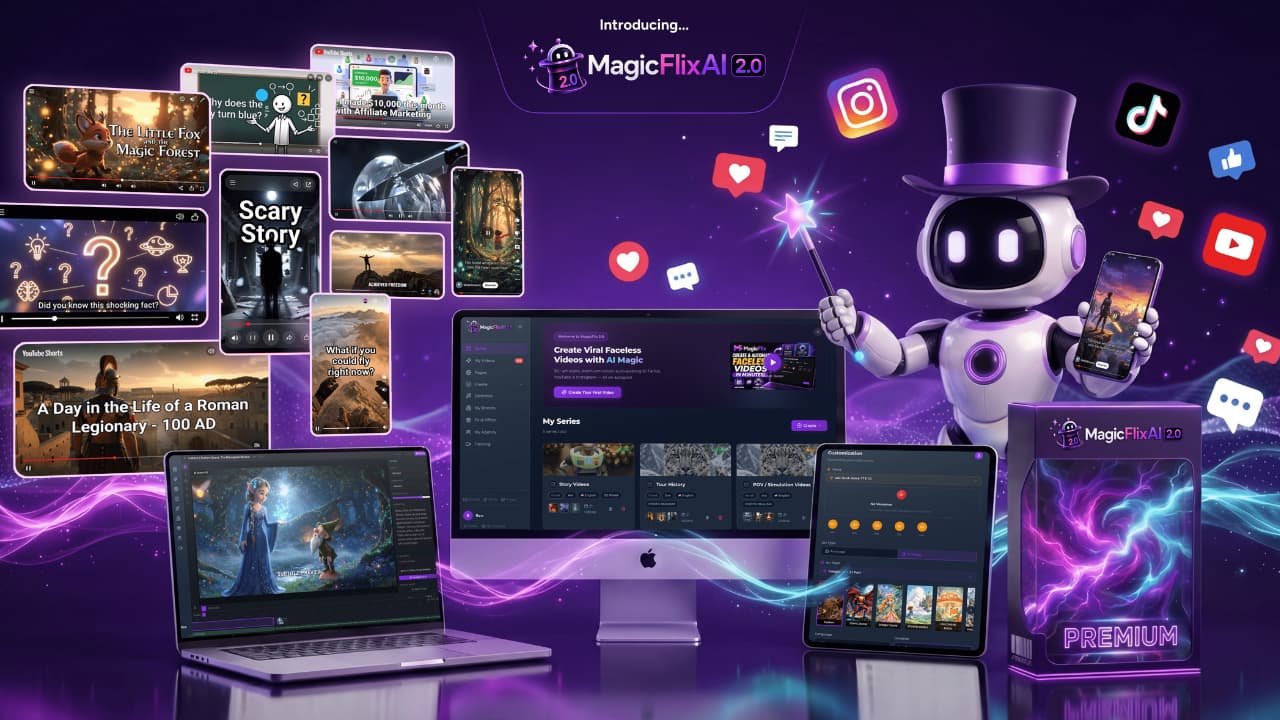
01 What Is MagicFlixAI 2.0? A Complete Overview
MagicFlixAI 2.0 is a cloud app that builds faceless video channels from end to end. You log in through a browser. Nothing to install, nothing to update, and it runs the same on a cheap laptop as it does on a new one.
You don’t film anything. You don’t write scripts. You don’t record a voice, cut footage, design thumbnails, or sit there uploading at 9pm because that’s when your audience is online. The app handles all of it, including the posting schedule.
The flow is short. Drop in an idea, a keyword, a product, or a website URL. Pick a channel theme and an art style. The AI writes the script, generates the visuals, narrates it, adds subtitles, builds a thumbnail, then pushes it to YouTube, TikTok, Meta, or Reddit on the calendar you set.
There are three ways to run it. Manual Mode gives you a multi-track timeline editor and full control. Automatic Mode creates and posts a whole series hands-free. Agent Mode is the new one, and it’s the reason I paid attention.
It’s built by Ben Murray and the AtlasWebSolutions team. Same people behind DoodleMaker and VidToon 2.0, so these are tools that have been around a while and still get updates.
Agent Mode is what they call a self-learning AI Brain. You feed it a brand, a product, a personality, or a site, and it studies that input to build a channel with its own voice instead of the same flat AI narration everyone else is publishing. That’s the piece I most wanted to test for this MagicFlixAI 2.0 review, because sameness is what kills most faceless channels.
02 MagicFlixAI 2.0 Demo Video
Reading about a video tool only gets you so far. The demo below shows the real dashboard, the themes, and what the finished videos look like.
Like What You Saw in the Demo?
One-time launch payment · 30-day money-back guarantee
03 MagicFlixAI 2.0 Pricing: What Does It Cost?
Two ways to buy. The Front End on its own, or the Bundle that folds every upgrade into one payment.
Front End — MagicFlixAI 2.0
$37 one-time
launch payment · no monthly fee
- ✓ Premium access with all three modes: Manual, Automatic, and Agent
- ✓ 50 channels and 1,000 videos a month
- ✓ Post to YouTube, TikTok, Meta, and Reddit
- ✓ Viral channel themes, premium art styles, ultra-realistic voices
- ✓ Timeline editor, auto subtitles, SEO tools, thumbnail maker
- ✓ Commercial license to sell videos or whole channels
- ✓ VIP bonuses plus training and 24/7 support
Bundle Deal — MagicFlixAI 2.0 + All Major Upgrades
$317 one-time
one payment · all OTOs included
- ✓ Full Premium front end
- ✓ Gold unlimited for unlimited series, renders, and Full HD
- ✓ Elite international licensing plus done-for-you agency assets
- ✓ Platinum whitelabel and 100 agency accounts
- ✓ Audio2Video and Voicely bolted on
- ✓ Single payment, no upsell flow at checkout
Front End Coupon
Already own MagicFlix 1.0? Use code PREMIUM for $10 off Premium.
Existing 1.0 accounts only. New buyers pay the $37 launch price.
Bundle Coupon
Use code MAGIC for $50 off the Bundle.
Drops the Bundle from $317 to $267 in one payment.
Optional Upgrades (Available After Checkout)
The front end works on its own. These five offers show up after you buy, and every one of them is optional. I’m listing them so nothing at checkout catches you off guard.
MagicFlixAI 2.0 Gold
$197.00 ONE-TIME
Lifts the caps. Unlimited channel series, unlimited renders, unlimited thumbnails, faster render times, and Full HD output. Adds an agency license for 15 clients plus the premium channel themes and art styles.
MagicFlixAI 2.0 Elite
$127.00 ONE-TIME
International licensing so you can build channels in any language and sell to clients outside the US. Strips the MagicFlix branding off your rendered videos, and includes Channel Club themes plus a done-for-you agency site.
MagicFlixAI 2.0 Platinum
$197.00 ONE-TIME
The agency tier. Whitelabel the app under your own logo, add 100 client accounts, bring in team members, and pick up the DFY Fiverr and Upwork gig pack plus contracts and proposals.
MagicFlixAI 2.0 Audio2Video Unlimited
$37.00 ONE-TIME
Turns audio into video. Upload a podcast, a voice note, or any recording and it generates the visuals, captions, animations, and scenes around it. Handy if you already have audio sitting around doing nothing.
MagicFlixAI 2.0 Voicely Special
$37.00 ONE-TIME
A voice upgrade. Adds emotion, pauses, emphasis, and tone control so the narration lands closer to a real person reading than a text-to-speech engine. The cheapest upgrade and probably the one you’ll notice most.
The team has said openly that this launch deal is one-time now and moves to monthly billing after the launch week closes. If a recurring fee would bother you, the one-time window is the whole point.
🎁 Exclusive Bonuses Included With Your Purchase
Buy through any link on this page and you also get the bonus pack Ben put together. Most of it is case studies and channel blueprints, which tell you what to point the tool at. That decision matters more than the tool does.
🎁 BONUS 01 FREE
$5 Million Affiliate Channel GPT
A custom GPT trained on Ben Murray’s affiliate playbook and the $5 million in commissions behind it. Ask it what to promote and how to frame it.
🎁 BONUS 02 FREE
YT Channel Automator
Diagnoses why a channel has stalled, then hands you the specific fixes to get views moving again. Useful whether the channel is new or six months stuck.
🎁 BONUS 03 FREE
How a Complete Beginner Built a $12,000/Month Faceless Channel
The full breakdown of one channel: the niche picked, the content angle, the video format, and how it got monetized. A map you can copy.
🎁 BONUS 04 FREE
$3k/Month Agency Client Channel Case Study
How a beginner landed a client paying $3,000 a month to run a faceless channel that feeds that business leads and customers. Worth reading before you pitch anyone.
🎁 BONUS 05 FREE
100 Perfect AI Channels
A hundred channel blueprints with the niche, video ideas, keyword openings, content angles, and monetization already worked out. Kills the blank-page problem on day one.
🎁 BONUS 06 FREE
AI Faceless Blogger Pro
Builds AI blogs that match your channels so the written content and the video content feed each other instead of running as two separate jobs.
How to claim your bonuses
Nothing to email me for. Buy through any link on this page and the bonuses appear in your JVZoo account right after purchase, delivered instantly alongside your MagicFlixAI 2.0 login.
Get MagicFlixAI 2.0 + All 6 Bonuses Today
30-day money-back guarantee · One-time launch payment
04 Key Features and How They Help You
Feature lists get long and boring fast, so each one below is written as what it does for you when you sit down to use it.
Self-Learning AI Brain
Train a channel on your brand, product, or site and it develops its own voice instead of the generic AI tone everyone recognizes.
Three Creation Modes
Manual for full control, Automatic for hands-free series, Agent for self-building channels. Start in one and move to another whenever.
40+ Channel Themes
POV simulations, trivia, ASMR, recreated history, story videos, education. The formats pulling views right now, ready to go.
20+ Premium Art Styles
Pixar-style 3D, Ghibli, comic book, noir, cyberpunk, ultra-realism. Pick a look that keeps your channel from blending into the feed.
Ultra-Realistic Voices
A big library of narrators across ages, accents, and personalities so your channel sounds like a person and not a robot reading.
Character Consistency
Your characters keep the same face across a long video and across the whole channel. This is where most AI video tools fall apart.
Multi-Track Timeline Editor
Drag, cut, trim, and rearrange every layer. When the AI gets a scene wrong you fix it in place instead of regenerating the whole video.
Automatic Subtitles
Captions generate in sync with every spoken word. Most short-form gets watched on mute, so this one quietly protects your retention.
Built-In SEO Tools
Keyword discovery, title and description rewrites, hashtag picks. It sorts ideas by viral, trending, and evergreen so you know what to make next.
Viral Thumbnail Maker
Generates high-contrast thumbnails built to earn the click. You can swap them out later, but you’re never stuck staring at a blank canvas.
Auto-Scheduling and Posting
Set the calendar once and it publishes to YouTube, TikTok, Meta, and Reddit on its own. Consistency stops depending on your mood.
Monetization Built In
Drop affiliate offers into the videos, chase sponsorships, or run channels for local businesses. Revenue isn’t bolted on after the fact.
The Launch Price Ends When the Week Does
Lock in one-time access before it moves to monthly billing
05 How MagicFlixAI 2.0 Compares to Similar Tools
vs. Doing It Manually
Doing this by hand means script, images, voice, edit, thumbnail, upload. Six steps, six tools, and call it two hours per video once you count the fiddling. Thirty videos a month is sixty hours. That’s a part-time job you’re not getting paid for yet. MagicFlixAI collapses those steps into one dashboard and one render queue. You trade a little control for a lot of hours back, and honestly the control you give up is mostly the stuff you were doing on autopilot anyway.
vs. General AI Video Tools
Most AI video apps stop at the video. You get a nice clip and then you’re on your own for keywords, thumbnails, scheduling, and monetization. That gap is where people quit. I ran into the same wall when I tested Faceless Social earlier this year, and it’s a common pattern in this category. MagicFlixAI is aimed at the channel rather than the clip, so the SEO, the calendar, the affiliate placement, and the character consistency all sit in the same place. Whether you need that depends on how many videos you plan to publish.
vs. Hiring Freelancers
Paying an editor per clip costs more than this whole app costs once, and a voice actor adds more on top. At thirty videos a month that bill climbs fast, and you’re paying it long before you’ve earned a dollar back. Freelancers still win on taste and judgment, no argument there. But for volume work where the format repeats every time, paying a person per clip stops making sense.
06 Pros and Cons
What I Liked
- One-time launch price instead of another monthly subscription stacking up
- Three modes, so you can learn in Manual and graduate to hands-free later
- Agent Mode trains on your own brand or URL, so channels don’t all sound alike
- Character consistency holds across a full series, not just a single clip
- The timeline editor means you can fix a bad scene instead of rerolling everything
- Subtitles, SEO, and thumbnails are included rather than sold as add-ons
- Posts to four platforms on a schedule, so one video becomes four placements
- Commercial rights come with Premium, so client work is allowed from day one
- Built by a team with a long track record of updating their apps
What Could Be Better
- The refund window is 30 days and the policy is worded around the product not working as described, so test it properly in week one and keep your notes.
- Your results ride on niche choice and how consistently you post. The tool removes the labor, not the need to pick a good topic.
- The front end caps you at 50 channels and 1,000 videos a month, and longer renders sit in a queue. Unlimited output needs the Gold upgrade.
- Five upgrade offers appear after you pay, which slows checkout down. The Bundle skips that whole sequence if you’d rather not click through it.
You Have 30 Days to Decide From the Inside
Test it, build a channel, and get your money back if it isn’t for you
07 What Real Users Are Saying
While putting together this MagicFlixAI 2.0 review I went through the early-access feedback to see what people said once the honeymoon wore off. I’m paraphrasing here rather than quoting names, and I’d take any big income number with a grain of salt. Still, the patterns are worth reading.
The comment that came up most often had nothing to do with money. It was about the output not looking cheap. Several people had tried faceless channels before and felt their videos blended into the same recycled AI look. This was the first time the branding and art style felt like theirs.
The second pattern was volume. One user reported running five channels at once, another said multiple channels were earning in different ways at the same time. Whether the exact numbers hold up, the underlying point is that running several channels in parallel stopped being a scheduling nightmare.
One reviewer with early access said the thing that surprised them was the coherence. The videos didn’t feel randomly assembled. Scripts, visuals, voiceover, and subtitles all matched the same house style, which is the part they’d expected to have to fix by hand.
The freelancers and agency folks flagged a different thing. Once they showed sample channels to local businesses, the orders came faster than they could fill them. That tracks with what I see generally. Small businesses want video and have no idea how to make it, so a working sample does most of the selling for you.
08 Tips to Get the Most Out of MagicFlixAI 2.0
Start with one channel, not five. The app lets you spin up 50, and that’s exactly the trap. Pick one niche, publish thirty videos, and read the data before you open a second. Five half-fed channels beat you in effort and lose to one focused channel every time.
Use Manual Mode for your first week. Automatic is the reason you bought this, but you’ll make better automated channels if you first watch how the AI builds a video by hand. A week in the timeline editor teaches you what to tell it later.
Feed Agent Mode something specific. A vague prompt gets you a vague channel. Give it a real product page, a competitor URL, or a tight audience description. The more specific the input, the less your output sounds like everyone else’s.
Lock one art style per channel. Switching between Pixar-style 3D and ultra-realism across a feed makes a channel look unfinished. Pick a look, keep it, and let the thumbnails carry the variety instead.
Rewrite the first line of every script. The AI writes a competent opener. Competent openers don’t hold anyone past three seconds. This is one minute of work per video and it moves retention more than anything else in the app.
Put the affiliate offer in from the start. Don’t build an audience and then figure out monetization. Choose the offer before the first video so every clip has somewhere to send people. Channels that monetize early profit without needing huge view counts.
Schedule a month at once. Batch a full month of videos, load the calendar, then close the tab. The whole value here is that consistency stops depending on whether you feel like working on a Tuesday.
09 Frequently Asked Questions
Do I need to show my face or record videos?
No. That’s the whole idea. No camera, no microphone, no filming. The AI writes the script, makes the visuals, and narrates it with one of the built-in voices. You never appear and you never record anything.
Is MagicFlixAI 2.0 good for beginners?
Yes, and it’s probably a better fit for beginners than for editors. Automatic Mode handles a whole channel with almost no input, and training videos come with the account. If you’ve never made a video before, you can publish your first one the same day you buy.
Can I sell the videos or channels to clients?
Yes. The Premium front end includes commercial rights, so you can sell videos or entire channels to businesses. If you want client logins inside the app or whitelabel branding, that’s the Gold and Platinum upgrades rather than the front end.
Will this guarantee views or sales?
No, and be careful with anyone who tells you otherwise. The app makes and posts the videos. Views depend on your niche, your hooks, and how long you keep going. The vendor’s own disclaimer says the same thing: no income is guaranteed.
How does the refund work?
You get 30 days. The policy is worded around the product not working as described, so use the first week to actually build something and save your notes if anything breaks. Support runs through help.magicflixapp.com and JVZoo handles the billing side.
10 Final Verdict: Is MagicFlixAI 2.0 Worth It?
For $37, yes. The math is hard to argue with. Hiring out a single video costs more than the whole app does, so if you publish even ten videos you’re already ahead.
This is for you if you want a faceless channel and keep stalling on the production work. It’s for you if you already have an audience and want to feed four platforms without four times the effort. And it’s a strong fit if you sell to local businesses, because the commercial rights are included and a sample channel closes deals faster than a pitch deck.
Skip it if you want a cinematic one-off. This tool is built for volume and repetition, and a single flagship video deserves a human editor. Skip it too if you were hoping the AI picks the niche for you. It won’t. That decision stays yours, which is the same thing I said when I looked at Tube Engine AI.
On the upsells, here’s the honest read. Gold is the only one most people will feel the absence of, because the front-end caps are real once you start scaling. Elite matters if you sell outside the US or want the branding removed. Platinum is for agencies and nobody else. Audio2Video and Voicely are cheap and fun, and Voicely is the one I’d take first at $37.
The refund is real but it’s 30 days and it’s conditional, so don’t buy it and leave it sitting in a tab. Build something in week one. That’s the only way you’ll know, and it’s also the only way the guarantee protects you. Everything I found while writing this MagicFlixAI 2.0 review points to a tool that does what it says, as long as you show up.
My recommendation, after wrapping up this review: grab the Premium version, use coupon PREMIUM for $10 off if you already own MagicFlix 1.0, post daily for 30 days, and judge from your own numbers. If you want everything in one shot without the upsell sequence, the Bundle deal at $317 with coupon MAGIC for $50 off saves you the most overall.
My Final Score
4.5 / 5
★★★★★
MagicFlixAI 2.0 handles the part of faceless channels that makes people quit: the grind of producing and posting week after week. The output looks branded rather than generic, the three modes let you grow into it, and at a one-time $37 there’s very little standing between you and finding out whether this model works for you. It won’t pick your niche or guarantee views. Do that part yourself and the tool holds up its end.
GET MAGICFLIXAI 2.0 → OR SPECIAL BUNDLE DEAL
30-day money-back guarantee · One-time launch payment · Free updates included