


I’ve watched a lot of people try to launch an online course business. Most of them never ship anything.
They pick a niche, second-guess it, buy a course builder, sign up for an email tool, try to figure out ClickFunnels, and then six months later they still have nothing for sale. Sound familiar?
The problem isn’t motivation. It’s the sheer number of moving parts. You need a course, a community, a sales page, payment processing, email sequences, and traffic.
Doing all of that across five different tools while also trying to run a business is genuinely hard. And most people quietly give up before anything goes live.
GuruOS is trying to solve exactly that. It’s an all-in-one platform that uses AI agents to handle a big chunk of the work — building course content, writing sales copy, managing communities, and scheduling social posts — so you can focus on the parts only you can do. The promise is a faster path from idea to live product, without the usual tool chaos.
So I went through it properly. I looked at every feature, every pricing tier, and every claim on the sales page. This review tells you what works, what’s overhyped, and whether it’s worth your money depending on where you’re at right now.
What Is GuruOS and Who Is It For?
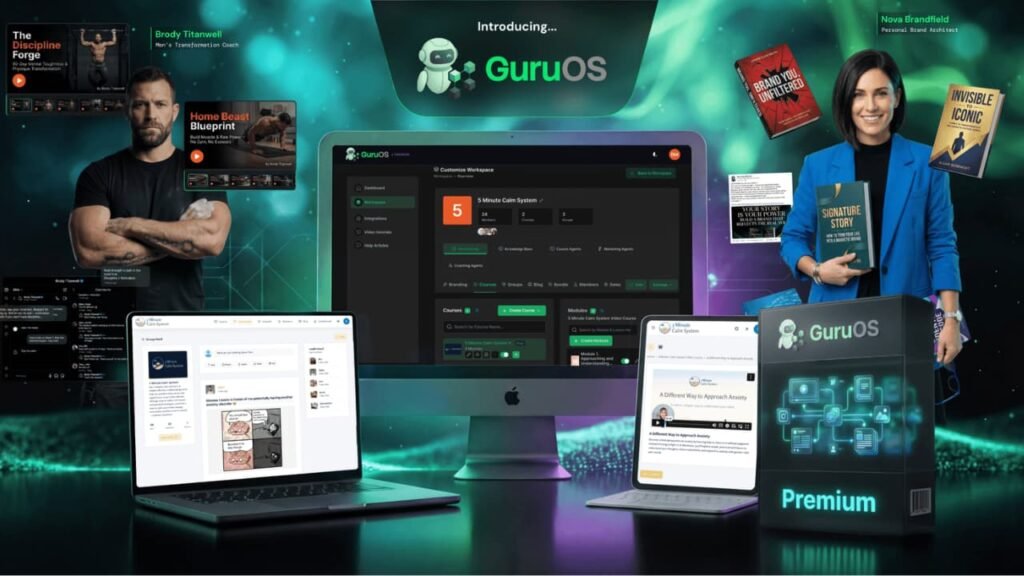
GuruOS is an all-in-one cloud platform built for coaches, creators, and small business owners who want to sell digital products online. Think courses, memberships, paid communities, and coaching programs.
The platform bundles course creation, community management, landing pages, and AI-powered content generation into one dashboard.
The big sell is the AI agent system. Instead of you writing every course lesson, sales page, and social post from scratch, GuruOS sends AI agents to do a lot of that heavy lifting.
You feed the system your content, your notes, your brand voice, and it uses that to make output that sounds closer to you and less like a generic chatbot.
So who is this for? If you’ve been sitting on a course idea for six months and haven’t launched yet, GuruOS is built for you.
It’s also a fit for freelancers who want to offer info-product services to clients, and for coaches who want a community platform without paying for five separate tools.
GuruOS Design and Platform Quality: How Does It Feel to Use?
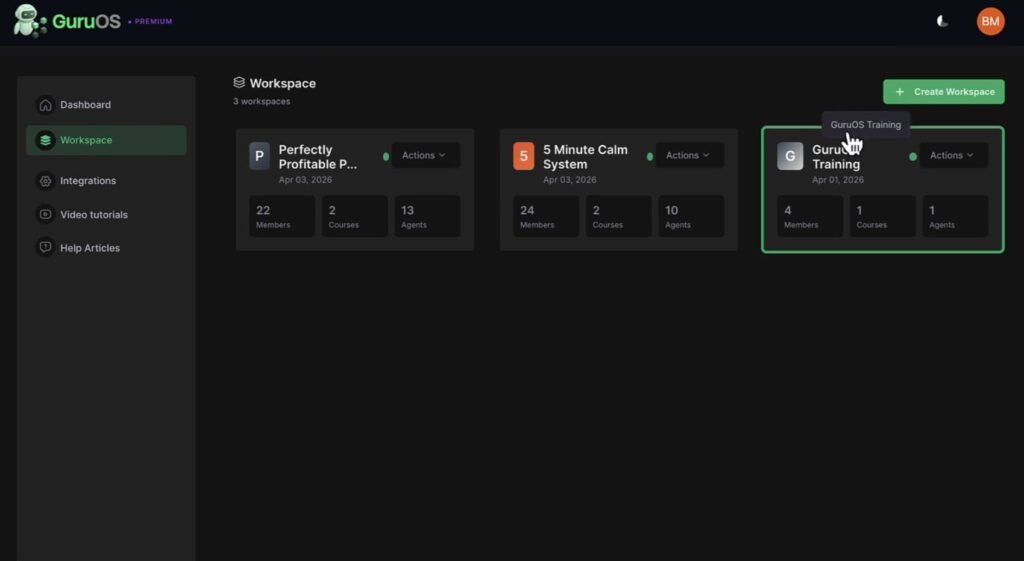
The platform looks clean. It’s cloud-based, so there’s nothing to install. Everything lives in one dashboard, and moving between courses, community spaces, AI agents, and landing pages takes just a few clicks. It works fine on mobile, which matters if you’re checking things from your phone.
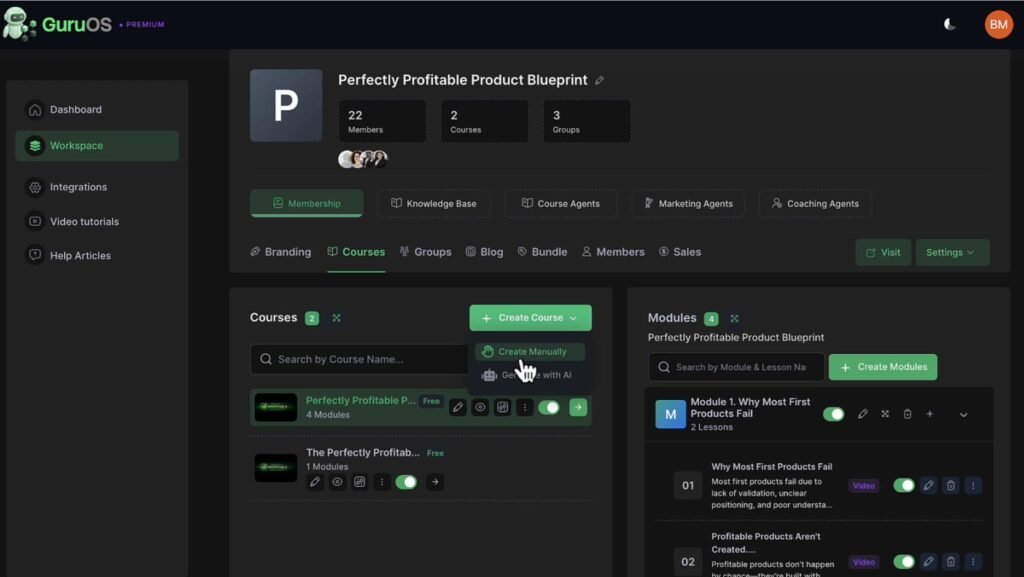
Setup is faster than you’d expect. You can turn a rough idea into a working course shell in under an hour. That’s a real contrast to piecing together Teachable, ConvertKit, Canva, and ClickFunnels and trying to make them all talk to each other.
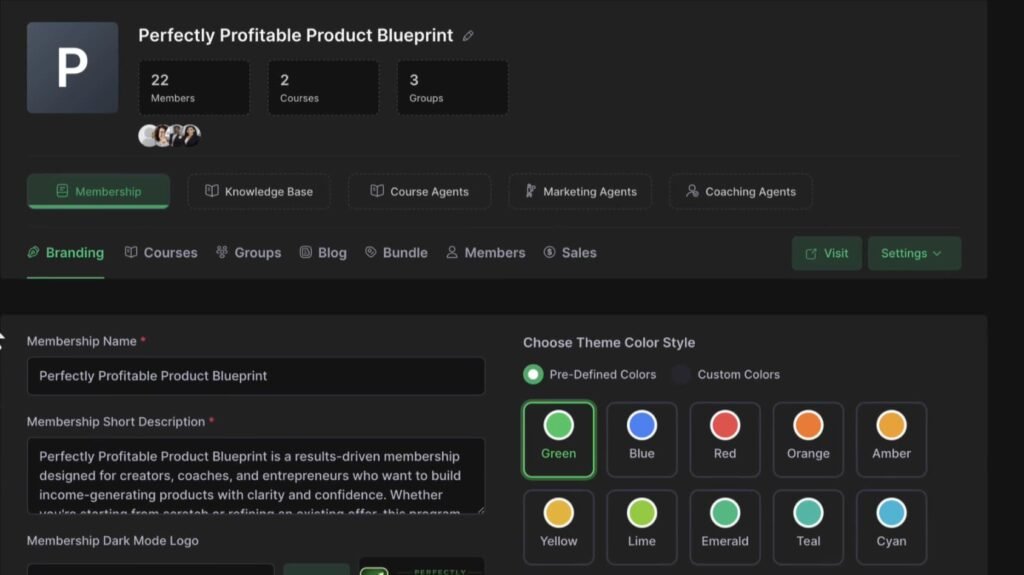
The layout isn’t flashy, but it’s organized. Agents, courses, communities, and pages all have their own sections. Nothing feels buried.
And for a tool aimed at people who aren’t tech experts, that matters a lot. If people get confused during setup, they quit. GuruOS mostly avoids that problem.
GuruOS Review: Demo Video
GuruOS Pricing Breakdown: What You Pay and What You Get
GuruOS sells through JVZoo with a tiered launch model. You start with a low front-end price, then get offered a series of upgrades.
You can buy them one by one as you go, or skip straight to the bundle and save money. Here’s exactly what each plan costs and what you actually get.
GuruOS Premium — $37 (Front End)
This is where everyone starts. For $37 one-time, you get full access to the core platform. That includes all five AI agent types — Course, Coaching, Chat, Lead, and Traffic agents.
You also get drip-feed membership portals, the AI community with gamification features like badges, points, and leaderboards, the drag-and-drop landing page builder with AI-written copy, and payment processing through Stripe, PayPal, and Razorpay.
Commercial rights are included too, so you can build products for paying clients right from the start. And the full Blueprint Academy training — 6 modules and 30+ lessons by Ben Murray — comes with it at no extra cost.
The catch is that the front-end has usage limits. You can launch one product and get a real feel for the platform, but if you want to run multiple niches or manage several clients at once, you’ll hit a ceiling fast. That’s where the upgrades come in.
GuruOS Gold — $197 (First Upgrade)
Gold is the scale-up plan. It removes all the front-end limits and adds everything you need to go bigger. You get unlimited workspaces, courses, communities, and agents — so no cap on how many products you build.
It also adds 15 agency client accounts, premium niche-specific agents that come pre-trained for popular markets, banner and pop-up ad tools for inside your portals, bulk email notifications to message your whole community at once, advanced webhooks to connect GuruOS with other tools, and pinned posts to keep key announcements visible in your communities.
If you’re planning to serve more than one niche or take on client work, Gold is the logical next step. At $197 one-time, it’s cheaper than what you’d pay in a few months across separate platforms.
GuruOS Elite — $127 (Second Upgrade)
Elite is about growth and branding. It adds multi-language support for courses, content, and agents, so you can reach buyers in Spanish, French, Portuguese, and other markets.
You can also remove the “Powered by GuruOS” branding so your platform looks fully like your own.
On top of that, you get the Agent Booster which makes agents start conversations automatically without you having to trigger them, a done-for-you agency site to sell your services, Viral Social Tech to help spread your content faster, and a monthly template pack with fresh done-for-you content added regularly.
This one makes sense if you want to work with non-English audiences or run an agency where the platform needs to look like your own product.
GuruOS Platinum — $197 (Third Upgrade)
Platinum is the top tier and it’s built for real agency scale. You get full whitelabel rights to rebrand the entire platform under your own name, 100 agency client accounts, and a resell program where the GuruOS team helps close deals for you.
It also includes enterprise team access with role-based permissions, unlimited team member licensing, AI agents for appointment and booking automation, done-for-you Fiverr and Upwork gig templates to sell services on freelance platforms, and a full agency scaling bundle with contracts, proposals, and bid templates.
Platinum only makes sense if you have an active agency plan. If you’re not signing clients and scaling a service business right now, skip it and put that $197 toward traffic instead.
GuruOS Rewardsly 2 Unlimited — $37 (Fourth Upgrade)
This one is a separate app altogether, not a GuruOS feature. Rewardsly 2.0 lets you create and sell rewards programs and gift card systems to small businesses, both online and offline.
Think loyalty punch cards and gift cards, but digital and fully automated. It comes with agency rights, so you can offer this as a service to local businesses and charge a fee to set it up and run it for them.
If you’re already using GuruOS to serve clients, adding a loyalty program service on top is an easy upsell. At $37, it’s a low-risk add-on if local business clients are part of your plan.
GuruOS Forrk Special — $37 (Fifth Upgrade)
Forrk is another standalone app built for a very specific niche: independent restaurants. It lets you set up QR-code menus and mobile online ordering for small restaurants that can’t afford to give 40% of every order to platforms like UberEats, GrubHub, or Deliveroo.
You build it for them, they keep more of their money, and you charge for the setup and management. Like Rewardsly, it pairs well with a local agency offer. If you’re already pitching GuruOS services to small businesses, restaurants are a natural next client. Skip it if local businesses aren’t your target market.
GuruOS Full Bundle — $267 (with coupon code GURU, regular $317)
The bundle gives you Premium, Gold, Elite, and Platinum in one shot. If you buy each upgrade separately, the total comes to $558.
The bundle at $267 saves you around $290. So if you already know you want the full feature set, go straight to the bundle and skip the individual upsell flow entirely.
Use the coupon code GURU for $50 off.
Optional Add-On: MegaBundle — $127
This appears at checkout as a separate add-on. It’s not part of the core platform, but it includes some useful extras.
You get unlimited access to JusTap (a digital business card and NFC tool), MarketpressoAI for AI-generated marketing graphics, LinkableDFY assets, live VIP training calls with Ben Murray directly, a done-for-you agency course you can sell immediately, extra agency accounts, and access to a private buyer community.
The live calls with Ben Murray are the most valuable part here for beginners. The rest are solid bonuses, but not essential to running GuruOS.
The creators have said publicly that they plan to move to a monthly subscription after the launch window. If you want the one-time price, don’t sit on it. The $267 bundle is the smart buy if you’re serious about using the platform long-term.
My Exclusive Bonuses When You Buy Through This Link
When you grab GuruOS through my link, you get a stack of extra bonuses on top of everything the platform already includes. Here’s what you’re getting and why each one is useful.
$42,300 in 30 Days from a Faceless Course Case Study
This is a full walkthrough of how someone built a course completely from scratch, with no face on camera, and generated $42,300 in a single month.
It covers the traffic strategy, the content setup, and the exact launch steps used. If you’re not sure where to start with GuruOS, this is the first thing you should read.
HUGE Premium Course Templates Bundle
A full library of plug-and-play course templates covering outlines, modules, and a wide range of niches.
Instead of staring at a blank screen trying to structure your course, you pick a template and fill in the gaps. Paired with the GuruOS course agents, this cuts your build time down dramatically.
$18K in 9 Days With 0 Followers — Case Study
A simple niche PDF with no audience behind it made $18,000 in nine days. This case study breaks down the faceless funnel, the content strategy, and the offer setup that made it work.
It’s a good example of what’s possible when the product and positioning are right, even without a big following.
LandingGenius AI Leadpage Builder
An AI-powered landing page builder that creates high-converting lead pages for your courses, memberships, and communities without any design or tech skills.
It works alongside the GuruOS page builder to give you more options for capturing leads before you pitch the paid offer.
SmartyPants AI Auto-Marketer
This tool writes blog posts, articles, and promotional content about your info-business automatically. So while you’re building inside GuruOS, SmartyPants is pushing out content that brings in search traffic.
It’s a simple way to keep marketing running in the background without adding more to your plate.
50 Untapped PDF Products That Sell $500/Day
A curated list of 50 simple PDF products that consistently sell well using faceless content and beginner-friendly niches.
These are low-effort to create and easy to pair with the GuruOS landing page and community tools. If you’re looking for a quick first product to launch, this list takes the guesswork out of picking one.
HighEnd Community Builder LeadMagnet Templates
A set of done-for-you lead magnet templates built specifically for community and course builders. Use them to grow your email list and feed leads into your GuruOS membership portal without starting from scratch.
Adds appointment booking directly to your website or your client’s website. It’s simple to set up and easy for clients or their customers to use. If you’re running agency services with GuruOS, this makes it easy to get booked without back-and-forth emails.
Gorgeous Coaching Workbook with Agency Rights
Adds appointment booking directly to your website or your client’s website. It’s simple to set up and easy for clients or their customers to use. If you’re running agency services with GuruOS, this makes it easy to get booked without back-and-forth emails.
Delivered instantly after purchase.
GuruOS Key Features and How They Benefit You
AI Agents That Build Your Course Content
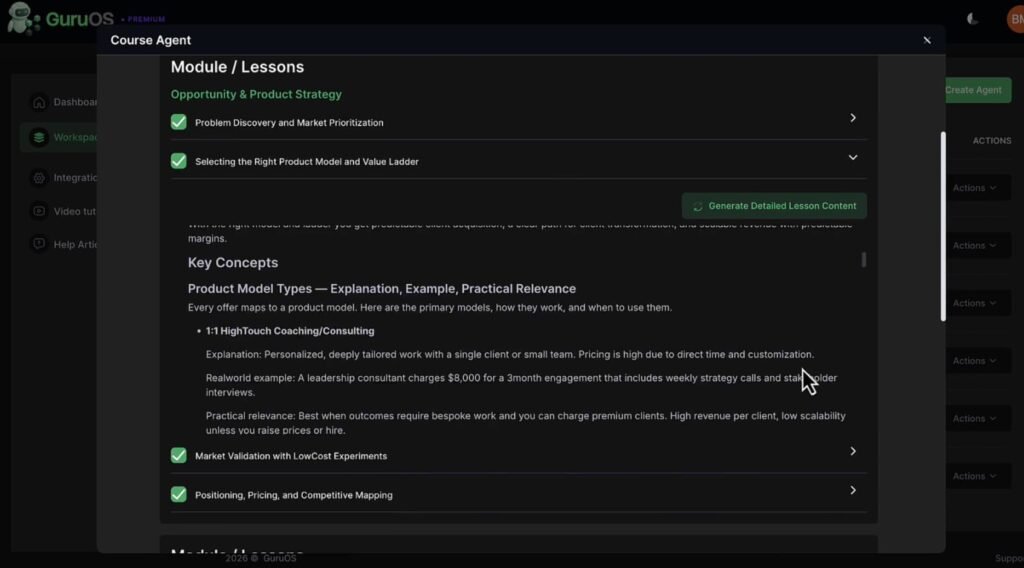
This is the feature that makes GuruOS different from a standard course platform. The AI agents create course outlines, lesson scripts, slides, infographics, and even eBooks. You don’t start with a blank page. You start with a framework that’s already been built for you.
The way it works is that you upload documents, notes, blog posts, or URLs, and the system uses that as a knowledge base. When an agent creates content, it pulls from what you uploaded.
The result feels more like your voice than a cold AI output. Technically, this is called retrieval-augmented generation (RAG), and it works better than starting from a blank prompt.
For coaches and creators who already have a body of work, this is a big time-saver. You’re not writing from scratch. You’re editing and refining, which is a much faster process.
Coaching Agents That Answer Student Questions 24/7
GuruOS includes Coaching Agents that live inside your membership portal and answer student questions around the clock. This is genuinely useful for anyone running a paid community or course.
Students often have questions at odd hours, and having an AI agent handle the basic stuff means you’re not glued to your inbox all day.
The agent pulls from your uploaded knowledge base to answer questions, so the replies stay relevant to your specific course content rather than giving generic answers.
AI Communities With Gamification Built In
The community feature includes leaderboards, badges, points, referral links, and AI-scheduled discussion posts. That last one is clever. A lot of online communities die because no one posts anything after the first week.
GuruOS can auto-schedule threads on an hourly, daily, or weekly basis to keep the conversation alive.
Referral links let your members bring in new members, which means the community can grow without you spending more on ads. And gamification keeps the active members engaged by rewarding participation.
This is included in the $37 front-end, which makes it one of the best-value features on the platform.
Drag-and-Drop Landing Page Builder With AI Copy
The landing page builder lets you create a sales page for your course or membership without hiring a copywriter or paying for ClickFunnels.
AI writes the sales copy using launch frameworks developed by Ben Murray, and you drag and drop the layout to match your product.
It’s not the most advanced page builder out there. But it gets a product page live and accepting payments, which is the actual goal. You can connect Stripe, PayPal, or Razorpay directly from the dashboard.
Blueprint Academy Training by Ben Murray
This is a 6-module, 30+ lesson training course that shows you how to use the platform and launch an info-product business the right way.
Topics include finding a profitable niche, structuring your course offer, writing launch email sequences, setting up your membership site, finding JV partners, and running a product launch.
This training is worth something on its own. If you’re new to the info-product space, the Blueprint Academy gives you a real map of how launches work in the JVZoo ecosystem. Most tools don’t include anything like this.
Commercial Rights at the Front-End Tier
You can use GuruOS to build courses, communities, and landing pages for paying clients, and you don’t need to buy an agency plan to do it.
Commercial rights come with the $37 front-end. That’s a real opportunity for freelancers who want to offer course-building or community setup services to small business clients.
GuruOS vs. Competing Platforms: How Does It Stack Up?
GuruOS vs. Teachable: Teachable is a solid course hosting platform, but the entry-level plan costs $39 a month with limited features, and you still need separate tools for community and sales pages. GuruOS gives you all three for a one-time fee.
GuruOS vs. Skool: Skool is clean and community-first, but its AI features are limited. It also costs $99 a month. GuruOS’s auto-posting and agent features try to solve the dead-community problem that hits most Skool groups after the first few weeks.
GuruOS vs. Kajabi: Kajabi is the most polished all-in-one platform on the market, but it starts at $149 a month and takes time to learn. GuruOS is faster to set up and a lot cheaper, though it doesn’t match Kajabi’s depth at scale.
GuruOS vs. ClickFunnels: ClickFunnels is a better pure funnel builder. GuruOS isn’t trying to compete there. But ClickFunnels doesn’t handle course hosting or AI community management, so they’re solving different problems.
Honest Pros and Cons of GuruOS
✓ What Works
- Everything in one dashboard
- AI agents cut content creation time
- Community gamification is genuinely useful
- Blueprint Academy training is strong
- Commercial rights at the front-end price
- Connects to Stripe, PayPal, and Razorpay
- 30-day money-back guarantee via JVZoo
- Mobile-friendly and fast to set up
✗ What Doesn’t
- Marketing overpromises AI autonomy
- Front-end has limits that push upgrades
- Agent output still needs human editing
- No AI tool replaces a real traffic strategy
- Sales page testimonials predate the launch
- One-time price likely won’t last
- Not as powerful as Kajabi at scale
Real User Experiences: What People Are Saying About GuruOS
Users who have tried the platform generally respond well to two things: the speed of setup and the Blueprint Academy training. The most common feedback is that getting a first course live feels much faster than with other tools.
People who were stuck in planning mode for months report actually shipping a product after using GuruOS.
On the flip side, experienced creators point out that the AI agents still need a human in the loop. The output is a solid first draft, but it doesn’t replace your personality, your stories, or your specific expertise.
So if you go in expecting the agents to do everything, you’ll be disappointed. If you go in expecting a great writing partner that saves you 60% of the time, you’ll be happy.
Some users also flag the upsell structure as aggressive. The front-end plan gets you started, but you’ll feel the usage limits fairly quickly if you’re trying to serve multiple clients or run more than one niche.
That said, most note that the $267 bundle price is fair compared to paying for five separate SaaS subscriptions every month.
One note of caution: the testimonials featured on the official sales page were collected before the public launch. So treat those with some skepticism. Look for reviews from real users who bought the product through the JVZoo marketplace for a clearer picture.
Tips and Tricks to Get the Most Out of GuruOS
1. Train the system before you build anything
Upload your best existing content first. Blog posts, scripts, notes, brand guidelines. The more context you give the agents, the more your output will actually sound like you.
2. Treat agents like a writing assistant, not an employee
Always review and edit agent output before publishing. Add your own stories, your own examples, your specific voice. The AI builds the skeleton. You add the flesh.
3. Launch one product first
The platform can handle multiple workspaces, but focus matters more than features. Get one course live and selling before you build anything else. Half-finished products don’t earn money.
4. Watch the Blueprint Academy before you build
Seriously. The way you frame your offer is more important than how polished your course looks. The training covers this. Do it first.
5. Budget for traffic separately
GuruOS has a Traffic Agent that schedules social media posts, but that alone won’t fill your course. Plan for paid ads, JV partnerships, or a content strategy on top of the tool.
Frequently Asked Questions About GuruOS
What exactly does GuruOS do?
It lets you create and run an online business that sells courses, memberships, and digital coaching programs. It bundles course creation, AI community management, landing pages, payment processing, and marketing content tools into one platform.
Do I need to be technical to use it?
No. Everything is controlled from a dashboard and the AI handles most of the content generation. If you can use Google Docs, you can use GuruOS.
Will the AI agents run my whole business for me?
No. They help with content creation, sales copy, and scheduled community posts. You still need to guide strategy, edit output, and generate traffic. The agents speed up the work; they don’t replace it.
Is the one-time price permanent?
For now, yes. But the creators have said publicly they plan to move to a subscription model after the launch window closes. Buy during the launch period to lock in the one-time rate.
What’s the refund policy?
GuruOS offers a 30-day money-back guarantee enforced through JVZoo. So you can try it risk-free for a month.
Can I use GuruOS to build products for clients?
Yes. Commercial rights are included in the $37 front-end plan. You can build courses, communities, and landing pages for paying clients without upgrading to an agency tier.
Final Verdict: Should You Buy GuruOS?
GuruOS does one thing really well: it cuts down on the amount of work it takes to get an info-product business off the ground.
Instead of juggling five different subscriptions and still feeling stuck, you get one dashboard that handles courses, community, content, and payments. And the Blueprint Academy training actually teaches you how to launch, not just how to use the software.
Is it perfect? No. The marketing oversells the AI autonomy. The agents still need human editing. And the front-end limits will push you toward an upgrade if you want to scale. Traffic is still something you have to figure out yourself. No platform changes that.
But at $37 to start, with a 30-day refund window, the risk is low. And for someone who has been stuck in planning mode for months, GuruOS might be exactly the push that gets a real product out the door.
My Recommendation
Buy it if you’re a creator, coach, or small business owner who wants an all-in-one starter platform and real launch training. The $37 front-end is a fair test. The $267 bundle is the right buy if you already know you want unlimited use and agency features.
Skip it if you’re expecting the AI to build a successful business while you sit back and watch. That’s not what this tool does. And honestly, that’s not what any tool does right now.
Get it as a useful platform with solid training included. Go in with realistic expectations and you’ll likely get a lot out of it.