


If you’ve ever wanted to start a YouTube channel but had no idea where to begin, this is for you. Most people quit before they even post a single video. Scripts take forever to write.
Voiceovers feel awkward. Editing is a whole skill on its own. And figuring out which topics will actually get views? That’s a job by itself. So most beginners give up and never see a single dollar from their effort.
Vydora AI changes that. It’s an all-in-one platform that writes your scripts, builds your videos, records AI voiceovers, and even handles your YouTube SEO — all without you touching a camera or editing software.
In this Vydora AI review, I’ll walk you through everything: what it does, how it works, who it’s for, and whether it’s actually worth your money.
What Is Vydora AI?
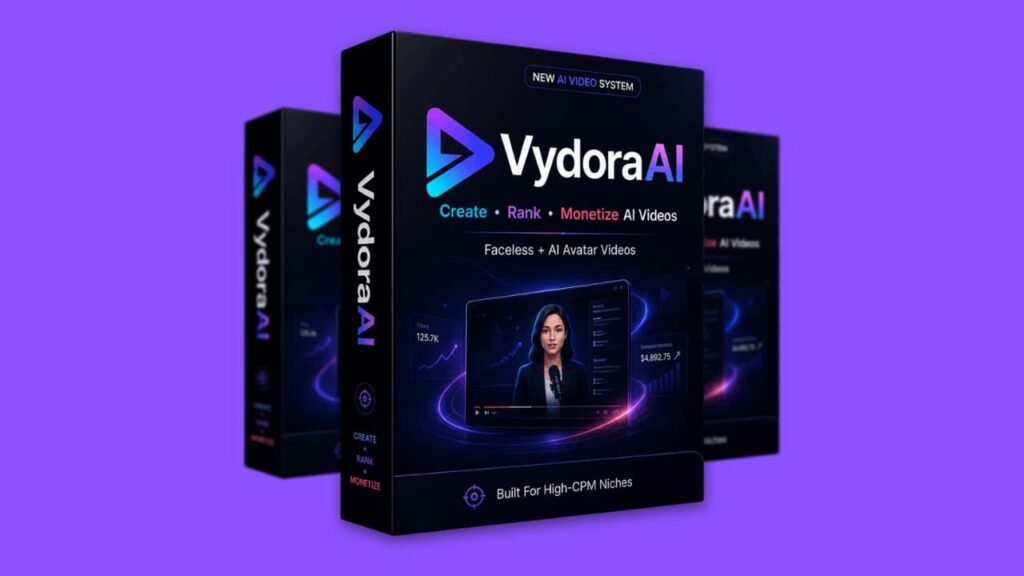
Vydora AI is a cloud-based video creation platform built around AI automation. It’s made for people who want to grow a YouTube channel, earn through ads and affiliate marketing, or simply produce video content at scale — without filming anything or learning how to edit.
The platform focuses on what’s called “faceless videos.” These are YouTube videos where you never appear on camera.
Instead, you use AI-generated visuals, stock footage, and avatar characters paired with AI voiceovers and a solid script. Channels like these are hugely popular right now, and many of them earn serious money through ad revenue and affiliate commissions.
Vydora AI handles every step of making those videos. You pick a niche and topic, and the AI builds the whole video for you — script, scenes, voiceover, SEO tags, and thumbnail ideas.
It also targets high-CPM niches, which means the topics it recommends tend to attract ads that pay more per thousand views. That matters a lot when it comes to actual earnings.
And yes — it’s designed for beginners. You don’t need a degree, a microphone, or a video editing background. If you can click a button and type a keyword, you can use this tool.
Vydora AI Design and Platform Quality
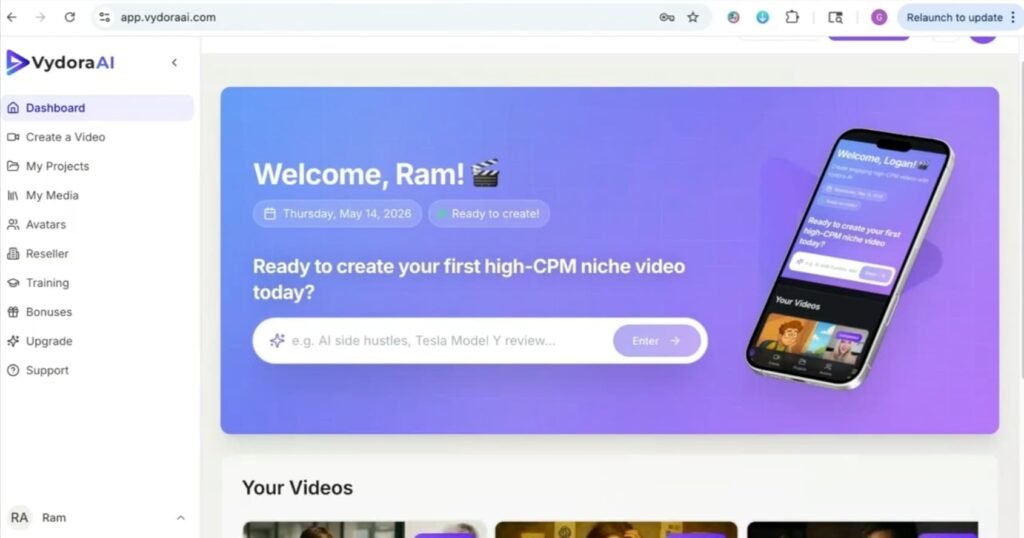
Vydora AI runs entirely in the browser, so there’s nothing to download or install. The dashboard is clean and easy to follow.
Everything flows in a logical order — choose your niche, generate your script, build your video, optimize it for SEO. Each step is clearly laid out so you always know what comes next.
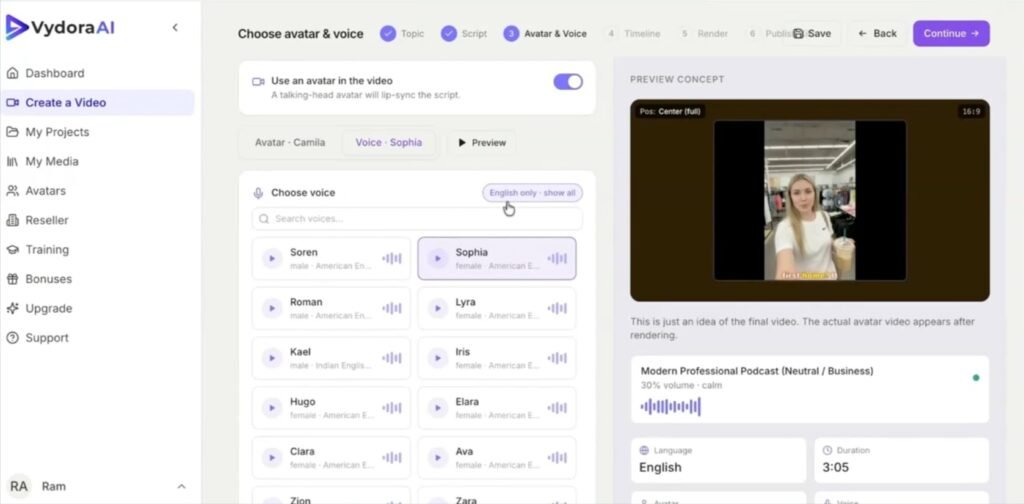
The AI voiceovers sound natural. They’re not robotic or hard to listen to. That’s a big deal because watch time matters on YouTube, and if a voice is annoying, people leave fast. Vydora AI’s voice engine is designed to keep viewers engaged.
The avatar system is also solid. You can create realistic-looking avatar characters and lock them to a consistent style across all your videos. So your channel looks professional and branded — even if you’re just getting started.
Overall, the platform feels polished. It’s not a rough beta product with broken features. It works the way it should, and the workflow makes sense even if you’ve never made a video before.
Vydora AI Review: Demo Video
Vydora AI Pricing: What Does It Cost?
Vydora AI has a simple front-end price with optional upgrades if you want more power.
Front End — $37
This is the core product. For $37, you get full access to the main AI video system including the niche finder, script generator, voiceover engine, SEO tools, thumbnail strategy, video assembly, and multilingual creation. It’s a one-time price, not a monthly subscription.
(Use Coupon VYDORA10 for 10% Off)
Upsell 1: Vydora AI Pro — $67
This unlocks bigger limits. You can run up to 200 campaigns per month, access 500+ avatars and 100+ AI voices, create 10-minute videos, and get unlimited script and SEO generation. Good for people who want to scale fast.
Upsell 2: Vydora AI MasterMode — $97
This adds team collaboration for up to 10 members, 20-minute video creation, faster rendering, full 1080p HD output, and a full commercial license. Perfect for agencies or serious content teams.
Upsell 3: StreetSpeak AI — $47
A separate tool that generates street interview-style videos from a single keyword. These feel real and authentic, which tends to drive strong engagement.
Upsell 4: ClickAgent — $47
An AI-powered sales room builder that uses avatar characters to sell products 24/7 without funnels or manual work. Good for affiliate marketers and eCommerce sellers.
Upsell 5: Vydora AI Reseller — $297–$397
Buy the rights to resell Vydora AI accounts and keep 100% of the profits. Comes with done-for-you sales pages and full marketing materials.
Best Deal: Vydora AI Bundle — $297 (Use Coupon VYDORAVIP for $50 Off)
This gives you everything — all five upgrades plus the front end — in one package. If you’re serious about using this long-term, the bundle saves you the most money overall.
(Use Coupon VYDORAVIP for $50 Off)
Vydora AI Exclusive Bonuses: 10 Extra Tools You Get for Free
When you grab Vydora AI during this launch, you don’t just get the platform. You also unlock ten premium bonuses instantly inside your JVZoo account.
These are real tools worth hundreds of dollars — and they all connect directly to building, growing, and monetizing a video-based online business.
Here’s exactly what you get.
Bonus #1: VideoShare Pro — WordPress Video Theme (Value: $97)
VideoShare Pro is a responsive WordPress theme built specifically for video-sharing websites. If you want to build your own video hub or niche content site alongside your YouTube channel, this theme makes it easy.
It supports videos from multiple sources, includes post ratings, social share buttons, custom skin colors, and a one-click demo import. No coding needed, and it updates automatically.
Bonus #2: Social Stream for WordPress (Value: $97)
Social Stream pulls your content from Facebook, Instagram, Twitter, and YouTube into one clean, filterable feed on your website.
So every video you publish with Vydora AI can show up on your site automatically. It loads fast thanks to built-in caching, works on any device, and includes lightbox viewing and sharing — all designed to keep visitors on your site longer.
Bonus #3: PixelPlay — Video Autoplay and Thumbnail Overlay Plugin (Value: $97)
PixelPlay lets you add custom thumbnail overlays and autoplay to any embedded video on your WordPress site. It works with YouTube, Vimeo, and custom video URLs. Better thumbnails mean more clicks.
Autoplay means faster engagement. And since it works with a simple shortcode, you can drop it anywhere on your site in seconds.
Bonus #4: Orbia — AI Agency and Technology WordPress Theme (Value: $97)
Orbia is a modern, fully responsive WordPress theme built for AI businesses, tech agencies, and SaaS brands.
If you want to present yourself as a professional video agency or freelancer using Vydora AI’s commercial license, this theme gives you a polished, high-converting website to send clients to.
It uses the Elementor drag-and-drop builder, Bootstrap 5, and includes contact form support right out of the box.
Bonus #5: Pmotion — Animated GIF and Video Maker for WordPress (Value: $97)
Pmotion is a drag-and-drop motion graphics editor that lets you create animated GIFs and short videos directly inside WordPress. Use it for social media posts, ads, or eye-catching banners on your site.
It includes keyframing, text animations, filters, and built-in access to Pexels and Pixabay for free stock media. Great for adding extra visual flair to your content strategy.
Bonus #6: How to Research Profitable Niches (Value: $97)
This guide walks you step by step through finding niches that actually make money. It covers the 3-Question Method for spotting viable markets, how to find evergreen topics that stay profitable long-term, and how to use tools like Google, Keywordtool.io, and Moz for keyword research. Pair this with Vydora AI’s niche finder and you’ll go into every video with a clear plan and a real earning strategy.
Bonus #7: 60-Minute Traffic Masterclass (Value: $97)
This masterclass shows you how to create content that drives traffic — fast. You’ll learn quick brainstorming methods for hooks that grab attention, the simple Hook-Value-Call-to-Action formula for posts and videos, and how to tap into existing audiences and communities to grow faster. It’s built for busy people who want results without spending hours on content every day.
Bonus #8: Invisible Income Guide (Value: $97)
This guide is a perfect match for Vydora AI users who want to earn online without showing their face. It covers faceless business models that work right now — from freelance writing and VA services to ghostwriting and ghost creative work.
You’ll learn how to get paying clients who care about results, not your personal brand. A solid read for anyone building a quiet, behind-the-scenes online income.
Bonus #9: YouTube Advertising Guide (Value: $97)
Once your Vydora AI videos are ranking organically, this guide shows you how to speed things up with YouTube ads.
You’ll learn how to launch your first campaign, define your target audience, set a smart budget, and choose the right ad format for your goals. Whether you’re promoting your own channel or running ads for affiliate offers, this guide walks you through it clearly.
Bonus #10: YouTube Influencer Growth Guide (Value: $97)
This guide covers everything you need to grow a YouTube channel from scratch — subscriber growth strategies, content tips for higher engagement, audience building, affiliate monetization, and influencer branding.
It’s a practical playbook that works hand in hand with the videos you create using Vydora AI.
Vydora AI Key Features: What It Actually Does for You
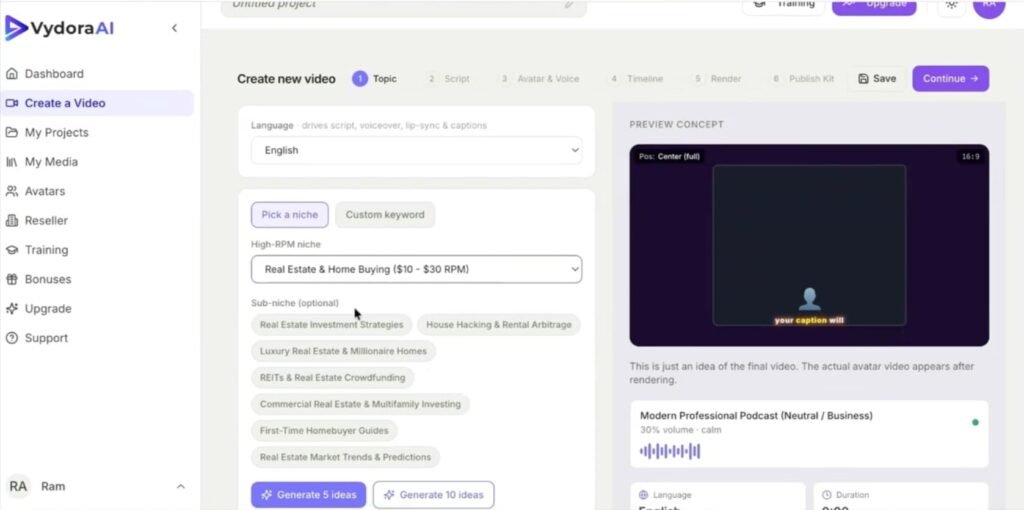
AI Niche and Topic Discovery
You don’t have to guess what to make videos about. Vydora AI scans niches for buyer intent, ranking potential, and competition levels.
It then shows you profitable video ideas that are more likely to rank and bring in real income. This alone saves beginners hours of research every week.
AI Script Generation
The platform writes your entire video script automatically. And it’s not generic content either.
You can choose from different script styles — monetization-focused, story-driven, viral, authority, or listicle. Each style is built to hold attention and keep viewers watching longer, which helps your rankings over time.
Faceless and Avatar Video Creation
No camera. No microphone. No awkward recordings. You can build fully faceless videos using visuals and stock footage, or you can use realistic AI avatars as your on-screen presenter. Both options look professional and work well for a YouTube audience.
Automated Video Assembly
Once the script and visuals are ready, Vydora AI puts everything together automatically. It adds scenes, transitions, and the voiceover — then delivers a finished video ready to upload.
You’re not editing anything manually. The whole thing is handled in just a few clicks.
AI Voiceover Engine
The built-in voiceovers sound human. They’re paced correctly, they have natural rhythm, and they fit the content style. Better voice-overs mean better watch time. Better watch time means better rankings. It all connects.
SEO Optimization Tools
Vydora AI generates YouTube titles, descriptions, tags, and hashtags for every video. These are built to match what people are actually searching for.
So instead of guessing, you get SEO-ready metadata every time — which helps videos climb the rankings faster.
Thumbnail and CTR Optimization
Getting someone to click your video is half the battle. Vydora AI creates thumbnail concepts and hook ideas designed to grab attention in search results and suggested feeds. Higher clicks mean YouTube shows your video to more people.
Multilingual Video Creation
You can create videos in over 100 languages. This means you’re not limited to an English-speaking audience. You can tap into markets where there’s less competition and still strong monetization potential.
High-CPM Monetization System
Vydora AI focuses on niches that attract high-paying ads. It also structures videos to naturally include affiliate offers and monetization hooks. So your videos don’t just get views — they’re set up to earn.
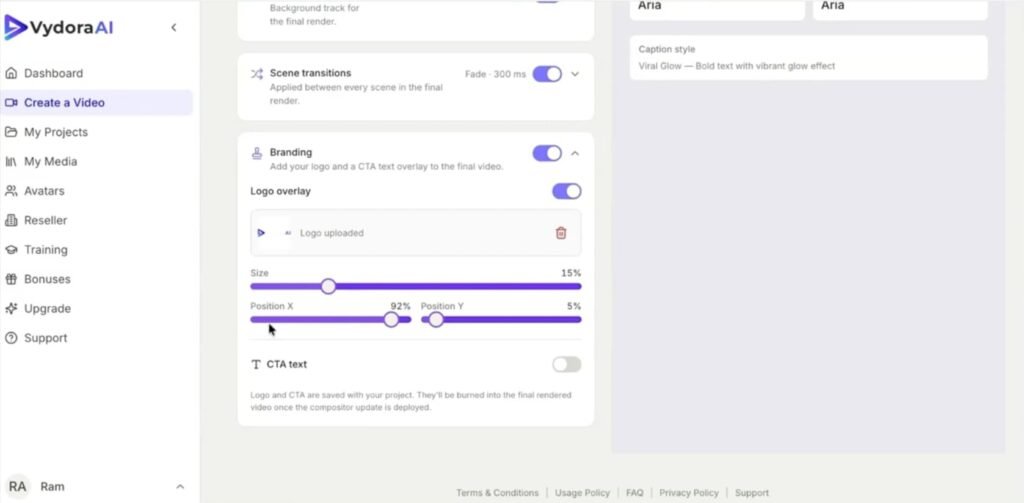
Character and Style Consistency
The character lock feature keeps your avatar, visual style, and branding the same across every video. This makes your channel look like it was built by a professional team, not someone who just started last week.
Commercial License Included
Even the front-end version lets you create videos for clients. You can offer video creation as a service and keep all the profits. This opens up a whole side income stream beyond just running your own channel.
How Vydora AI Compares to Similar Tools
There are other AI video tools out there — Pictory, InVideo, and Synthesia are a few common ones. But most of them focus on one part of the process.
Pictory is great for turning articles into videos. InVideo has solid templates. Synthesia does good avatar presentations.
What Vydora AI does differently is pull everything under one roof. Niche research, script writing, avatar creation, voiceover, video assembly, SEO, and thumbnail strategy — it’s all inside the same platform.
You don’t need four different tools and four different subscriptions. You log in once and do everything in one place.
The price is also much lower. Synthesia, for example, starts at over $20 per month just for basic avatar use. Vydora AI’s front end is a one-time $37 with no ongoing fees. For beginners especially, that’s a big difference.
Vydora AI Pros and Cons
Pros:
- Everything is in one place — scripts, voiceovers, visuals, SEO, and video assembly
- Beginner-friendly with no editing or marketing experience needed
- No camera or recording equipment required
- Creates videos in 100+ languages for global reach
- Targets high-CPM niches to maximize ad and affiliate income
- One-time pricing with no monthly subscription on the front end
- Comes with a commercial license to create and sell videos for clients
- Consistent avatar and visual branding across all videos
Cons:
- The best features, like longer videos and more avatars, require upgrades
- Team collaboration is locked behind the MasterMode upsell
- Like any AI tool, results can vary depending on the niche and how well you set things up
- Heavy scalers will want the Pro upgrade to remove monthly campaign limits
What Real Users Are Saying About Vydora AI
Early users have highlighted a few things consistently. The time savings come up a lot. People who used to spend three to five hours on a single video say they can now produce the same quality in under an hour.
That alone changes the game for anyone trying to post consistently.
Beginners with no prior YouTube experience have also shared that the platform made starting feel less overwhelming. The step-by-step flow removes the confusion and gives you a clear path from idea to upload.
Several users mentioned that they finally posted their first video after months of putting it off — because the tool made it feel doable.
Marketers using the platform for affiliate content have noted the monetization-focused scripts work well. The content feels natural, not pushy, and fits YouTube’s ad-friendly guidelines.
A few users also praised the avatar system for making their channels look more polished than they expected from an automated tool.
Tips and Tricks to Get the Most Out of Vydora AI
Start with the niche finder before anything else. Don’t skip this step. Let the AI show you which topics have high earning potential before you pick a direction. This is where most people leave money on the table.
Test different script styles. The platform offers multiple formats — try the viral style for one video and the authority style for another. Watch which one holds viewers longer. Then stick with what works.
Post consistently. Even one video per week adds up fast. Use Vydora AI to batch-create three or four videos in one session and schedule them out. Consistency is what builds a channel over time.
Use the SEO tools every single time. Never skip the title and description step. The difference between a well-optimized video and a poorly optimized one is the difference between 20 views and 2,000 views.
If you’re doing affiliate marketing, pick your offers first. Know what you want to promote, then use the AI to build videos around topics that naturally lead to those products. The monetization flow works best when it’s intentional.
Take advantage of the commercial license. Even if you’re not running your own channel, you can offer video creation services to local businesses, coaches, or brands. Charge $200–$500 per video and let the AI do the work.
Vydora AI — Frequently Asked Questions
What is Vydora AI?
Vydora AI is an AI-powered platform that builds YouTube videos for you. It handles scripts, voiceovers, visuals, SEO, and video assembly — all without you needing to film or edit anything.
Do I need any experience to use it?
No. The platform is built for beginners and walks you through each step. No editing, recording, or marketing experience needed.
Can I use Vydora AI for affiliate marketing?
Yes. The platform is specifically built for affiliate and ad monetization. It targets high-CPM niches and structures video content around buyer intent and offers.
Does it include a commercial license?
Yes. Even the front-end version includes commercial rights. You can create videos for clients and keep all the profit. The MasterMode upgrade expands this further for agencies.
Is this a one-time payment or a subscription?
The front-end is a one-time payment of $37. There are no monthly fees for the base product. Upgrades are also one-time purchases.
What if I want to create videos in another language?
Vydora AI supports 100+ languages. You can create full videos for non-English audiences without re-recording anything.
Final Verdict: Is Vydora AI Worth It?
After testing Vydora AI, I can say it delivers on what it promises. It genuinely simplifies the whole video creation process and makes it possible for someone with zero experience to build a YouTube channel that looks professional and earns real money.
The combination of script writing, AI voiceovers, niche research, and SEO tools inside one dashboard is what sets it apart. You’re not juggling five different apps. You log in, follow the steps, and walk away with a finished video that’s ready to rank.
The main thing to keep in mind is that the base plan has limits. If you’re planning to create 20 or 30 videos per month, the Pro upgrade is worth the extra cost. And if you want 20-minute videos or want to work with a team, you’ll need MasterMode.
But for most beginners and intermediate content creators? The $37 front end is a solid starting point. And if you can stretch the budget, the bundle at $297 (with the VYDORAVIP coupon for $50 off) gives you everything at once.
Vydora AI is best for: Beginners who want to start a YouTube channel without being on camera, affiliate marketers looking for content that converts, freelancers who want to offer video creation as a service, and anyone who wants to build passive income through faceless video channels without spending hours on production.
If that sounds like you, Vydora AI is worth checking out.