


If you’ve ever spent hours trying to make one decent promo video, write the captions, build the graphics, find leads, and still find time to post — you already know the pain. VideoClawBot was built to fix exactly that.
It’s an AI-powered video marketing platform that lets you build autonomous AI agents to handle your entire content workflow from a single command.
Videos, scripts, social posts, outreach emails, graphics — all of it, from one dashboard. And yes, you can even run it from your phone via WhatsApp or Telegram.
So in this VideoClawBot review, I’m going to break down what it does, how it works, what it costs, and whether it’s actually worth your money.
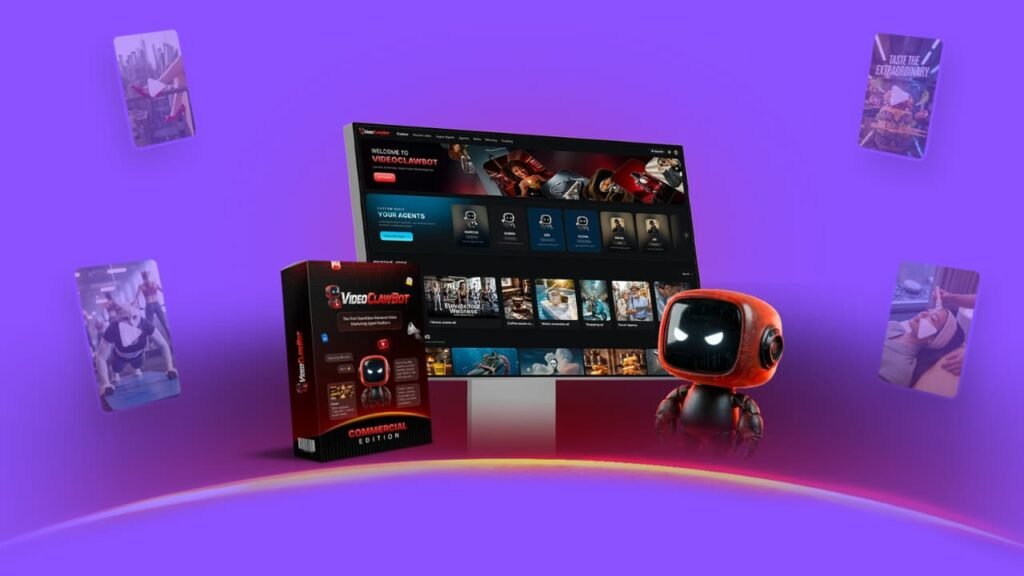
What Is VideoClawBot? A Closer Look at the Platform
VideoClawBot is a cloud-based AI platform designed for marketers, creators, freelancers, and agencies who want to automate video content production and marketing campaigns. Instead of jumping between five different tools to record, edit, write, design, and post — this platform pulls it all under one roof.
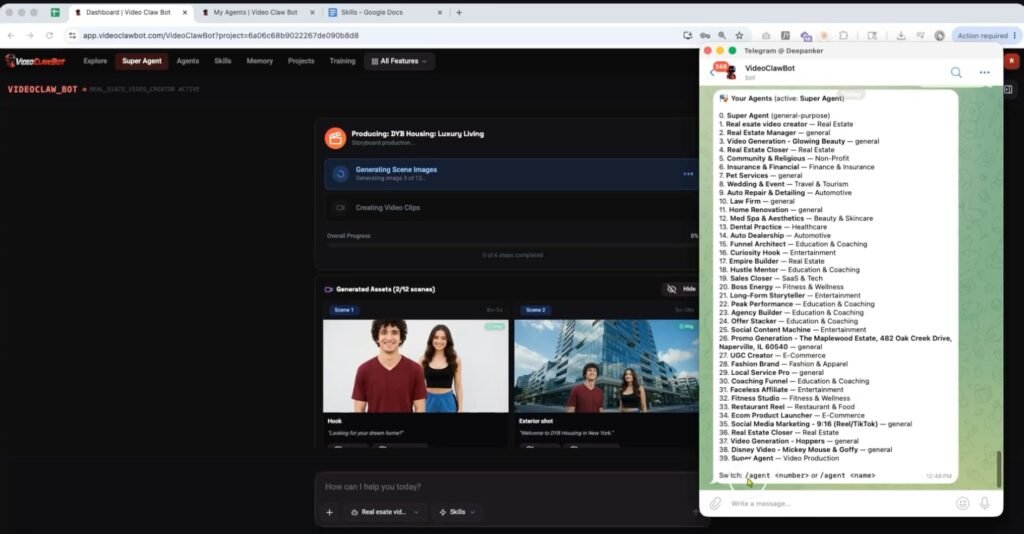
The big idea here is AI agents. You either pick a pre-built agent made for your niche (ecommerce, real estate, local business, coaching, etc.) or build your own from scratch.
Then you train it with your brand info, product pages, URLs, or client data. Once it knows your business, it starts producing content — videos, captions, hooks, outreach emails, thumbnails — automatically.
It’s not just a video tool. It’s more like having a full marketing team running on autopilot, and you’re the one giving orders.
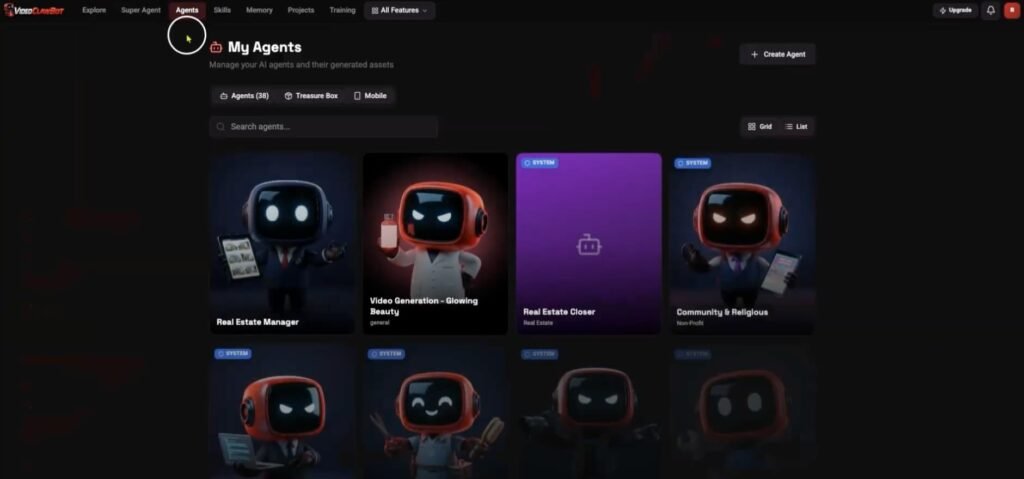
VideoClawBot runs in the cloud, so there’s nothing to install. The dashboard is clean and organized, with your agents, projects, and content tools all in one place.
For a platform this packed with features, it doesn’t feel cluttered — and that matters when you’re trying to move fast on a campaign.
The WhatsApp and Telegram integration is honestly one of the best parts. You can launch a campaign or generate a video just by sending a message from your phone.
That’s a huge deal for freelancers or agency owners who are constantly on the move. No need to sit at a desktop every time a client needs something done fast.
The video quality is solid. You get HD exports in multiple formats — vertical, square, and landscape — so your content fits TikTok, Instagram Reels, YouTube Shorts, and Facebook without extra resizing work.
VideoClawBot Demo Video
VideoClawBot Pricing & Upsells
Here’s a breakdown of the pricing tiers available during the launch:
Front End – VideoClawBot Commercial Edition ($47)
This is the starting point. For $47, you get access to the core platform including 20+ AI agents, 25+ built-in skills, WhatsApp and Telegram access, HD multi-format exports, a commercial license, 2,500 monthly credits, and 5 active projects. Use coupon EARLY10 to get 10% off.
Upsell 1 – Pro Edition ($67)
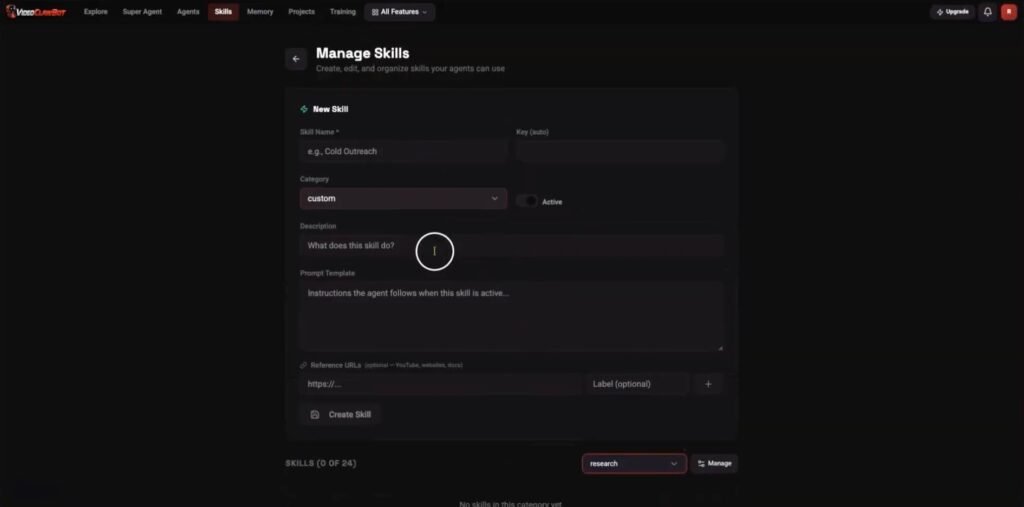
This removes credit limits and unlocks unlimited video generations, 4K Ultra HD output up to 2 minutes, faster rendering, 50+ pre-trained agents, a custom skill builder, cinematic effects, multi-variation video creation, and up to 5 team members.
Upsell 2 – Closer Edition ($97)
Closer Edition is built for lead generation and outreach. It adds AI prospecting tools, cold email automation, competitor monitoring, website scanning, and personalized pitch asset creation.
Upsell 3 – Creator Edition ($67)
This adds AI image generation for product photoshoots, lifestyle visuals, social graphics, thumbnails, branding mockups, and ecom visual packs. Great for ecommerce brands or design-heavy agencies.
Upsell 4 – Empire Edition ($197)
The agency and reseller upgrade. You get whitelabel branding, unlimited client workspaces, 100% reseller revenue, DFY funnels and contracts, and priority support.
Upsell 5 – Cinematic Edition ($47)
Adds text-to-video, image-to-video, Hollywood-grade visual effects, a timeline editor, motion graphics, an audio studio, and a faceless viral clip generator.
The Bundle Deal ($297)
This is the best value. You get all five upgrades plus the front end in one package. That’s everything — from video creation and outreach to agency tools and cinematic effects. Use coupon INSTANT100 to save $100 off the bundle price.
There’s also a Mega Bundle order bump at $127, which adds 50+ DFY niche agent templates, 100+ cold email swipes, agency training, 200+ local business leads, and the “First $10K” private course.
VideoClawBot Review: My Bonuses
And here’s where it gets even better. When you grab VideoClawBot during this launch, you also get five premium bonuses added to your member area instantly.
No waiting, no hoops to jump through. They’re just there, ready to use. The total bonus value stacks up to over $2,000 — and you get all of it free.
Bonus 1: AI Newsroom JupiterMeet Suite (Whitelabel — Value $485)
This tool lets you host live news panels, expert interviews, and virtual events straight from your platform. It comes with screen sharing, whiteboards, and HD recording built in.
So if you want your brand to feel active and credible — this is a great add-on to pair with your AI-generated video content.
Bonus 2: AI RadioStation CastLab Pro (Whitelabel — Value $265)
Want to add a “Listen Now” feature to your site or launch a 24/7 online audio channel? CastLab Pro lets you stream live audio commentary, breaking content, and pre-recorded AI reports to a global audience. It’s a smart way to boost reach and keep people coming back.
Bonus 3: NewsBot AutoPoster Engine (Whitelabel — Value $495)
This WordPress plugin runs on autopilot. It pulls fresh news content, videos, and social posts directly into your site around the clock — no manual work needed. If you want a content hub that never goes quiet, this bonus does the heavy lifting for you.
Bonus 4: FluxNews AI Mobile App Builder (Value $397)
Turn your WordPress site into a real iOS and Android app — fast. Built on Flutter, this tool lets you reach mobile users directly and send push notifications whenever you publish something new. More reach, more clicks, more engagement — straight to their phones.
Bonus 5: NewsPro AI Mobile Suite (Value $425)
This takes the mobile app idea even further. NewsPro converts any WordPress-based site into a sleek, high-performance app synced with your backend in real time.
Your readers get articles, videos, and AI content delivered straight to their phones — wherever they are.
All five bonuses are free, and they show up instantly in your member area the moment you purchase. No need to reach out or wait for delivery.
Key Features and What They Actually Do for You
AI Agent Builder – Your Personal Marketing Team
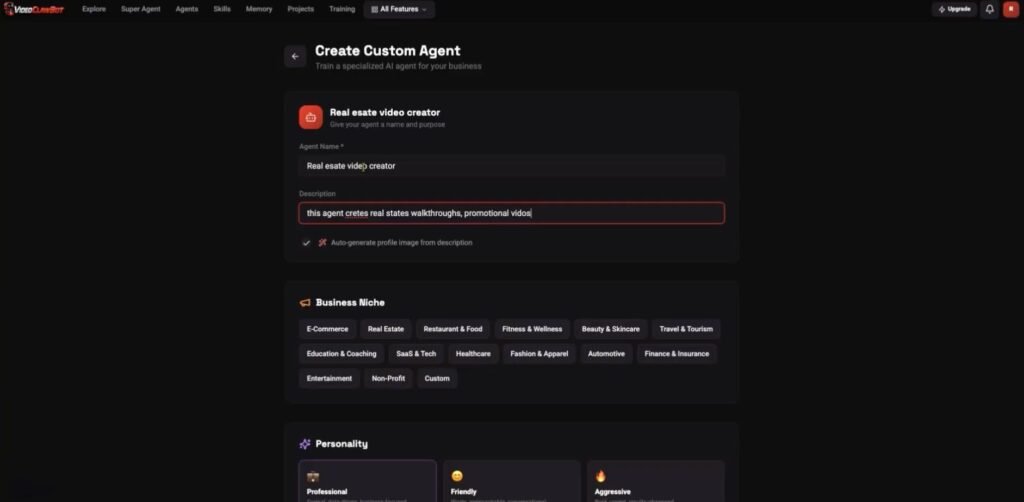
You build or pick an agent, train it with your brand data, and it goes to work. It knows your tone, your niche, and your goals. So instead of starting from scratch every time, your agent already knows what to create and how to position it.
One-Command Campaign Builder
Type one command and the platform generates videos, captions, graphics, outreach emails, and social posts all at once. This is what sets VideoClawBot apart from basic video tools. It’s not just content — it’s a full campaign ready to deploy.
Autonomous Video Creation
You can produce promo videos, product demos, real estate walkthroughs, UGC-style clips, explainer videos, faceless content, and logo animations — all without touching a camera or editing timeline. The AI handles the entire production pipeline.
Script and Copy Tools
VideoClawBot builds your scripts, hooks, ad copy, voiceovers, captions, and cold outreach emails. So if writing isn’t your strength, the platform does it for you — fast.
WhatsApp and Telegram Control
Connect your agents to your phone and manage campaigns without logging into a dashboard. This is a real-world feature, not just a bullet point. It means you can respond to client requests, push new content, and check campaign status from anywhere.
Lead Generation and Outreach
The platform scans business websites, finds weak spots in competitors’ marketing, and builds personalized outreach emails to pitch your services. For agencies and freelancers, this is a powerful way to land new clients without spending hours on cold research.
Trend and Competitor Research
The platform monitors niches, pulls trending hooks, and analyzes what competitors are doing. So your content stays relevant and your campaigns stay competitive.
Multi-Platform Social Content
VideoClawBot creates content sized and optimized for Instagram, TikTok, YouTube Shorts, Facebook, and LinkedIn — with hashtags, captions, and graphics included.
How VideoClawBot Compares to Similar Tools
Most video tools like Pictory, InVideo, or Canva are single-function tools. They help you with one thing — editing, templates, or graphics. But you still need separate tools for scripting, outreach, scheduling, and lead gen.
VideoClawBot combines all of that into one platform with AI agents doing the work automatically. The WhatsApp and Telegram control is unique — very few platforms offer that.
And the one-command campaign builder isn’t something you’ll find in standard tools. The pricing is also more accessible, especially compared to monthly SaaS subscriptions that charge $50–$200/month for far fewer features.
Pros and Cons
Pros:
- Generates full campaigns from one command
- AI agents learn your brand and niche
- WhatsApp and Telegram control for mobile-first users
- Covers video, copy, graphics, outreach, and lead gen
- Commercial license included from the front end
- One-time price during launch — no monthly fees
- Works for multiple niches out of the box
Cons:
- The best features (unlimited videos, 4K, outreach tools) require upgrades
- 2,500 credits on the base plan may not be enough for heavy users
- New platform, so long-term reliability is still being proven
What Real Users Are Saying About VideoClawBot
Early users are responding well to the platform. Most reviews highlight how fast the AI agents produce content, and many users are surprised by how little setup time is needed before the tool starts generating usable output.
Freelancers mention the time savings as the biggest win — tasks that used to take hours now take minutes.
Agency owners appreciate having everything in one dashboard. The ability to manage multiple client projects without switching tools is mentioned often. The WhatsApp feature also gets strong positive feedback from users who work on the go.
Some users note they purchased the bundle deal to unlock the full feature set, and felt the price was fair given how much it replaces in their existing tool stack.
Tips and Tricks to Get the Most Out of VideoClawBot
Train your agent well. The more information you give it upfront — brand voice, product details, target audience, tone — the better and more accurate the output. Don’t skip the training step.
Use the one-command builder for speed. If you need a fast campaign, type one detailed command with your goal, platform, and audience. Let the agent build the full package.
Connect it to WhatsApp or Telegram. Even if you mostly work from a desktop, having mobile access means you can push content or check progress without being tied to your desk.
Start with a pre-built niche agent. If you’re in ecommerce, real estate, or local business marketing, start there. It saves time and the agents are already tuned for those markets.
Grab the bundle if you plan to scale. The $297 bundle (with the $100 coupon) covers everything — video, outreach, image generation, agency tools, and cinematic features — and it’s a better deal than buying each upgrade separately.
Frequently Asked Questions About VideoClawBot
What exactly does VideoClawBot do?
It’s an AI platform that uses autonomous agents to create videos, scripts, graphics, captions, social posts, and outreach campaigns from a single command. You train the agent with your business info and it handles the rest.
Can it make different types of videos?
Yes. It produces promo videos, product videos, real estate walkthroughs, UGC-style clips, faceless videos, explainer videos, logo animations, and social media ads.
Does it work for social media automation?
Yes. It builds captions, hashtags, thumbnails, and graphics for Instagram, TikTok, Facebook, LinkedIn, and YouTube Shorts. Higher-tier upgrades add comment and DM automation.
Who is VideoClawBot made for?
Marketers, freelancers, agencies, ecommerce sellers, local businesses, coaches, and content creators — basically anyone who needs a steady flow of video content and marketing materials without the manual workload.
Is there a monthly subscription?
No. During the launch period, it’s a one-time payment. The front end starts at $47, and the full bundle is $297 (use INSTANT100 for $100 off).
Can I use it for client work?
Yes. A commercial license is included from the base plan, so you can produce and deliver content for clients legally.
Final Verdict: Is VideoClawBot Worth It?
After going through everything VideoClawBot offers, it’s clear this platform is built for people who are serious about scaling their video content and marketing — without burning out or hiring a full team.
The AI agent system is genuinely useful. Training an agent with your brand data and letting it produce campaigns automatically is a real time-saver.
The one-command campaign builder, WhatsApp control, and lead generation tools make it more than just a video creator — it’s a full marketing assistant.
Is it perfect? Not quite. The base plan has credit limits, and the full power really comes out in the higher tiers. But even at the front-end price of $47, the value is strong for what you get — especially with the commercial license included.
Who should buy it? Freelancers and agencies who manage multiple clients. Ecommerce sellers who need product content constantly. Local businesses trying to compete with consistent video marketing. Content creators who want to post more without working more.
If any of those sound like you, VideoClawBot is worth a serious look — especially at this launch price before it goes to a monthly subscription model.