


If you’ve ever tried running ads across Facebook, TikTok, Google, and Instagram all at once, you know how much work it takes. You need copy, visuals, videos, the right sizes, the right formats — and it adds up fast.
So when I came across AdStorm, an AI-powered ad creation platform that promises to do all of that in one place, I had to put it to the test.
AdStorm isn’t just another AI writing tool. It builds full, platform-ready ads — copy, images, videos, UGC-style content, product mockups, and more — all from one dashboard.
No more jumping between five different apps or hiring a freelancer every time you need a new creative. And it supports nine platforms: Facebook, Instagram, Google, YouTube, TikTok, Pinterest, Reddit, Quora, and X.
So, does it actually deliver? Let’s get into everything you need to know before you buy.
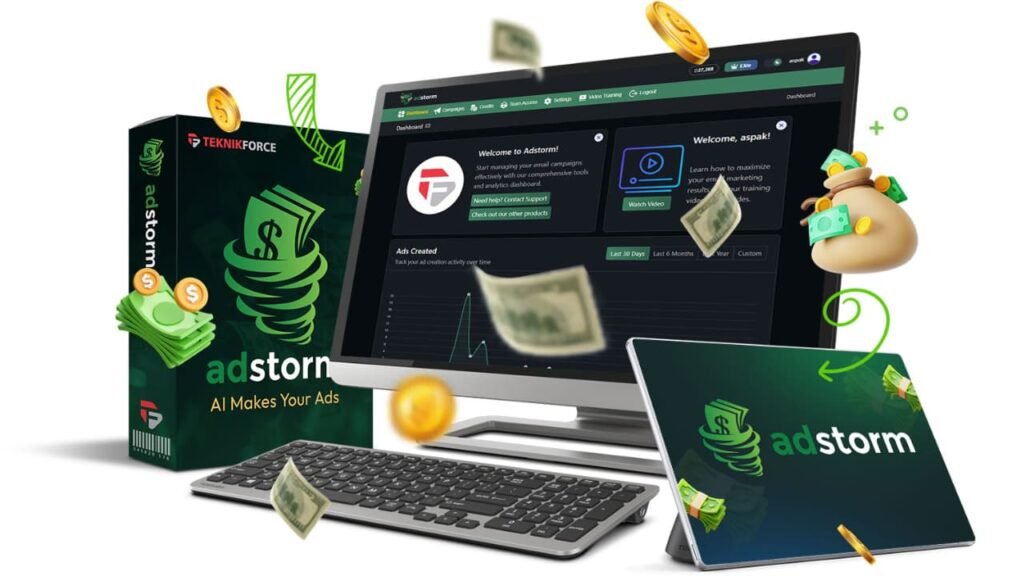
What Is AdStorm and Who Is It For?
AdStorm is a cloud-based platform that uses AI to create full advertising creatives across multiple channels. You enter your product details or drop in your website URL, choose a platform and ad format, and it generates ready-to-use ads in minutes.
Most AI tools stop at one thing — some write copy, others generate images. AdStorm pulls it all together. You get ad copy, visuals, videos, carousels, UGC-style spokesperson clips, and even product mockups — all built under one roof.
That’s a big deal if you’ve ever tried to stitch together Canva, ChatGPT, a video tool, and a stock photo site just to launch a single campaign.
It’s built for small business owners, ecommerce sellers, content creators, freelance marketers, and agencies who need to move fast and can’t afford a full creative team.
But honestly, even experienced marketers will find value here — especially the ad angle generator, the multi-AI model access, and the creative variation tools.
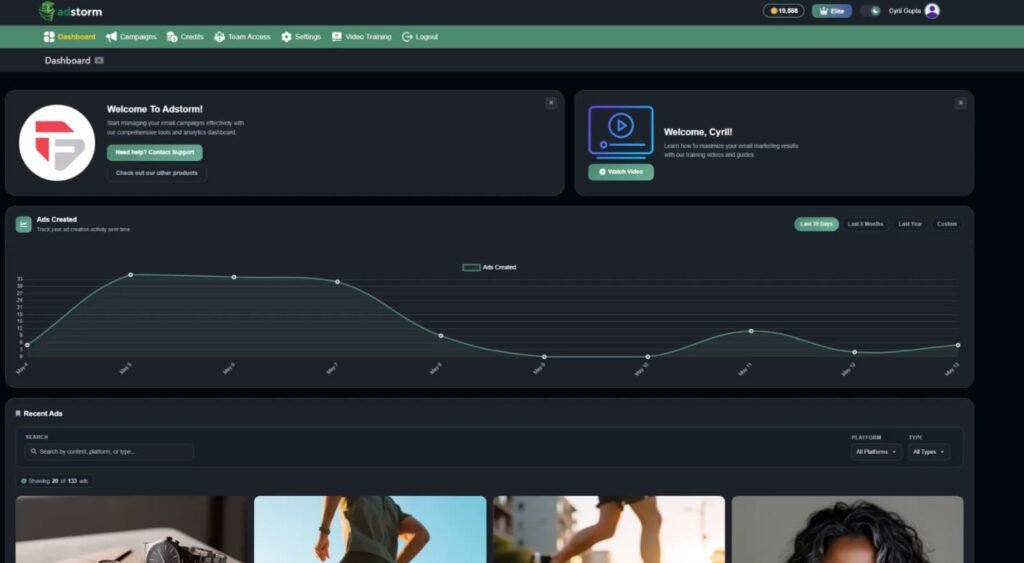
AdStorm Platform Design and Ease of Use
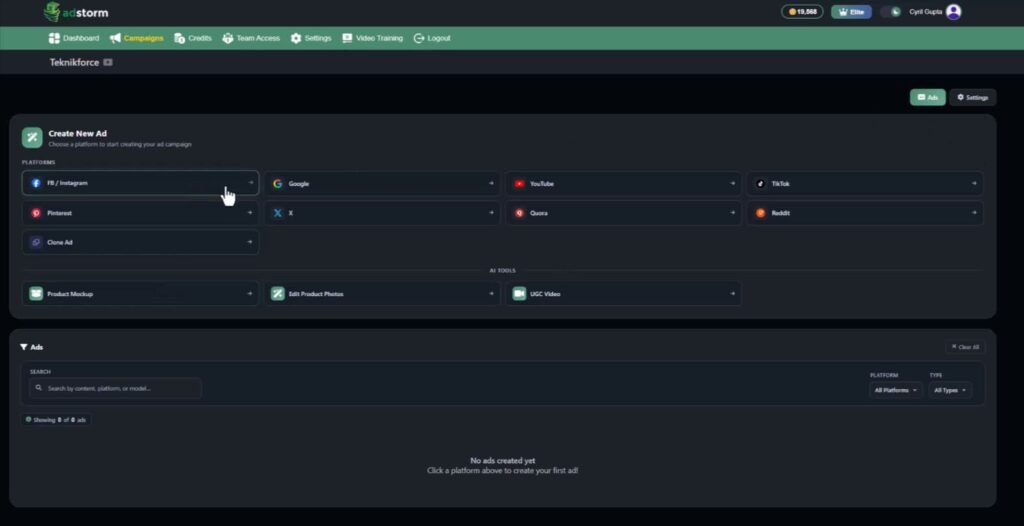
The dashboard is clean and structured around a three-step workflow: create your campaign, choose your platform and format, then generate and customize. There’s no steep learning curve. You don’t need to be a designer or a copywriter to get results.
Step 1 — Create Your Campaign. Add your business details, product info, brand assets, and goals. Or just paste your website URL and let AdStorm scan and extract everything automatically. That website scanning tool is one of the most useful features for speed. It saves a ton of setup time, especially if you’re building ads for client sites or multiple products.
Step 2 — Choose Your Platform and Ad Format. Pick from Facebook, TikTok, YouTube, Google, Instagram, Pinterest, Reddit, Quora, or X. Then choose your format: image ad, video, carousel, UGC video, search ad, Reels, Shorts, and more.
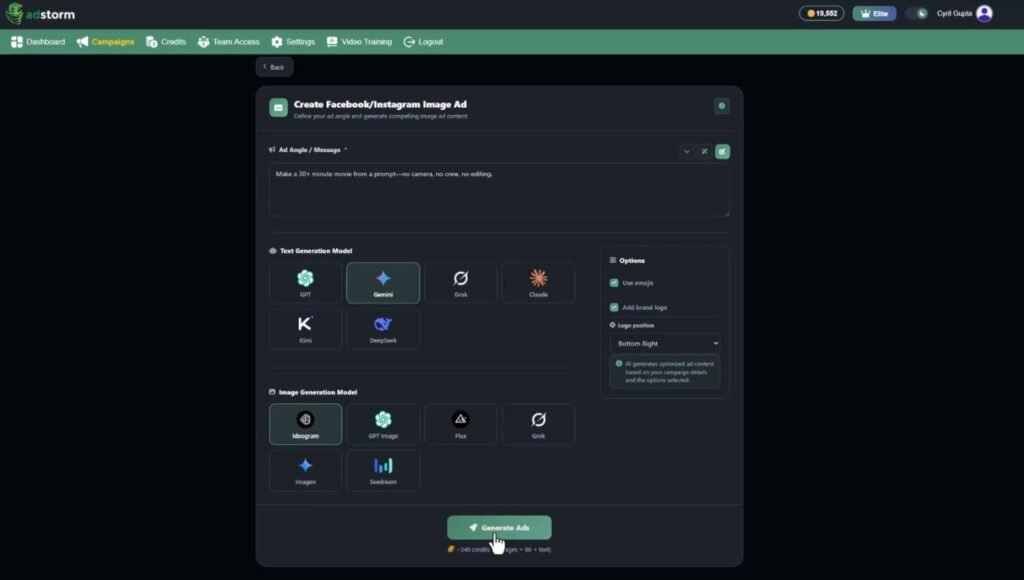
Step 3 — Generate and Customize. AdStorm instantly outputs platform-ready ads. You can edit manually, use AI commands to refine, generate variations, download your creatives, and launch. The editor lets you tweak copy or use commands like “make this more persuasive,” “add emojis,” or “rewrite for a younger audience.” So you’re never locked into the first draft it gives you.
AdStorm Review: Demo Video
AdStorm Pricing Breakdown — What Does It Cost?
AdStorm uses a one-time payment model during its launch period. No monthly fees, no recurring charges. You pay once and you’re in. Here’s exactly what each tier includes:
Front End: AdStorm Elite — $39
This is the entry-level plan. It’s a solid starting point if you’re new to AI ad creation or just want to test the platform before committing to more.
- 20,000 credits included
- Create up to 10 campaigns
- Up to 30 ads per campaign
- Up to 3 UGC videos per day
- Up to 10 mockups per day
- Limited AI model options
- 1 year of free upgrades
Optional add-on at checkout: 50,000 extra credits for $44 if you need more output from the start.
Upsell 1: AdStorm Pro — $67
This is the upgrade most active marketers will want. It removes the limits and unlocks the full power of the platform, including access to multiple AI models and a commercial license for client work.
- 50,000 credits included
- Unlimited campaigns
- Unlimited ads per campaign
- Full multi-AI model access (GPT, Gemini, Claude, Grok, Flux, and more)
- Unlimited AI edits
- Unlimited product mockups and UGC videos
- Team access
- Commercial license included
- 2 years of free upgrades
Upsell 2: AdStorm Reseller — $197
This one is for agencies, affiliates, and entrepreneurs who want to sell AdStorm as their own product and keep the profits.
- 70 reseller licenses included
- Sell AdStorm as your own offer
- Create custom sales pages
- Offer recurring or one-time pricing to your customers
- Built-in license management system
- Full feature access for your customers
- Vendor handles all customer support
Upsell 3: TubeTarget Pro — $67
A YouTube advertising research and targeting tool. If you run YouTube ads, this helps you find better targeting opportunities and cut wasted spend.
- Discover profitable YouTube targeting opportunities
- Target specific videos and channels
- Find audience interest opportunities
- Analyze competitor traffic sources
- Improve YouTube ad targeting precision
- Includes training materials
Upsell 4: AdPlify Pro — $67
A Facebook ad intelligence suite with seven tools designed to improve targeting, reduce ad costs, and increase campaign profitability.
- PageWatcher competitor tracking tool
- Hidden Audience Finder
- Behavioral Retargeter
- Page Targeter tool
- Email List to Audience feature
- Ad Decorator enhancements
- ROI Calculator included
Bundle: AdStorm All-Inclusive — $297 (Best Deal)
This is the full package. You get every upsell bundled together at a significant discount compared to buying each one separately.
- AdStorm Elite ($39 value)
- AdStorm Pro ($67 value)
- AdStorm Reseller ($197 value)
- TubeTarget Pro ($67 value)
- AdPlify Pro ($67 value)
- All bonuses included
- Full tutorials and knowledge base
Optional add-ons available with the bundle:
- Extra 140 reseller licenses — $99
- Extra 50,000 credits — $44
- Unlimited ads daily (removes daily generation limits) — $19
- Seller’s Pack (extra promo materials to help you sell AdStorm) — $29
My Custom Bonuses
All these bonuses are available only if you get this product through my link or buttons on this page. Your download link with my bonuses will be delivered to your JVZoo account after purchase.
Bonus 1: Free GPT Store Exposed Account
Gpt Store – Exposed is a game-changing system that lets you create money-making AI tools in seconds, without selling anything.
Rank on Google instantly, generate income effortlessly, and dominate any niche with minimal effort.
It’s your chance to join a revolutionary opportunity and achieve financial freedom. Don’t miss out—get started now!
Bonus 2: Free Anonymous AI Account
$102,016.16 in 27 Days Case Study with Anonymous AI!
Unlock effortless money with the power of Anonymous AI—no products, followers, or skills needed. This all-in-one system brings you traffic and sales on demand, completely anonymously.
Get in on the ground floor of this game-changing opportunity and start making money today. Timing is everything—don’t miss your chance to crush it with Anonymous AI in 2025!
Bonus 3: Free AInfluencer
Unlock massive online success with AInfluencer! Create anonymous AI influencers in any niche, without showing your face or creating products.
Gain millions of followers and make money effortlessly 24/7. This is your chance to ride the wave of AI-driven digital influencers—don’t miss out!
Bonus 4: Free Recurring AI Account
Want hands-off, recurring income? With Recurring AI, you can earn money effortlessly by selling simple products like text files or access to exclusive groups.
No website, skills, or upfront costs needed—AI handles everything for you. Start making passive income today and live the lifestyle you’ve dreamed of!
Bonus 5: Free AI Agents Exposed Account

AI Agents Exposed lets you use powerful AI to earn money 24/7 with no skills needed.
These AI agents handle tasks like building websites, managing social media, and creating content, allowing you to focus on growing your business and making passive income.
It’s simple, efficient, and offers huge potential. Get in early on this game-changing technology and start profiting today!
Bonus 6: Free Instant Cash Dash Account
Skip the fluff and get REAL results with Instant Cash Dash. In just 5 minutes a day, you’ll make money with proven methods. No skills, no time, no money?
We’ve solved it all for you. Start earning $5, $10, $20, or more daily—just follow the system. The only way you fail is by not taking action.
Bonus 7: Free Skooolify Account
Skooolify – Earn from Skool without owning one! Drive free traffic, earn recurring commissions, and get paid to refer people to Skool—all with zero upfront costs.
Bonus 8: Free Slide Cash Loophole Account

The Slide Cash Loophole is a beginner-friendly system that uses simple slides to drive free traffic in minutes.
No website, following, or paid ads required—sell affiliate products, services, or anything online effortlessly. Perfect for generating passive income or boosting sales fast!
Bonus 9: Free Niche Profit Secrets Account
Earn big in any niche by selling digital products on a secret platform. This proven system has helped many make six figures, with no special skills, website, or large following needed.
Create and sell simple products that solve real problems and build a profitable online business.
Plus all the vendor bonuses. Most affiliates offer vendor bonuses as their own, whereas I go beyond to create and offer you only custom-made bonuses.
Remember, these are free even if you get only the front end offer! Instantly delivered to your members area.
AdStorm Key Features and What They Actually Do For You
Multi-Platform Ad Creation
AdStorm creates ads formatted for nine major platforms. Each ad matches the size, structure, and format requirements of the platform — so you’re not manually resizing a Facebook image for Pinterest or rewriting a TikTok caption to fit a Google ad.
AI Ad Copy Generation
The platform writes headlines, primary text, descriptions, and calls-to-action. It also generates multiple copy variations so you can A/B test different angles without writing them yourself. It adjusts tone, structure, and length based on the platform and marketing angle you pick.
AI Ad Angle Generator
This is a standout feature. It helps you find new hooks and angles based on pain points, benefits, curiosity, savings, and emotional triggers. If your ads feel stale or your click-through rates are dropping, running this tool on your product gives you a fresh set of directions to test fast.
Multi-AI Model Access
AdStorm gives you access to multiple AI engines — GPT, Gemini, Claude, Grok, Flux, Ideogram, Kling, and others — for text, images, and video. You’re not locked into one AI’s style. Switch models to get different output quality and creative results depending on what the project needs.
Video Ad Creation and UGC-Style Videos
You can generate short promotional videos for TikTok, Instagram Reels, YouTube Shorts, and Facebook Ads. The UGC video tool lets you create AI spokesperson videos with custom scripts, different avatar styles, and multiple resolutions. This is especially useful for ecommerce brands that want content that looks organic and authentic rather than over-produced.
Website Scanning Technology
Drop in a URL and AdStorm extracts product details, brand voice, positioning, and marketing content from the page. It speeds up campaign setup significantly — especially useful for agencies building ads for multiple client sites.
Product Mockup Creator
Generate branded product mockups — t-shirts, merchandise, ecommerce visuals — without a graphic designer. For print-on-demand sellers and Shopify store owners, this is a practical time-saver.
Ad Inspiration and Cloning Tool
Upload a screenshot of any ad and AdStorm analyzes the structure, messaging, and creative style, then builds inspired variations for your own campaigns. It’s a smart way to reverse-engineer what’s working in your market and apply those patterns to your brand.
Google Search Ad Creation
AdStorm generates Search ads with multiple headlines and descriptions that follow Google’s character limits and structural requirements. No more counting characters manually or rebuilding the same headlines in a different order.
Multi-Language Ad Creation
The platform can generate ads in multiple languages. For businesses targeting international markets, this cuts translation time and keeps the copy sounding natural rather than like a machine translation.
Creative Variation Generation
Quickly create multiple versions of the same ad to test different hooks, visuals, headlines, and creative directions. More variation equals better data and better results over time.
AdStorm vs. Similar AI Ad Creators
How does AdStorm compare to the tools you might already know?
AdCreative.ai has strong image-based ad output but doesn’t touch video or UGC content. It’s also subscription-only, so the monthly cost adds up fast.
Jasper is great for long-form copy and content writing but isn’t built for multi-platform ad creatives. It generates text only — no images, no video, no mockups.
Canva AI is solid for design but doesn’t generate ad copy, video, or platform-specific ad structures. It’s a design tool with AI features, not an ad creation platform.
AdStorm is the only tool in this comparison that handles the full creative workflow — copy, images, video, mockups, and multi-platform formatting — in one place, with a one-time pricing option.
If you’re currently paying monthly for two or three separate tools to achieve what AdStorm does in one dashboard, the numbers favor switching.
AdStorm Pros and Cons
Pros:
- Covers nine ad platforms in one dashboard
- Generates copy, images, video, and UGC all together
- Website scanner speeds up campaign setup
- Access to multiple AI models for better results
- Ad angle generator finds fresh hooks fast
- One-time pricing — no monthly subscription
- Works for beginners with no design or copy skills
- Commercial license available for agency use
- Multi-language support for international campaigns
- Product mockup creator built in
Cons:
- Entry plan limits credits and daily outputs
- Output quality depends on the quality of your inputs
- Full multi-AI access is locked to the Pro plan
- UGC video quality can vary depending on avatar style
- Best features require the $67 upgrade
What Real Users Are Saying About AdStorm
Based on feedback from marketing communities and product launch audiences, here’s what people are actually experiencing:
“I used to spend three to four hours putting together ads for a single client. With AdStorm, I’m getting platform-ready drafts in under 30 minutes. The website scanner alone saves me a huge amount of time on briefing.” — Freelance Digital Marketer
“The UGC video tool is what sold me. We sell skincare products and UGC-style content performs way better for us than polished brand videos. Being able to generate those without hiring an actor is a real win.” — Ecommerce Store Owner
“I appreciate having access to multiple AI models. If one gives me a flat result, I just switch and regenerate. The angle generator is also really good for breaking out of the same hooks I keep defaulting to.” — Performance Marketing Specialist
Common themes in user feedback include time savings, the all-in-one format, and the value for the price compared to paying for separate monthly tools.
The most common criticism is that the entry-level plan feels limiting, and most users upgrade to Pro once they test the platform and want more output volume.
Tips and Tricks to Get the Most Out of AdStorm
1. Use the website scanner first. Instead of typing in product details manually, drop in your URL. AdStorm extracts your brand voice, product benefits, and positioning automatically — and it sets a stronger foundation for everything the AI builds after that.
2. Run the angle generator before writing anything. Use the angle tool to discover six to ten different hooks before generating any copy. Pick the two or three that fit your audience best and build your whole campaign around those angles rather than defaulting to generic benefits.
3. Upload competitor ad screenshots to the inspiration tool. Find three to five ads in your market that are performing well, screenshot them, and feed them into AdStorm’s cloning tool. Use the output as a starting brief for your own ad variations.
4. Always generate at least three variations of every ad. Don’t launch with just one version. Use the variation generator to create different headlines, visuals, and copy angles, then test them. More variation means better data and better results over time.
5. Switch AI models when results feel flat. If the first output doesn’t land, don’t just regenerate with the same model. Try a different AI engine. Each model has a different style and strength, so cycling through them often produces a noticeably better result.
6. Use AI commands to refine, not just regenerate. Instead of starting over when you don’t like the copy, use targeted commands like “make this shorter,” “add urgency,” or “rewrite for a 35–45 year old female audience.” It’s faster and usually gives you exactly what you need.
7. Build your campaign library early. Save your best-performing ad structures, angles, and copy patterns inside AdStorm. Over time, you’ll have a ready-made reference bank that makes every new campaign faster to build.
Frequently Asked Questions About AdStorm
What exactly is AdStorm and what can it create?
AdStorm is an AI-powered ad creation platform. It can generate ad copy, image ads, video ads, carousel ads, UGC-style spokesperson videos, product mockups, Google Search ads, and platform-ready creatives for Facebook, Instagram, TikTok, YouTube, Pinterest, Google, Reddit, Quora, and X — all inside one dashboard.
Do I need design or copywriting experience to use AdStorm?
No. You enter your product details, pick a platform and format, and the AI handles the rest. You can then edit the output manually or use AI commands to refine it.
Can I use AdStorm for client work or commercial projects?
Yes, but you need the Pro plan ($67) to unlock the commercial license. This lets you use AdStorm’s output for client campaigns and sell the creatives as part of your services.
What’s the difference between Elite and Pro?
Elite ($39) comes with 20,000 credits, up to 10 campaigns, and limited AI model access. Pro ($67) removes campaign limits, unlocks full multi-AI access, includes unlimited ads per campaign, unlimited mockups and UGC videos, team access, and a commercial license.
Does AdStorm include video creation?
Yes. It can generate short promotional videos for TikTok, Reels, YouTube Shorts, and Facebook Ads. It also includes a UGC-style video generator that creates AI spokesperson videos with custom scripts, avatar options, and multiple resolutions.
Is AdStorm a one-time payment or a subscription?
It’s currently available as a one-time payment during the launch period. Elite is $39, Pro is $67, and the full bundle is $297. Optional add-ons are available at checkout.
What are TubeTarget Pro and AdPlify Pro?
TubeTarget Pro is a YouTube ad targeting research tool that helps you find profitable channel and audience options.
AdPlify Pro is a Facebook ad intelligence suite with seven tools including competitor tracking, hidden audience finding, and an ROI calculator. Both are included in the $297 bundle.
Final Verdict — Is AdStorm Worth It?
After going through everything AdStorm offers, my honest take is this: it delivers real value if you spend time building ads manually across multiple platforms.
The combination of copy generation, image creation, video ads, UGC videos, mockups, and a website scanner in one dashboard is genuinely useful — and hard to replicate with a stack of separate tools at a similar price point.
The entry-level plan at $39 is a fair way to test the platform, but the Pro plan at $67 is where it earns its keep.
Unlimited campaigns, full multi-AI access, a commercial license, and unlimited ad variations — that’s a solid toolkit for anyone running campaigns regularly.
If you’re an agency or managing multiple clients, the $297 bundle adds two powerful tools on top of everything else that can sharpen your YouTube and Facebook targeting.
The main drawback is that output quality still depends on what you put in. Vague prompts give vague results.
But if you take five minutes to use the website scanner, run the angle generator, and give the platform solid inputs, the output quality improves noticeably.
AdStorm is best for small business owners and ecommerce sellers who need ads fast but can’t afford a full creative team, freelance marketers and agencies who want to speed up client work, creators and online entrepreneurs running their own paid traffic, and anyone currently using three or more separate tools to build ads who wants to simplify the whole process.
If that sounds like you, AdStorm is a practical buy — especially at a one-time price while the launch offer is still available.