


Most sales pages just sit there. Visitors scroll, maybe read a bit, and then leave without doing anything. That’s a real problem if you’re trying to sell something that needs a little explaining.
Pitchora AI is built to fix exactly that. It turns a plain URL, product idea, or service description into a talking, interactive sales pitch — one that can answer questions, collect leads, and guide visitors step by step toward a decision.
I’ve gone through the platform in detail, and this review covers everything you need to know before you buy — what it does, how it works, what it costs, who it’s for, and whether it’s actually worth your money.
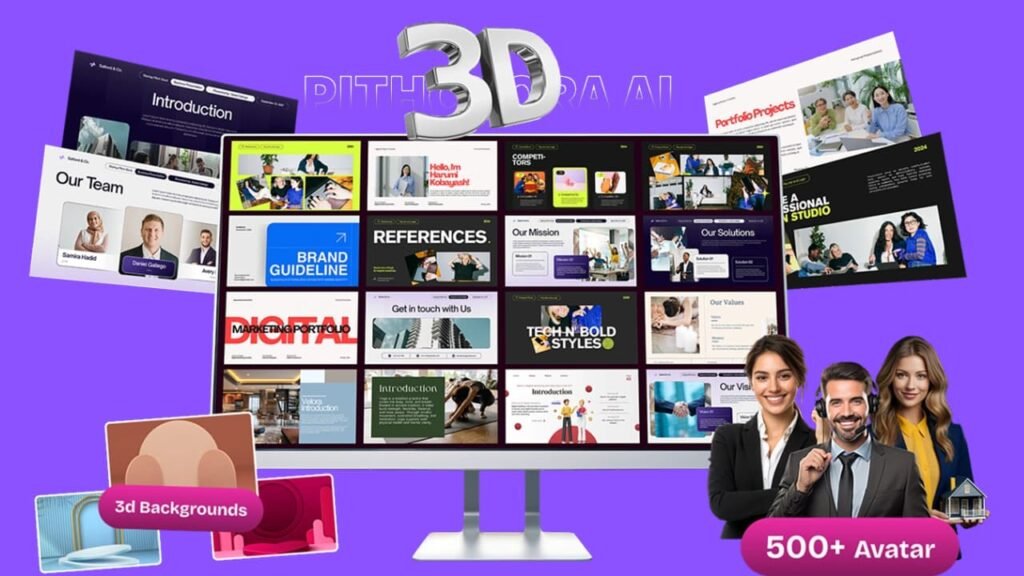
What Is Pitchora AI and What Does It Actually Do?
Pitchora AI is a cloud-based platform that builds interactive AI sales pitches. Instead of a flat landing page, it creates a guided pitch experience with an AI presenter that speaks to your visitors, answers their questions in real time, and walks them through your offer in a way that feels more like a conversation than a sales page.
You don’t need to be a designer or a developer to use it. You just paste in a URL, type out a product description, or drop in some existing content. The platform takes that and builds out your pitch — copy, visuals, structure, and AI conversation logic included.
From there, you can customize the presenter, pick a voice, adjust the layout, add lead forms, and set up follow-up automation, all without touching a line of code.
The idea is simple: a static page can’t answer objections, and it can’t qualify a lead. Pitchora AI can do both. That makes it useful for anyone selling something where visitors might have questions before they feel ready to buy.
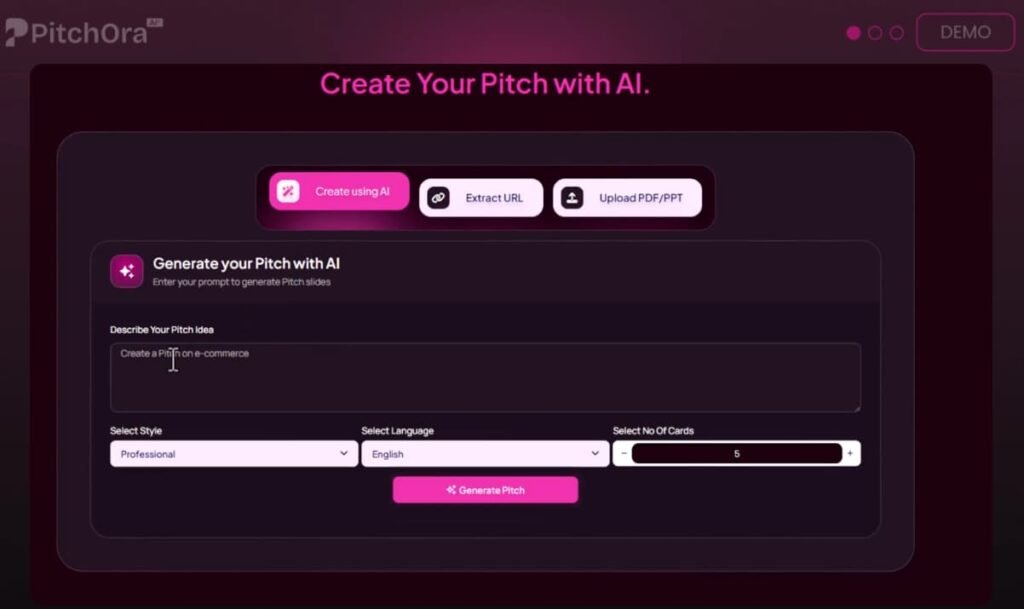
Pitchora AI runs in your browser, so there’s nothing to install. You can manage everything — pitches, leads, campaigns, and edits — from a desktop, tablet, or phone.
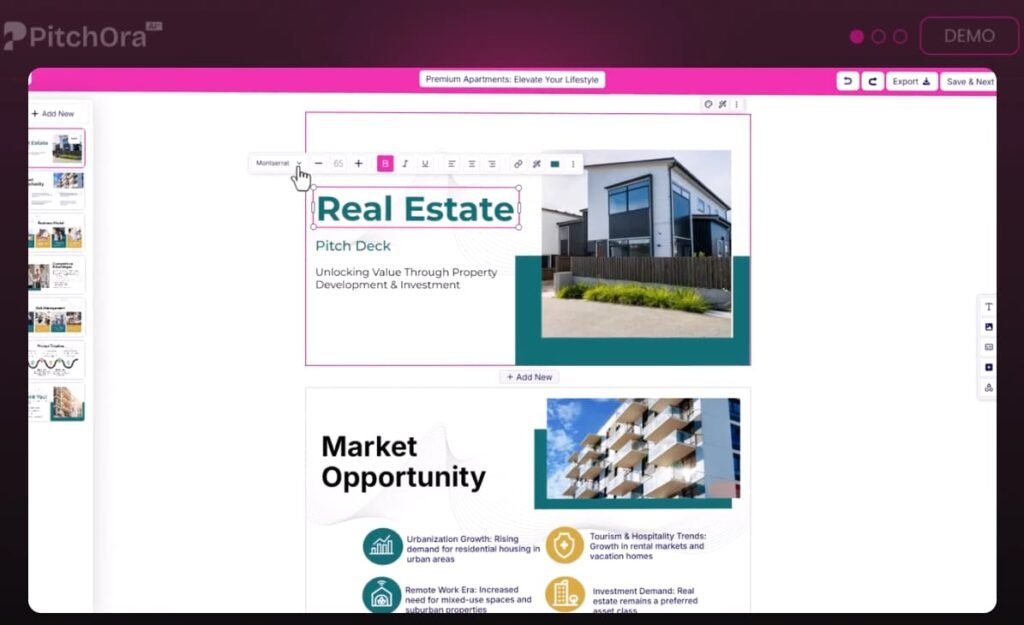
The editor is drag and drop. You can move sections around, change text, swap out visuals, add hotspots, and drop in lead forms without any technical knowledge.
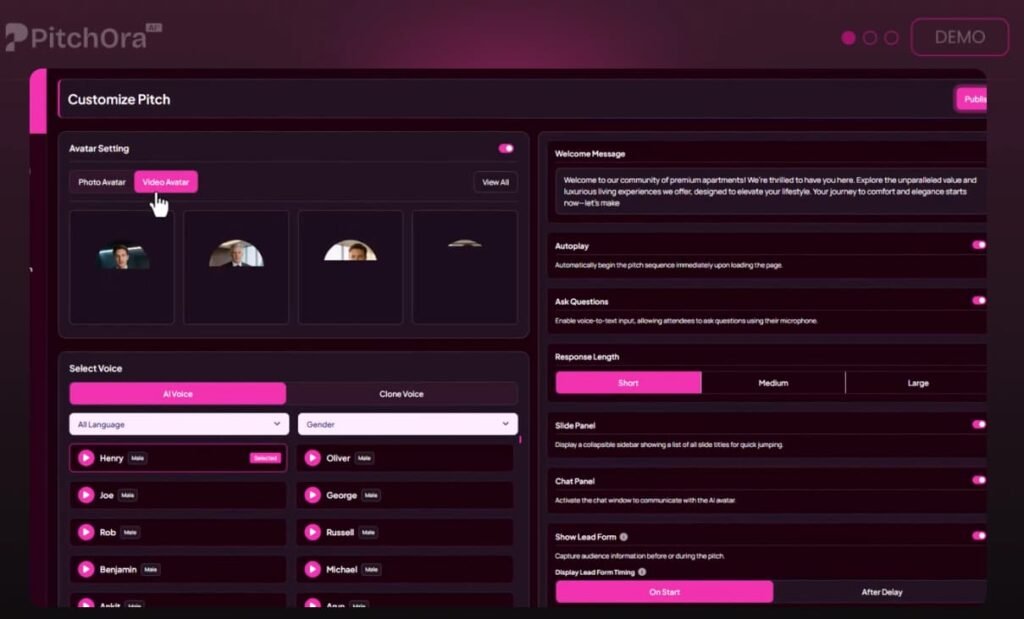
The platform also includes a library of AI presenters, so you can pick a character that fits your brand or build a custom one.
Voice cloning is available at the Enterprise level, which means you can make the pitch sound like you or a specific persona you’ve created for a client.
The 3D-style pitch flows are one of the visual hooks of the platform. Sections have motion, depth, and layered effects that make the pitch feel more alive than a normal page. It’s not just for show — the guided format keeps visitors moving through the offer instead of scrolling past it.
The whole setup is designed so that even beginners can build something that looks professional. But you still need to review the AI output, check the claims, and make sure the pitch actually reflects your offer clearly.
Pitchora AI Review: Demo Video
Pitchora AI Pricing: What Each Plan Covers
Here’s a full breakdown of every option in the funnel:
Front-End — Pitchora AI Commercial ($37)
This is the entry point. It includes URL-to-pitch creation, AI presenters, voice tech, drag-and-drop editing, lead forms, CRM features, funnel embeds, 3D-style pitch flows, and a commercial license. Use coupon EARLY5 to save $5.
Upsell 1 — Unlimited ($67)
For higher volume use: unlimited pitches, workspaces, deployments, 2,000+ AI pitch agents, expanded voice access, unlimited visitor chats, up to 10,000 leads per month, multi-language support, and priority processing.
Upsell 2 — Enterprise ($47)
Adds multiple pitches in one flow, unlimited custom presenters, voice cloning, behavior triggers, booking tools, deeper analytics, surveys, feedback tools, and advanced customization.
Upsell 3 — Leads ($47)
Lets you find local businesses by niche or location, collect contact info, build lists, run outreach campaigns, use done-for-you email templates, export leads, and connect with CRM tools.
Upsell 4 — Automation ($47)
Covers AI lead scoring, follow-up systems, unified inbox management, behavior-based triggers, customer timelines, multi-channel lead handling, smart segmentation, tagging, CRM sync, and 2,000+ app integrations.
Upsell 5 — Agency ($67–$97)
White-label access, unlimited client accounts, custom domain mapping, team tools, agency resources, priority support, and the ability to keep all client revenue.
Upsell 6 — Done-For-You ($97)
The Pitchora AI team builds and deploys your pitch for you. Includes strategist support, custom presenter setup, voice configuration, website-to-pitch conversion, CRM setup, and rapid deployment.
Pitchora AI Bundle ($267)
This is the best overall deal if you want everything. It includes Commercial, Unlimited, Enterprise, Leads, Automation, Agency, bonuses, tutorials, and knowledge-base access. Use coupon SAVE100 to knock $100 off.
Mega Bundle ($77)
Adds extra apps, VIP training, priority support, a dedicated account manager, and more resources to speed up your results.
Pitchora AI Bonuses
🎁 Bonus #1 – 6-Figure Sales Webinar Script Blueprint: A proven webinar script framework to present Pitchora AI interactive pitches effectively and convert viewers into high-ticket clients.
🎁 Bonus #2 – 100 Call-To-Action Closers That Convert: A powerful collection of closing lines designed to drive action and boost conversions from your interactive AI pitches.
🎁 Bonus #3 – AI Voice & Avatar Optimization Secrets Learn how to optimize Pitchora AI voices and avatars for more natural, engaging, and persuasive pitch delivery.
🎁 Bonus #4 – $5K Per Client Pitch Offer Blueprint: Discover how to package and sell premium Pitchora AI pitch services businesses are willing to pay thousands for.
🎁 Bonus #5 – 200 Power Opening Lines for AI Pitches: A swipe file of powerful opening hooks designed to instantly capture attention and keep visitors engaged longer.
🎁 Bonus #6 – 30 Viral Demo Pitch Angles: Creative demo pitch angles that help your Pitchora AI pitches stand out and attract massive audience interest.
🎁 Bonus #7 – High-Retention Pitch Structure Blueprint: Learn the exact structure used to keep visitors engaged longer and improve pitch completion and retention rates.
🎁 Bonus #8 – The 3-Step AI Pitch Profit Formula: A simple framework for turning Pitchora AI pitches into consistent income streams for your business or clients.
🎁 Bonus #9 – Done-For-You Client Onboarding System: A ready-made onboarding process that helps you welcome new clients professionally and start projects smoothly.
🎁 Bonus #10 – 100 Storytelling Hooks for AI Pitches: A collection of storytelling hooks designed to make your pitches memorable, persuasive and emotionally engaging.
🎁 Bonus #11 – 30-Day AI Pitch Content Calendar: A ready-to-use monthly calendar filled with ideas to consistently create engaging AI pitches.
🎁 Bonus #12 – 40 High-Engagement Interactive Pitch Structures: Pre-built pitch formats designed to increase visitor interaction and improve demo engagement.
🎁 Bonus #13 – 9-Step High-Ticket Client Closing System: A step-by-step sales system designed to convert prospects into high-paying Pitchora AI clients.
🎁 Bonus #14 – 60 Advanced Interactive Pitch Scenario Templates: Ready-to-use pitch scenarios that guide conversations and increase engagement during interactive pitches.
🎁 Bonus #15 – 25 Pitch Conversion Trigger Prompts: Strategic prompts that trigger curiosity, urgency and action during your AI pitches.
🎁 Bonus #16 – 100 High-Converting Pitch Niches That Sell Instantly. A list of profitable industries where businesses actively need interactive AI pitch solutions.
🎁 Bonus #17 – 120 Lead-Generating Demo Pitch Ideas: Creative demo ideas specifically designed to attract leads and generate client inquiries.
🎁 Bonus #18 – 60 Investor Pitch Niches That Attract Funding: High-potential industries where Pitchora AI pitches can attract investors and funding opportunities.
🎁 Bonus #19 – 90 Evergreen Webinar Topics That Sell Year-Round: A collection of webinar topics that consistently attract audiences and generate sales year-round.
🎁 Bonus #20 – 35 Done-For-You Service Pitch Niches Ready-made niche ideas to help you position and sell Pitchora AI pitch services quickly.
Key Features and How They Help You
AI Pitch Creation From Any Input
You can start with a URL, a rough idea, a product name, or a full description. The platform builds out the pitch structure, copy, and conversation logic from that input. This saves hours of writing and designing, and it gives you a working first draft you can refine.
AI Presenters That Talk to Your Visitors
The presenters are the centerpiece of the pitch. They introduce your offer, explain the benefits, and walk visitors through the key points.
You can pick from a library of pre-built characters or create your own. At the Enterprise level, voice cloning lets you make the presenter sound exactly how you want.
Real-Time Voice Q&A
This is one of the most useful parts of the platform. Visitors can type or ask questions inside the pitch, and the AI responds in real time using voice and text.
That means objections get handled on the spot, instead of sending a visitor away to search for answers somewhere else.
Lead Capture and CRM Built In
You don’t need a separate tool to collect leads. Pitchora AI includes lead forms, contact management, conversation tracking, and behavior data all in one dashboard.
You can see what visitors asked, where they dropped off, and what signals they gave before leaving — or before converting.
Automation and Follow-Up
After a visitor interacts with your pitch, the platform can trigger follow-up emails, reminders, and lead nurturing sequences based on their behavior. This keeps the conversation going without you doing it manually every time.
Analytics and Behavior Tracking
You can track views, clicks, questions asked, sections visited, and high-intent signals. That tells you what’s working in your pitch and what’s causing visitors to bounce, so you can fix it.
Multi-Language Support
You can build pitches for different languages and markets without rebuilding the whole thing from scratch. This is useful for agencies running campaigns in multiple regions.
How Pitchora AI Compares to Similar Tools
Most landing page builders — like ClickFunnels, Leadpages, or Carrd — give you a static page. You design it, write the copy, and hope visitors read it. They don’t talk.
They don’t answer questions. And they don’t know which visitors are interested and which ones left after 10 seconds.
Video sales letter tools are closer in spirit but still one-directional. The visitor watches, but can’t ask anything. Tools like SynthesiaAI or HeyGen let you create AI video presentations, but they’re not built around sales funnels, lead capture, or CRM workflows.
Pitchora AI sits in a different spot. It combines the visual engagement of a video presentation with the interactivity of a chatbot and the backend tools of a CRM. That combination is fairly specific and hard to replicate with a stack of separate tools.
Pros and Cons
Pros
- Visitors get a guided, interactive experience instead of a flat page
- Real-time Q&A handles objections before they kill the conversion
- Built-in lead capture, CRM, and automation reduce tool-stacking
- Works for agencies who want to sell it as a service
- No coding needed — drag and drop from start to finish
- Scales from solo use to full agency delivery
Cons
- A weak or unclear offer won’t get fixed by a better presentation
- AI-generated Q&A responses need to be reviewed before going live
- 3D effects and motion should be used carefully — too much distracts from the sale
- Some upgrades are only needed if you’re running high volume or managing clients
What Real Users Are Saying
Early buyers have pointed to the quality of the bonus packages and the post-purchase support as standouts. One buyer, Henry Sharp, noted he was impressed by the bonus quality and the after-sale assistance, adding he’d buy again.
That kind of feedback usually signals the team behind the product is responsive, which matters when you’re setting up something new and run into questions.
The general sentiment from users is that the platform delivers on its core promise — turning a basic offer into something that feels more like a conversation.
The main feedback pattern points to the setup taking some time up front, but producing a noticeably more engaging result than a standard page.
Tips and Tricks to Get the Most Out of Pitchora AI
Start with a clear offer before you generate anything. The AI can build a pitch from vague input, but the output will be vague too. Know your hook, your main benefit, and your call to action before you hit generate.
Review every AI response in the Q&A section. Go through the common questions and check that the answers are accurate, specific to your offer, and not making claims you can’t back up.
Use the behavior tracking to improve your pitch over time. Look at where visitors drop off and what questions they ask most. Those two data points tell you what’s missing in your pitch and what your audience actually cares about.
Don’t overload the pitch with effects. The 3D motion and presenter features are attention-grabbing, but they should support the message, not replace it. Keep the focus on the offer.
If you’re an agency, use the Leads upgrade to find clients before you even pitch them. You can find local businesses by niche, build a list, and send outreach with done-for-you email templates — all from the same platform.
Test the pitch yourself as a first-time visitor. Go through it cold, ask questions, and see if the experience actually moves you toward the next step. If it doesn’t, something in the flow needs work.
Frequently Asked Questions
Is Pitchora AI just a landing page builder?
No. It’s a different category. Landing pages are static — they present information and wait.
Pitchora AI builds interactive pitch experiences with AI presenters, voice Q&A, guided flows, lead forms, CRM tracking, and automation. It can work alongside your existing pages, but the pitch itself is a more active experience.
Do you need to know how to code?
Not at all. The whole creation process runs on prompts, drag and drop, and AI generation. You’ll still need to review and refine the output, but there’s no manual coding required for the presenter, forms, embed setup, or pitch flow.
Which upgrades make sense for an agency?
Unlimited handles volume. Leads helps with prospecting and outreach. Automation covers follow-up and CRM.
Agency gives you white-label access, unlimited client accounts, custom domains, and team tools. If you’re selling interactive pitch services, those four together make the most sense.
Can it work for local business marketing?
Yes — and that’s one of the stronger use cases. You can build sample pitches for restaurants, clinics, real estate agents, or gyms and use those demos as outreach assets to sign clients.
What happens after a visitor fills out the lead form?
The platform logs the contact, records the conversation, and can trigger automated follow-up sequences based on behavior. You manage everything from the CRM dashboard inside Pitchora AI.
Final Verdict: Is Pitchora AI Worth It?
Pitchora AI fills a specific gap that most marketing tools ignore — the space between a visitor landing on your page and actually deciding to act. It gives that visitor someone to talk to, questions to ask, and a path forward.
And it gives you the lead data, behavior tracking, and follow-up tools to do something with that interaction.
It’s not a fix for a bad offer. If your positioning is unclear or your product doesn’t solve a real problem, no amount of 3D effects or AI voice will save it.
But if you have a solid offer that just needs better delivery — especially one that needs explanation, handles objections, or targets a niche audience — Pitchora AI gives you a practical way to present it.
I’d recommend starting with the Front-End at $37 to test the core workflow. If it fits how you work, the Bundle at $267 (with the SAVE100 coupon) is the smartest move for the full stack.
Agencies and high-volume users will get the most from the Unlimited, Leads, Automation, and Agency upgrades.
For affiliates, freelancers, local marketers, software sellers, and agencies who want to turn a pitch into a real sales experience — this one is worth a look.