


I’ve been doing SEO for a while now. And here’s the hard truth: people are changing how they search very quickly. More and more people skip Google entirely and go straight to ChatGPT, Perplexity, or Gemini to get answers.
They ask a question, and the AI tells them exactly what to do. No clicking through ten blue links. No ads to scroll past. That means if these AI search engines don’t mention your business, a lot of people online simply won’t see you.
The problem? Most business owners and marketers have no idea how to get AI to recommend them. Backlinks, keyword stuffing, and meta tags don’t really work here the way they do in traditional SEO.

AI search engines care about structured data, clear entities, trust signals, and content format. It’s a whole new game.
So I tried out SerpSling AI, a new platform by Joshua Zamora that claims to handle all of this. The main promise is straightforward: SerpSling AI audits your site, tells you exactly why AI search engines are skipping you, fixes the problems, and publishes optimized content — with little effort on your part.
It’s made for marketers, agency owners, local business owners, and niche site builders who want to show up in AI-powered search results. Let me walk you through everything I found.
What Is SerpSling AI and How Does It Work?
SerpSling AI is a web-based platform paired with a WordPress plugin. The vendor calls the approach “Answer Engine Optimization” — or AEO. The goal is to optimize for how large language models like GPT, Gemini, and Claude choose which websites and businesses to recommend, instead of chasing Google’s usual algorithm.
Here’s how it works step by step. You type in a business name, URL, or location. SerpSling AI runs a deep visibility audit that checks schema markup, review signals, content gaps, technical health, and entity clarity.
The AI then produces a detailed report showing exactly what’s wrong and what needs fixing. From there, the platform gives you tools to address those issues — schema injection, AI-optimized content generation, and structured data deployment.
And the WordPress plugin lets you publish everything with just one click.
The interface looks clean and straightforward. The audit dashboard is easy to read, and the content tools are laid out in a logical order. You don’t need to be a developer or SEO expert to use it, which makes sense because that’s clearly who this product is aimed at.
What stood out to me right away: the audit reports are detailed and ranked by priority, the WordPress plugin handles schema injection without touching any code, content generation is built right into the same dashboard, and there’s a PDF export option for sharing results with clients.
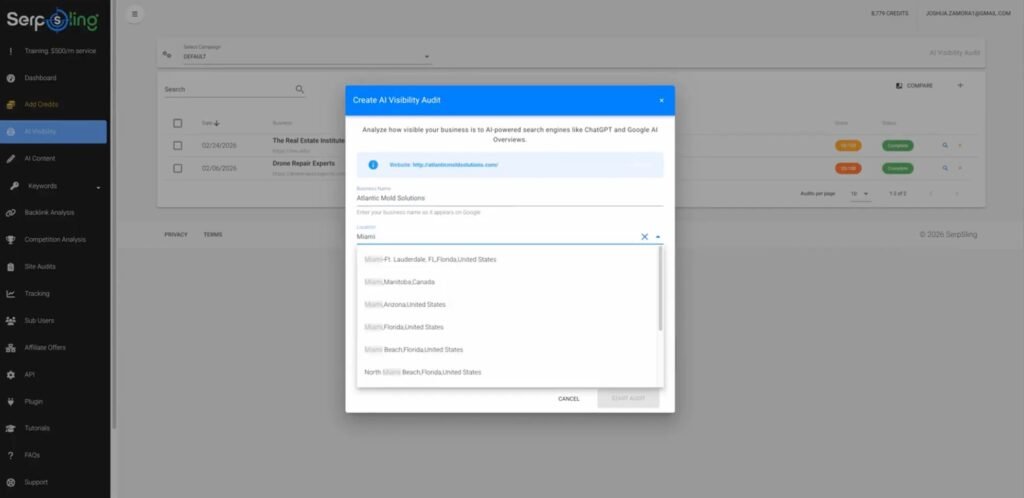
Now, the platform feels well-built for what it does. The dashboard is clean and doesn’t overwhelm you with options. Everything is grouped logically — audits in one place, content tools in another, schema settings close by.
You can get in, run an audit, and know what to do next without digging through menus.
The WordPress plugin installs like any other plugin and adds structured data behind the scenes without changing anything visible on your site.
That’s a smart design choice because most business owners don’t want to risk breaking their site while trying to improve it.
The live schema preview feature is a nice touch. Before you publish, you can see exactly what data the AI search engines will read. That lets you catch mistakes before they go live, which saves a lot of headaches.
The PDF export for audit reports is professional-looking. If you’re running this as a service for clients, you can hand them a branded document that clearly shows the issues and what you’re doing to fix them.
That kind of presentation matters when you’re trying to justify a monthly retainer.
SerpSling AI Review: Demo Video
SerpSling AI Pricing: What Each Plan Costs and What You Actually Get
SerpSling AI has a front-end offer plus four upsells and a bundle deal. Here is a full breakdown of every option so you know exactly what you are paying for before you buy.
Front End: SerpSling Agency — $34.95 One-Time
The front-end plan is a one-time payment of $34.95 during the launch period. It gives you access to the core SerpSling AI platform and lets you run it as an agency.
You get the AI visibility audit tool, the AI Booster WordPress plugin, the AI content generator, schema deployment tools, downloadable PDF audit reports, and side-by-side site comparison.
There is a catch, though. The front-end plan limits how many domains you can manage and how many audits and content pieces you can run each month.
So if you only want to test the platform on your own site or a couple of client sites, this is a fine starting point. But if you plan to use it regularly, you will hit those caps quickly.
Upsell 1: SerpSling Agency+ — $1 for the First Month, Then $47/Month
This is the monthly subscription upgrade. You pay $1 to try it out, then $47 a month after that. With Agency+, all the caps from the front-end plan are removed. You get unlimited domains, unlimited audits, unlimited AI content creation, and unlimited schema deployments.
If you want to run SerpSling AI across multiple client sites or offer it as an ongoing service, this is where the real value is.
But the cost adds up over time. At $47 a month, you need to be actively making money with the tool to justify keeping it. If you are just experimenting, stick with the front-end plan first.
Upsell 2: AEO Super Booster — $47 One-Time
This upgrade is focused on getting new clients. It includes an AI-powered lead prospecting system that is supposed to find local businesses in any niche or location, check their websites for AEO problems, and send personalized outreach messages pitching your services.
The promise is that it can automatically find, pitch, and help you close clients. This is the upsell I am most skeptical about.
Cold outreach automation has very low conversion rates in general, and no AI tool can reliably close $500-a-month retainers without real human follow-up, trust-building, and sales skills. Approach this one with caution.
Upsell 3: AEO Sniper — $67 One-Time
This $67 upgrade claims to help you improve AI search visibility even before you have a full website built. The vendor says it does something most people already do, but in a smarter and faster way.
The sales page descriptions are vague, so it is hard to judge the real value without buying it. If you are just starting out with SerpSling AI, skip this one until you have gotten results from the core platform first.
Upsell 4: AI Niche Site Blueprint — $27 One-Time
This is a training course, not a software tool. For $27, you get a step-by-step blueprint for building automated niche sites that the vendor claims can earn between $100 and $4,000 a month. It covers niche selection, site setup, monetization, workflow automation, and scaling.
It is extra training that could be useful if you want to build income from niche sites, but it has nothing to do with the main SerpSling AI platform. Take the income figures with a large pinch of salt.
Bundle Deal: Everything Included — $297 One-Time
The bundle deal gets you the front-end plan and all four upsells for a single one-time payment of $297. If you know you want everything and plan to use SerpSling AI as a core part of your business, this avoids the $47 monthly fee and saves you money over time compared to buying each piece separately.
But only go for the bundle if you have already decided this tool fits your workflow. Buying everything upfront when you have not tested the platform yet is a risk you do not need to take.
SerpSling AI Bonuses: Everything You Get for Free With Your Purchase
On top of the core platform, SerpSling AI comes with a solid stack of bonuses. Some of these are genuinely useful. Others are more marketing fluff. Here is a straight look at each one so you know what you are actually getting.
Bonus 1: Agency Rights — Use SerpSling AI on Client Sites ($197 Value)
This one is actually worth having. Agency rights let you run SerpSling AI across your clients’ sites, not just your own. That means you can offer AI search optimization as a paid service and charge a monthly fee for it.
Without agency rights, you would be limited to using the tool only on your own properties. If you plan to work with clients at all, this bonus removes a real barrier and opens up the main way most people would monetize this tool.
Bonus 3: The Zero-Code Schema Toolkit ($147 Value)
There are hundreds of schema types out there, and most of them you will never need. This bonus cuts through all of that and gives you a focused cheat sheet covering the schema types that actually matter for AI search: LocalBusiness, FAQ, Review, Service, Author, and more.
You also get fill-in-the-blank templates so you can apply the right schema fast without writing any code. It is a practical add-on that pairs well with the main plugin.
Bonus 4: One-Click Custom Schema Deployment via the WP Plugin
This bonus adds an exclusive feature inside the WordPress plugin that lets you deploy any custom schema type with a single click. So the templates you get in Bonus 3 can go live on your site without any manual code work.
You can add as many schema types as you want, whenever you want. For non-technical users, this is a big deal. It keeps the whole process inside the plugin and removes the need to touch any code at all.
Bonus 5: 30+ AI Search-Ready Niches Cheat Sheet ($67 Value)
This is a curated list of niches that are already performing well in AI search, based on actual large language model data trends. It covers both local and global niches, evergreen and trending topics, and includes keyword ideas, buyer intent angles, and traffic potential for each one.
If you are not sure where to focus first, this gives you a starting point without having to do the research yourself. It is a useful shortcut, especially for niche site builders.
Bonus 6: AI Search Monetization Blueprints ($297 Value)
This bonus maps out several different ways to turn AI search visibility into actual income. The models covered include local lead generation, rank and rent, affiliate offers, info products, and service bundles.
It is not one-size-fits-all, which is good. Different people have different skills and business setups, so having multiple roadmaps to pick from makes it more practical. It is worth reading through even if you already have a monetization plan, just to spot angles you might not have thought of.
Bonus 7: Done-for-You AI SEO Services Brochure ($147 Value)
This is a professionally designed, fully editable brochure available in both Google Doc and Canva format. It includes a breakdown of AI SEO services, ready-made pricing packages, and a FAQ section that handles common client objections.
If you are trying to land clients and do not want to build your own sales materials from scratch, this saves you real time. You just add your branding, adjust the pricing, and you have something you can hand to a potential client or attach to an email right away.
Bonus 8: LLM Content Cheat Sheet ($47 Value)
This is a short guide that breaks down what large language models actually look for when deciding which sources to recommend.
It covers what to include in your content, what to avoid, and how to make your writing more AI-friendly without overcomplicating things. It is a quick read and a useful reference, especially if you are creating content yourself rather than relying only on the platform’s content generator.
Think of it as the thinking behind the tool, explained clearly.
Bonus 9: AI SEO Cold Email Templates ($67 Value)
These are pre-written email templates designed to pitch AI search optimization services to local businesses and online clients. They are built around urgency and the fear of missing out on early AI search positioning.
If cold outreach is part of your plan, having a ready-made starting point is better than staring at a blank page. That said, treat these as drafts.
Personalize them before you send. Generic cold emails get ignored fast, and no template alone will close clients without real follow-up and relationship-building on your end.
SerpSling AI Key Features Broken Down: What Each Tool Actually Does for You
The AI Visibility Audit Tool
This is the engine that makes the whole platform useful. You type in a business name, location, or URL, and the system does a full scan.
It checks for JSON-LD schema markup, looks at the number and tone of Google reviews, verifies that the Name, Address, and Phone (NAP) info is consistent across your site and Google Business Profile, and spots content gaps — areas where AI models don’t have enough information to confidently recommend you.
It also rates technical health based on HTTPS, mobile-friendliness, and accessibility, and checks entity clarity — whether AI can clearly understand what your business does, where it’s located, and why it should be trusted.
The results come out as a prioritized report. The most important issues are listed first, so you know exactly where to start. A lot of businesses don’t know why they aren’t showing up in AI search results. This tool gives them a clear answer.
The AI Booster WordPress Plugin
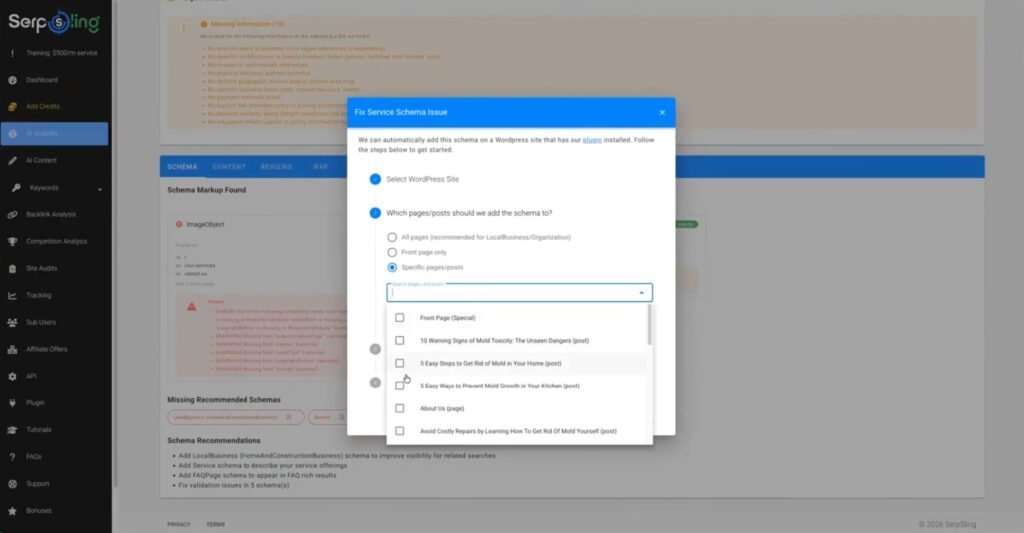
Once installed, the plugin adds JSON-LD schema markup without changing anything visible on the site. It comes with six pre-made schema types: Organization, Services, FAQs, Articles, Local Business, and Reviews.
You can also set targeting rules that assign specific schema to specific posts, pages, or categories.
That precision matters. Each page on your site has a different purpose, and AI models do better when they know the exact context of each page.
The plugin also updates automatically as AI search engines change, so you don’t have to keep going back in to update your settings manually.
The AI Content Maker
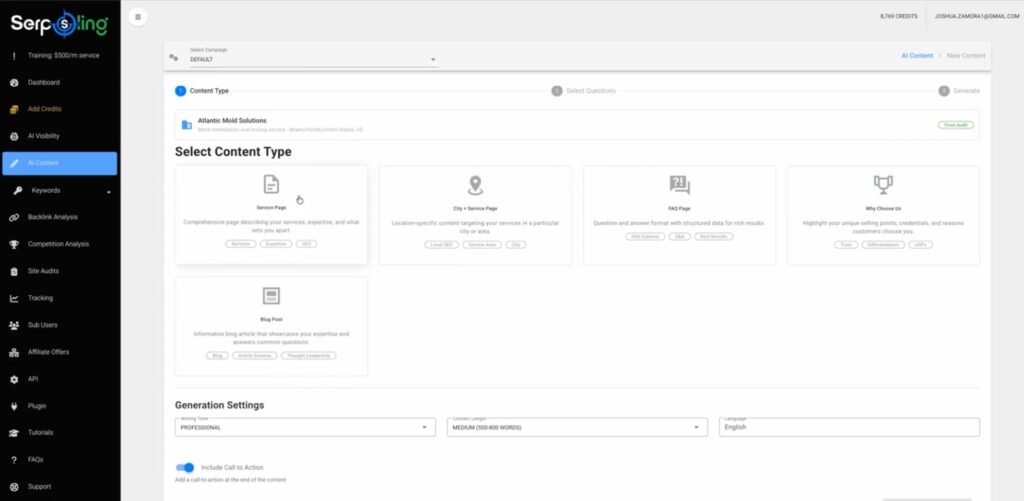
The content generator creates text specifically designed for how large language models find and recommend information.
Writing for AI search engines is different from writing for traditional SEO. AI models do best with content that is clear, organized, and built around questions and answers.
The tool produces FAQ blocks, conversational-style posts, “Why Choose Us” sections, and answer-format content that mirrors how tools like ChatGPT and Perplexity pull in information.
It also generates location-specific content for local businesses — think city-plus-service pages with schema already built in.
Multi-Language Support and Side-by-Side Site Comparison
SerpSling AI can generate content in multiple languages, which is a smart add-on. AI search is available all over the world, and non-English markets are far less competitive right now.
If you work with clients in other countries or target multilingual markets, this feature gives you a real edge.
The comparison tool lets you examine multiple websites at once. This is helpful for competitive analysis and for agencies that need to show clients exactly how they stack up against competitors in AI visibility.
Combined with the downloadable audit reports, it works both as a sales tool and an optimization tool.
SerpSling AI vs Similar Products: How Does It Compare?
There aren’t many tools specifically built for AEO yet. Most of what’s out there falls into two categories: traditional SEO platforms that have added AI-readiness checks as an afterthought, or general schema markup tools that don’t do auditing or content generation.
Tools like Semrush and Ahrefs are excellent for traditional SEO but don’t go deep on AI search optimization.
They can tell you about keyword rankings and backlinks, but they don’t check entity clarity, AI content gaps, or schema types designed for how LLMs process information.
Schema generators like Merkle’s Schema Markup Generator or Google’s Structured Data Markup Helper are free and solid for adding basic schema, but they’re manual tools. They don’t audit your site, generate content, or integrate directly into WordPress.
SerpSling AI pulls the audit, the schema injection, and the content generation into one place. At $34.95 for the front-end, that’s a better starting price than paying for multiple tools separately — as long as you go in knowing what it can and can’t do.
SerpSling AI Pros and Cons
Pros
- The audit tool gives you real, useful information about how ready your site is for AI search.
- The WordPress plugin adds schema markup without writing a single line of code.
- Content generation is built specifically for AI search engine formats — not just copied from a generic writing tool.
- PDF audit reports look professional and are useful for client presentations.
- Multi-language support opens access to less competitive international markets.
- The front-end price of $34.95 is reasonable for testing out the platform.
Cons
- The income claims on the sales page are heavily exaggerated.
- The front-end plan has tight limits that push you toward the $47/month recurring subscription.
- The automated client acquisition upsell overpromises what cold outreach automation can actually do.
- AEO is still new and unpredictable, and no tool can guarantee AI search results.
What Real Users Say About SerpSling AI: Genuine Experiences and Testimonials
User feedback on SerpSling AI is mixed, which is pretty much what you’d expect from a product in a new and unproven niche. People who came in with realistic expectations generally got value from it.
People who expected passive income and guaranteed results walked away frustrated.
The audit tool gets consistent praise. Users say it gives them clear, prioritized action steps — something that most SEO tools either hide behind jargon or bury under too much data.
The schema plugin also gets positive marks for being easy to set up. Several WordPress site owners said it saved them hours of manual work.
The content generator gets more mixed reviews. Some users found the output helpful as a starting point. Others said it needed significant editing before it felt natural and useful.
That tracks with most AI content tools right now — the raw output is rarely publish-ready.
The biggest complaints center on the upsells and income claims. Several buyers felt misled by the sales page’s promises about making six figures from AI optimization services.
The tool is useful, but it’s a tool — not a business. The ones who got the most from it already had clients, already understood SEO, and used SerpSling AI to add a new offering to something they had already built.
Tips and Tricks: How to Get the Most Out of SerpSling AI
Start with the audit before touching anything else. Run a full scan on your site and read through the prioritized report from top to bottom.
Don’t jump ahead to content generation until you understand exactly where your AI visibility gaps are. The audit is the foundation — everything else builds on what it finds.
Use the live schema preview every time. Before you publish any schema, check the preview to make sure the data is reading the way you want.
Small errors in structured data can confuse AI models instead of helping them, so it’s worth taking the extra minute to verify.
Target your schema by page type. Don’t apply the same schema to every page on your site. Use the targeting rules to match schema types to page purposes — FAQ schema on FAQ pages, Local Business schema on location pages, Article schema on blog posts. The more precise you are, the more useful the structured data becomes.
Edit the AI-generated content before publishing. The content tool gives you a useful draft, but it’s not always ready to go live.
Read through it, adjust the tone to match your brand, and add any specific details that only you would know. AI-written content that sounds generic won’t help you — content that sounds clear, specific, and trustworthy will.
If you’re using this for clients, use the PDF audit reports as a sales tool. Walk potential clients through the report before you pitch them on a retainer.
Showing them a concrete list of issues they didn’t know they had is far more compelling than explaining AEO in the abstract.
SerpSling AI FAQ: Your Most Common Questions Answered
Does SerpSling AI guarantee AI search rankings?
No, and be careful of any tool that claims it does. AI search recommendations depend on training data, live web crawls, and constantly shifting algorithms.
SerpSling AI improves your chances by making your site easier for AI models to understand, but it can’t control what those models ultimately recommend.
Do you need to know how to code to use it?
No. The WordPress plugin handles schema injection without any coding required. The audit and content tools are all point-and-click. You do need a WordPress site to use the plugin portion of the platform.
What is the front-end price, and are there upsells?
The front-end plan is $34.95 as a one-time payment. There are several upsells, including a $47/month Pro subscription that removes limits on audits and content generation.
There are also higher-tier upsells for client acquisition automation and niche site income systems. The front-end is usable on its own, but the usage caps make the Pro plan worth considering if you plan to use it regularly.
Can I use it for non-WordPress sites?
The audit tool and content generator work for any site — you just enter a URL. But the schema injection plugin is WordPress-only. For non-WordPress sites, you’d need to add the JSON-LD output manually to your site’s code.
Is this useful for local businesses specifically?
Yes, local businesses are actually one of the best use cases. The audit checks NAP consistency, Google Business Profile signals, and local entity clarity — all things that matter a lot when AI models are deciding which local service provider to recommend.
The content tool also generates location-specific pages that match how AI handles local search queries.
Final Verdict: Should You Buy SerpSling AI?
After going through SerpSling AI thoroughly, here’s my honest take: the platform does offer real value. The AI visibility audit, the schema plugin, and the content generator are all tools that address a real and growing need.
If you already run WordPress sites and want to improve your structured data and content format for AI search engines, SerpSling AI can save you meaningful time and effort.
But you have to separate the tool from the hype. The sales page promises easy money, automatic client acquisition, and guaranteed AI rankings. None of that is true.
AI search optimization is a real opportunity, but it’s still early, still unpredictable, and it takes more than one plugin to work.
The software can’t close clients for you, can’t promise ChatGPT will recommend your business, and definitely can’t deliver six-figure income with zero effort.
So who should actually buy this? SerpSling AI is a good fit for WordPress site owners who want schema markup without the technical hassle, agency owners who want to add AEO to their service lineup, local SEO professionals looking to expand into AI search, and niche site builders who want better odds of getting recommended by AI tools.
It’s not a good fit for beginners who expect the tool to make money on its own, or anyone who takes the income claims at face value without understanding the work and selling involved.
At $34.95, it’s a low enough risk to try if you’re curious about AEO and already have a site or clients to work with. Just go in with open eyes, realistic expectations, and a plan for how you’ll use it — and you’ll get real value from it.