


Hi, this is Darius, and welcome to my SuperClips AI review.
I make content a lot, and video is always the bottleneck. A “simple” 30-second ad can turn into a long chain of tasks. Write a script. Plan scenes. Find clips. Record a voice. Add music. Edit. Export. Then do it again for a new hook or a new angle.
Superclips AI aims to cut that whole chain down to one short input. I type a one-line idea and can add an image, then it builds the script, hook, visuals, voice, music, and the final video. The platform frames this as a three-step flow: brief, approve, and publish.
If you run ads, post Reels or TikToks, sell products, or run a faceless channel, that promise is the whole pitch: more videos, less grind, less cost, less time.
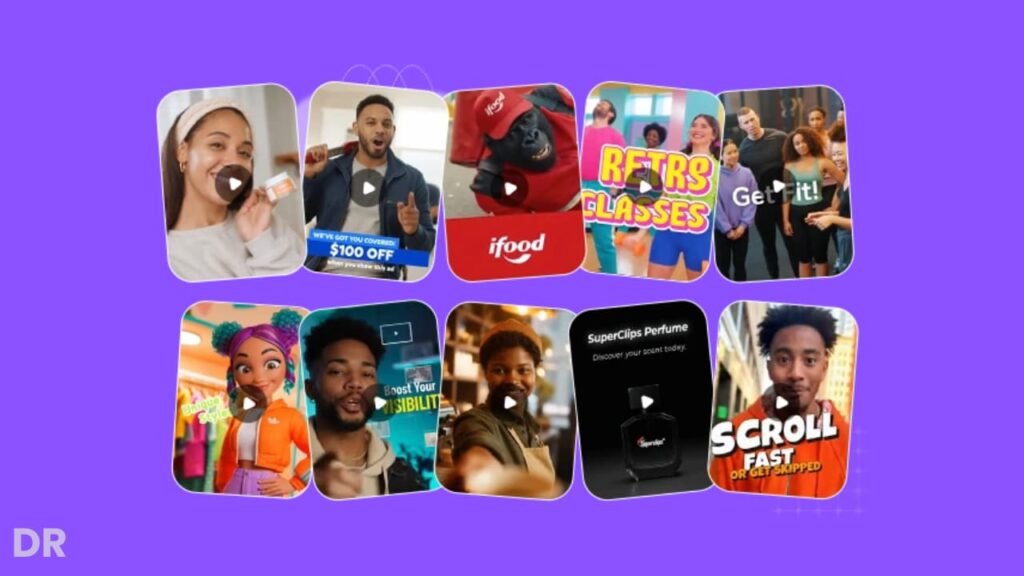
What Superclips AI Is, in Plain Words
Superclips AI is an all-in-one AI video maker that turns text or an image into a ready video. You start with a short idea, then you review what it made, tweak scenes or tone, and render a final clip.
The core use cases are easy to spot:
- Short ads for a product or offer
- Social clips meant to stop the scroll
- Product show-and-tell videos for shops and sites
- Faceless videos where you do not want to film anything
It is also positioned as a tool you can use for client work, with a workflow that supports multiple projects, plus clean exports meant for delivery.
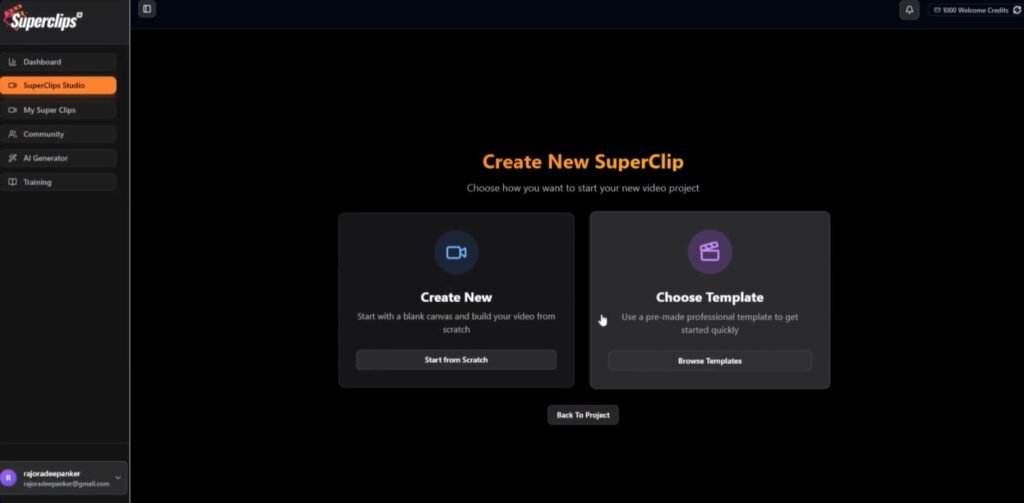
Superclips AI Design and Build Quality
The Interface Style and Flow
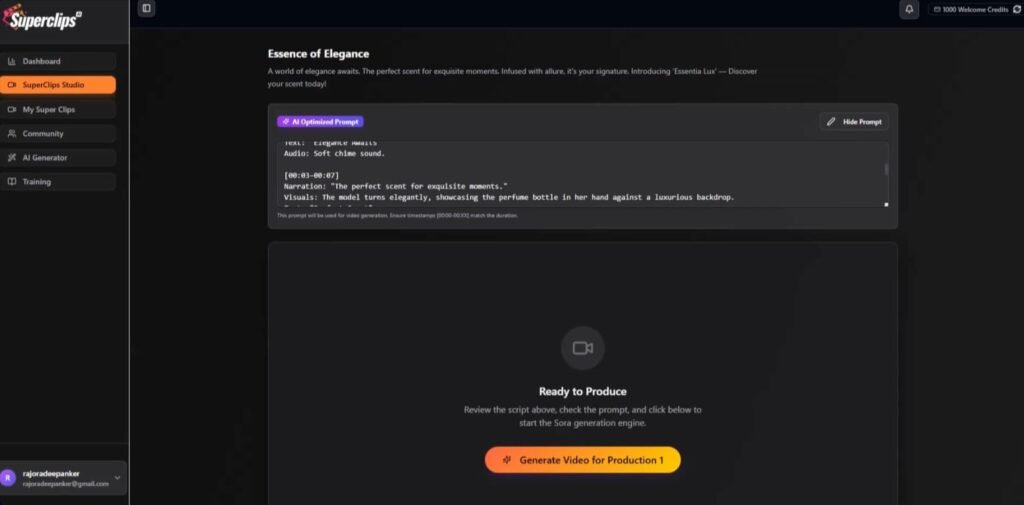
The “feel” of Superclips AI is geared toward speed. The flow on the site is built around: type a short idea, review a ready video plan, then generate the final clip.
What I like about this flow is that it matches how ads get made in real life. You do not start in a full editor with a blank timeline. You start with an angle, a hook, and a rough plan. Then you refine.
Storyboard First, Render Later
One design choice I care about is the storyboard view. The platform shows you scenes and pacing before you render. That helps you catch issues early, like a weak first line, a slow middle, or a messy offer line at the end.
Template Mode and Director Mode
Superclips AI also pushes two modes: templates for speed and a “director mode” for more control when you want to build scene-to-scene.
In practice, this matters a lot. Templates are great when you need volume. A manual scene mode is better when you need brand control, or when you want a repeat format you can reuse each week.
SuperClips AI Review: Demo Video
Superclips AI Pricing and Upgrades
Front End: Superclips AI Commercial Edition ($37)
This is the core offer and the one most people start with. You get the main Superclips AI studio so you can turn text or images into ready-to-post videos without filming, actors, or editing skills.
It is built for creators, marketers, and agencies who want fast output that looks clean. What you get in the front end:
- All-in-one AI video studio
- Text-to-video and image-to-video creation
- Script, scenes, voiceover, and music included
- 1,000 video credits
- Templates plus director mode
- Vertical and horizontal exports
- Watermark-free MP4 downloads
- Full commercial and agency rights
Front-end coupon:
- SUPEREARLY10 for 10% off the front end
Upsell 1: Superclips AI Unlimited Pro ($67)
This is for high-volume users who plan to create a lot of videos each week. It removes limits and adds more control, plus faster processing and team features. What it adds:
- Unlimited renders and exports
- No daily generation limits
- More video styles and templates
- Full character and text controls
- Custom music controls
- Unlimited presets and projects
- Priority rendering queue
- Team access and more cloud storage
Upsell 2: Superclips AI CoPilot ($47)
This turns the tool into a chat-style workflow. Instead of rebuilding projects, you “talk” to an AI Director that keeps context, so edits feel faster and less annoying. What it adds:
- Chat-based creation and editing
- Conversational script and scene edits
- Plain-English commands for quick changes
- Multiple angles per idea
- Brand memory that carries across work
- Resume projects anytime
- One-click video generation from chat
Upsell 3: Superclips AI Studio Professional ($47)
This adds a simple built-in editor inside the dashboard. If you want timeline control without using outside software, this is the upgrade that does it. What it adds:
- Timeline editor inside your account
- Multi-clip and multi-track editing
- Built-in music and voice tools
- Text overlays and captions
- Upload and manage your own media
- Live preview and quick exports
- Cleaner client delivery
Upsell 4: Superclips AI Sonic Suite ($47)
This is focused on music. You can create original tracks from text prompts, so you do not rely on stock music. What it adds:
- Text-to-music generation
- Instrumental or vocal tracks
- Genre and style picks
- Custom lyrics or AI-written lyrics
- Longer tracks
- Commercial-use downloads
- Copyright-safe music creation
Upsell 5: Superclips AI 6-Figure Agency Blueprint ($37)
This is training for people who want to sell video creation as a service. It focuses on getting clients, packaging offers, and delivering on repeat. What it includes:
- Step-by-step agency training
- Pricing and package templates
- Outreach scripts to find clients
- Delivery workflows
- Retainer model training
- Extra ways to monetize
Upsell 6: Superclips AI VIP Creation Service ($197 or $497)
This is a done-for-you option. A team creates the videos for you, so you do not have to manage prompts or production. What you get:
- Done-for-you video creation
- 10 or 25 pro videos per month
- Scriptwriting and prompt work included
- Priority delivery and quality checks
- High-res, watermark-free videos
- Full commercial usage rights
Bundle Deal: Superclips AI Bundle ($318)
This is the “all-in” package that includes the front end plus all upgrades and bonuses. It is mainly for people who want every tool and do not want to pick and choose.
Bundle coupon:
- SUPER50 for $50 off the bundle
Optional Order Bump: Superclips AI Mega Bundle ($127)
This is an add-on for power users and agencies that want more output and team access:
- 3,000 additional generative credits
- 25 team member seats
Superclips AI Bonuses: The Extra Tools That Make Video Content Easier to Ship
These bonuses matter because video is only half the job. After you render a clip, you still need thumbnails, ad graphics, landing pages, and extra assets to keep your content looking clean across every platform.
This bonus stack fills those gaps, so you can move from “I made a video” to “I posted a full campaign” a lot faster.
ProDesignerr Bonus: Make Ads, Posts, and Creatives in Minutes
ProDesignerr is basically your quick design station. When I finish a Superclips AI video, I still need scroll-stopping images for the same offer.
That means a YouTube thumbnail, a Facebook ad creative, an Instagram post, maybe even a simple banner for a landing page.
ProDesignerr gives you a big library of templates and a drag-and-drop editor, so you can produce those graphics fast without starting from a blank canvas.
What I would use it for:
- Matching ad images to the video angle, so the whole campaign looks like one set
- Fast thumbnails for YouTube Shorts and long videos
- Simple product graphics for a store, offer page, or email header
Why it helps with Superclips AI: Superclips AI pumps out videos quickly. ProDesignerr helps you keep up on the design side, so you are not stuck with a great video and weak visuals around it.
WebFramer Bonus: Build and Launch Pages Without Getting Stuck
WebFramer is the bonus that helps when you need a page to send traffic to. If you run ads or even post organic content, you still need a clean place for people to land.
A basic one-page site with a headline, short pitch, proof, and a button can make your video work harder.
What I would use it for:
- Quick landing pages for a single product or offer
- Simple “link in bio” pages that match the video style
- Multi-page brand sites when you want something more full
Why it helps with Superclips AI: You can create the video, then build a page that matches it in the same day. That means you can test offers faster, and you do not have to wait on a dev or fight with a theme.
FlowMotion Bonus: Add Motion Graphics Without Heavy Software
FlowMotion is for animated content like GIFs, short motion graphics, and small video pieces. This is useful when you want motion text, simple animated promos, or looping visuals that grab attention without needing a full editing app.
What I would use it for:
- Animated captions and moving text for promos
- Quick GIF ads for display, email, or social
- Simple motion intros, end cards, and call-to-action screens
Why it helps with Superclips AI: Superclips AI gives you the main video. FlowMotion helps you create extra animated assets that can boost clicks, raise watch time, and give you more creative tests without doing a full rebuild.
MagicStocks Bonus: Stock Media on Tap When You Need It
MagicStocks is the “I need assets right now” bonus. Even if Superclips AI generates scenes, you will still want extra images, clips, GIFs, stickers, and other pieces for designs, pages, and extra edits.
What I would use it for:
- Extra visuals for ads, posts, and landing pages
- Quick filler assets when you need more variety
- Trend-style visuals when you want content that feels current
Why it helps with Superclips AI: It keeps production moving. When you need a clean image, a background clip, or a short animated element, you can grab it fast instead of hunting across five sites.
It also helps if you do client work, since you can package assets along with the finished video deliverables.
Superclips AI Features and How They Help Me
Text and Image to Video Creation
This is the main reason most people will buy it. I can type an idea like “30-second ad for a protein bar that tastes like dessert” or upload a product photo. Then it builds a full video draft.
Where this helps:
- I can test offers fast, without a camera.
- I can make a quick “first draft video” to see if an angle even works.
- I can turn one product photo into a clip for ads or a store page.
Script, Hook, and Call-to-Action Writer
Superclips AI puts a lot of weight on hooks and ad copy. It promotes a script engine made for short-form clips and ad hooks.
This feature is useful when I want speed, but I still want a clear structure:
- Hook in the first seconds
- Problem and payoff
- Proof or reason to trust
- Clear call to act
The real win is not “perfect copy.” The win is “no blank page.” I can always rewrite lines once I see the draft.
Scene Control Without Full Video Editing
This is where Superclips AI tries to sit in the middle. It is not a full pro editor. Also is not a one-click black box that gives you one result and that is it.
You can adjust scenes or tone with quick edits, or build scene-to-scene with the manual mode.
For most ad work, that is enough. I do not need a huge edit suite. I need control over:
- The first line
- The offer line
- The pacing
- The last frame and call-to-act
Voice and Music That Stay in Step
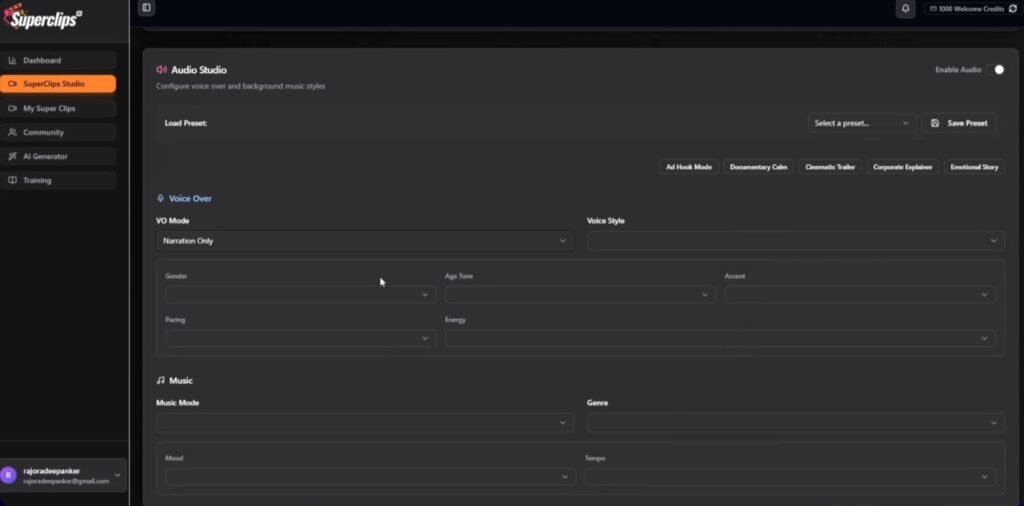
Superclips AI sells “studio audio” with voiceovers and music.
In real use, audio is often where AI videos fail. The voice does not match the cut, or music is too loud, or the beat fights the words. Tools that keep audio timing tight save a lot of clean-up work later.
Same-Face Recall for Repeat Hosts
One thing Superclips AI calls out is “perfect character recall,” meaning the same face and look can carry across scenes, instead of the face changing each cut.
If you build a faceless channel with a host, or you want a brand “spokes” look, this feature matters. Without it, you get a new face every scene and the clip feels off.
I still treat this as “good most of the time” rather than “perfect every time.” AI video can still need a re-gen. But when the tool even tries to keep the same look, it is already ahead of many basic text-to-video tools.
Sharp Text on Moving Shots
Superclips AI also claims a text system meant to keep text readable, even when motion is in the scene. This tackles a common issue: text turns into mush once it moves.
If you sell products, readable text is not a nice extra. It is the offer. Think price, name, size, or “free ship.” When text is clear, the viewer gets the point fast.
Batch Video Creation for Testing
Batch creation is one of the most money-making parts of any ad tool. Superclips AI promotes batch video output and also a “three concept” idea where you get three angles from one prompt.
This helps in two ways:
- I can test three hooks fast.
- I can keep the same product shots but swap the angle.
That is how you win with ads: test fast, keep winners, drop losers.
Format Switch for Shorts and Long Frames
Superclips AI supports exports meant for social formats. The goal is quick swaps for vertical and wide use.
That matters when you post the same idea across:
- TikTok and Reels (vertical)
- YouTube (wide or vertical)
- Site hero videos (wide)
Multi-Language Output
The platform also mentions a translator with 20+ languages for scripts, on-screen text, and voice.
If you sell in more than one market, this can turn one winning ad into five fast spin-offs.
Superclips AI Vendor and Launch Dates
Superclips AI Vendor: Pankaj Malav
The main vendor behind Superclips AI is Pankaj Malav (working with Deepanker Rajora). On JVZoo, their vendor profile shows as verified, which matters to me because it signals an established seller account, not a random new listing.
If you have been around JVZoo launches, you will also notice Pankaj Malav’s name shows up on the JVZoo release calendar tied to multiple launches, which usually means they run campaigns often and know the launch process well.
Superclips AI Launch Start and End Dates
Superclips AI officially opens on Saturday, December 20, 2025 at 11:00 AM EST.
The launch closes on Thursday, December 25, 2025 at 11:59 PM EST. Right after that close, the page states the price increases.
Superclips AI vs Other AI Video Tools
The AI video space splits into a few groups. A good comparison needs to respect that.
Superclips AI vs InVideo AI and Revid-Style Template Tools
Zapier lists InVideo AI as a pick for social videos and also calls out template-driven tools like revid.ai.
InVideo AI is strong for quick social videos with templates and stock style workflows. Superclips AI looks more focused on “idea to full clip” with script, scenes, voice, and music in one pass, plus product image placing and batch angles.
If you want a lot of stock-template options and you already know how you like to edit, InVideo AI is a safe pick. If you want an ad-style clip built from one short idea and you want fewer steps, Superclips AI is more aligned.
Superclips AI vs Synthesia and HeyGen Avatar Tools
Zapier puts Synthesia and HeyGen in the “avatar video” lane.
Avatar tools shine when you need a person talking to camera, like training, explainers, or sales videos. Superclips AI is more “scene clip” driven, where the voice can ride over visuals, product shots, and cuts.
If you need a human presenter on screen, go avatar. If you need short ads and product clips with fast cuts, Superclips AI fits better.
Superclips AI vs Runway, Sora, and Other Gen Video Labs
Zapier also lists Runway and Sora in the gen-video lane.
Those tools can do wild visuals and big creative shots, but they can also take more skill and more retries. Superclips AI is trying to be less of an art lab and more of a clip factory for marketers.
If you want pure creative video gen and you can spend time tuning prompts, the gen-video tools win. If you want repeat ad output with a clear offer, Superclips AI is easier to fit into a daily work plan.
Price Model Context
Many AI video tools run on monthly plans. AIMultiple’s pricing roundup shows many popular tools start in the rough $12–$30 per month range, with higher tiers for more output.
Superclips AI is listed in launch listings with a front-end price shown as $37–$47, tied to the launch window.
Superclips AI Pros and Cons
Superclips AI Pros
- Super fast first draft output. I can go from idea to a full video plan in minutes.
- All-in-one flow. Script, scenes, voice, and music come together in one place.
- Batch output and multi-angle concepts. Great for ad testing.
- Good fit for faceless and product ads. No filming needed.
- Project-style setup. Useful for client work and multiple brands.
Superclips AI Cons
- You still need taste. If your idea is weak, the video is weak. AI does not fix bad offers.
- You may need re-gens. AI video can miss details, so you sometimes re-run scenes.
- Brand rules take setup. To keep a tight brand look, you must reuse styles and keep prompts tight.
- Some details depend on upgrades. Many launch tools split features across add-ons, so read the offer stack before you buy.
What I Found in Online Reviews and Early Feedback
As of December 19, 2025, Superclips AI is right at launch time (launch listings show December 20, 2025). That means there are not many long-term, neutral user reviews yet. Most public content is demos, launch pages, and early “review + bonus” posts.
Here are the themes that show up again and again in early write-ups:
- People like the “brief, approve, publish” flow since it feels simple and fast.
- A lot of reviewers focus on the all-in-one setup: they do not want to juggle five tools for one short clip.
- The strongest praise is around speed and output readiness for ads and shorts, not long films.
My takeaway: treat Superclips AI like an ad output tool first. That is where the value is clearest.
Tips and Tricks to Get Better Videos From Superclips AI
Start With One Clear Job per Video
Do not cram. Pick one goal: “sell,” “get a click,” or “get a follow.” If you try to do all three, the clip gets messy.
Use Simple Product Photos
If you upload a photo, use a clean shot. Plain backdrops work well. The tool can place a product into scenes, but it needs a clean input for best results.
Write Hooks Like a Human
Hooks that work for me are short and direct:
- “Stop wasting money on…”
- “Here is the one thing…”
- “I tried this for 7 days…”
Then I keep the rest of the script tight.
Make Three Angles, Then Pick One
Use the multi-concept idea and batch output to get three versions. Keep the best one, then polish that one. That saves time.
Keep On-Screen Text Short
Even with text tools, less text is safer. Use 3–6 words per text hit. Use text for: price, offer, result, brand.
Lock a Repeat Look for Series Content
If you plan a channel, do not change style each upload. Keep the same host look, same font style, same pacing, same ending. Viewers like repeat patterns.
Superclips AI FAQ
What is Superclips AI used for?
It is used for making videos from text or an image, aimed at ads, shorts, product clips, and faceless content.
Do I need video edit skills?
You do not need classic edit skills for a first draft. You still need basic judgment: what to say first, what to cut, and what the offer is.
Can I make videos for clients?
The platform is positioned for multi-project work and agency-style use, with project handling and export focus. Always confirm the exact rights shown in the offer you buy.
Does it work for long YouTube videos?
It can help you make short segments, ad reads, intros, or shorts. For long videos, you will still want a full edit tool for full control.
What does it cost?
Launch listings show a front-end price in the $37–$47 range, tied to the launch window. Pricing can change after launch.
Final Verdict on Superclips AI
Superclips AI is built for people who need lots of short videos without filming, without a full edit suite, and without waiting on freelancers.
I see the best fit for ad buyers, small shop owners, social creators, and agency owners who want fast clip output with scripts, scenes, voice, and music in one place.
The main drawback is simple: you still need a strong offer and a clear hook. The tool speeds up production, but it does not fix weak ideas.
If you have offers to test, products to sell, or a faceless plan that needs daily clips, Superclips AI is a strong buy. If you want long, complex videos with deep edit control, stick with a full editor and use AI tools as add-ons.