


Hi, this is Darius, and welcome to my iMail review.
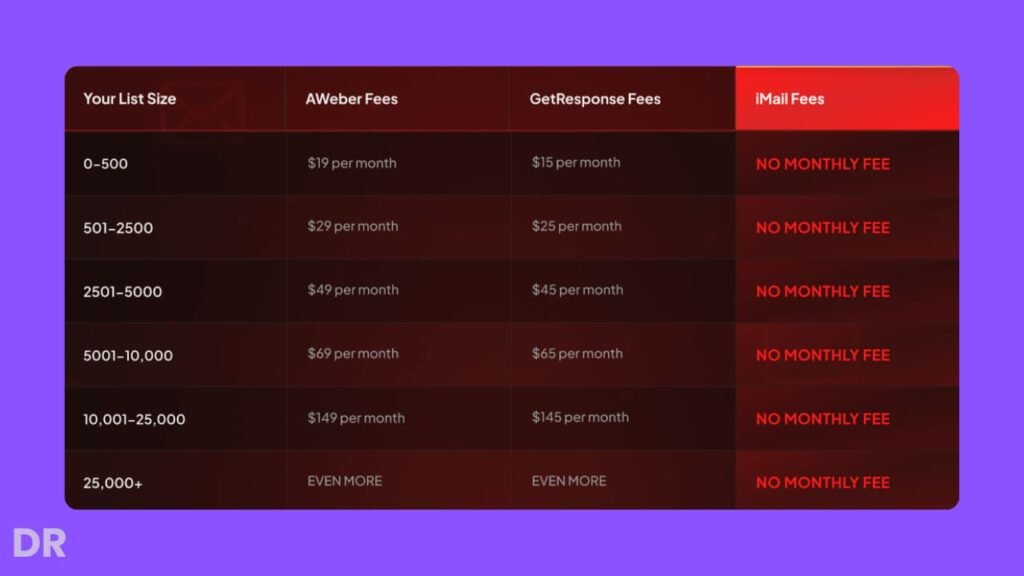
So, I got interested in iMail for one simple reason: email tools keep getting more expensive as your list grows. You start small, pay a fair rate, and then your bill climbs every month.
And even after you pay, you still worry about delivery, sending limits, and weird rules that can shut you down.
iMail is built to fix those pain points. It’s an AI-powered email marketing platform that lets me write, send, and automate emails with no monthly fees.
I can run broadcasts, build follow-up sequences, create opt-in forms, and even publish basic lead pages inside the same dashboard.
The big promise is simple: unlimited subscribers, unlimited sending, and more control over delivery because I’m not stuck in a shared sender pool.
So if you want to build an email list, mail it often, and stop stressing about rising costs, iMail is trying to be that “all-in-one” replacement.
What Is iMail, Exactly?
iMail is a web-based email marketing platform. I use it to manage lists, write emails, send emails, and automate follow-ups. It also includes built-in tools for lead capture, like opt-in forms and hosted lead pages.
The core idea is control. With many autoresponders, you are part of a shared system. That can hurt delivery when other users send spammy mail.
With iMail, the setup is built around connecting your own SMTP sending service, so your sending reputation is tied to your account and your choices.
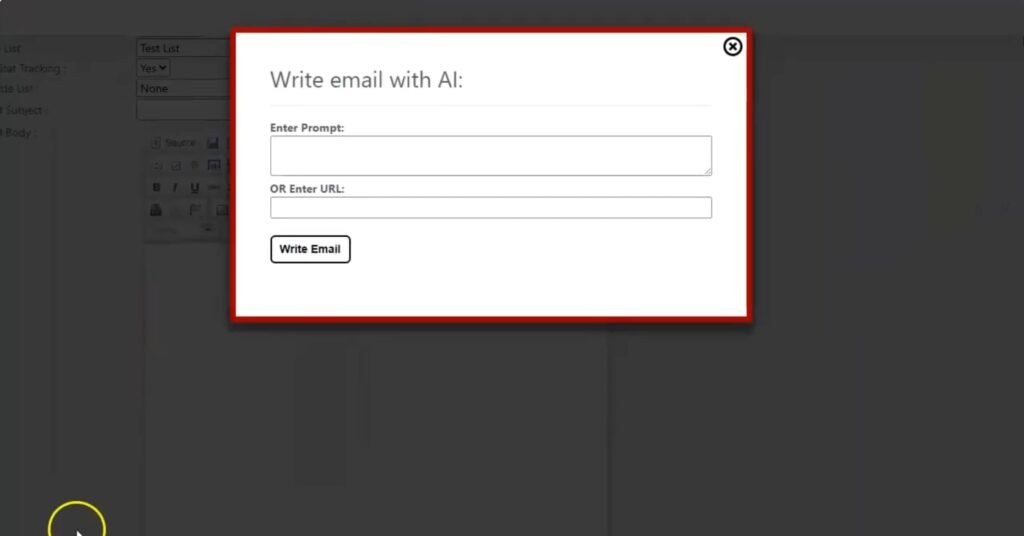
It also adds AI writing help. If I paste a link or describe my offer, it can generate a full promotional email that I can edit and send. That saves time, especially if I mail often or run promos as an affiliate.

When I judge an email tool, I look for two things: can I find what I need fast, and can I trust it not to break my sending flow.
iMail feels focused on the core tasks. The main areas make sense: lists, broadcasts, sequences, forms, pages, and reports. It does not feel like a “toy” tool with one feature and a lot of fluff.
It feels like it was built for marketers who want to send campaigns without fighting the platform.
The editor matters too. iMail includes a WYSIWYG email editor, so I can format text, add images, and build clean layouts without touching code.
For most promos, that’s enough. If you like plain text emails, you can keep it simple. If you want more design, you can do that too.
iMail Pricing: What You Pay and What You Get
iMail Front End Pricing (Cloud Version) – $34 One-Time
The Front End is the main iMail app. It’s the core cloud platform that replaces a normal autoresponder for a one-time $34. There is no active coupon right now.
With the Front End, you get the full day-to-day email toolkit:
- Unlimited subscribers and unlimited lists
- Unlimited email sending
- Built-in AI Email Writer
- Broadcasts and automation sequences
- Hosted landing page builder
- GDPR-ready form builder
- Full analytics (opens, clicks, bounces)
- Works with SES, SendGrid, Gmail, SMTP2Go, and hosting SMTP
- Automatic bounce filtering and list cleaning
If you just want to send emails, build simple automations, and stop paying a monthly bill, this is the plan most people should start with.
Upsell 1: iMail Pro – $67
iMail Pro is for people who send a lot of emails, manage bigger lists, or want cleaner branding. It costs $67 and focuses on speed and control.
What it adds:
- Send emails up to 30X faster
- Removes iMail branding from email footers
- Priority sending features
- Advanced analytics and reporting
- Extra formatting and design tools
- Premium deliverability controls
If you plan to mail often, run launches, or send for clients, Pro can pay for itself just from better speed and fewer limits.
Upsell 2: iMail Agency – $97
The Agency upgrade is for anyone who wants to use iMail as a client service or a small software business. It’s $97 and centers on account creation and admin control.
What it includes:
- Create unlimited client accounts
- Full admin control panel
- Ability to sell accounts at any price
- Commercial rights included
- No hosting or tech setup required
- Built for selling monthly email marketing services
If you run an agency, manage local business clients, or want a simple service offer you can sell, this is the upgrade that changes iMail from a tool into a product you can package.
Upsell 3: iMail Live Training – $97
This is a live training session for $97, taught by Brett and Mike. It’s designed for people who want a clearer plan for list growth and making money from email, not just learning buttons and settings.
What it covers:
- Live step-by-step training
- List-building strategies
- How to write profitable emails
- How to use iMail to automate income
- Q&A session
If you’re new to email or you’ve had a list but never made it work, the training can shorten the learning curve.
iMail Bundle – $197 (Best Deal)
The bundle is $197 and includes everything in one purchase: Front End + OTO1 + OTO2 + OTO3. There is no active coupon right now.
Included:
- iMail Cloud Version (FE) – $34 value
- iMail Pro (OTO1) – $67 value
- iMail Agency (OTO2) – $97 value
- iMail Live Training (OTO3) – $97 value
- All bonuses, plus tutorials and knowledge-base
If you already know you want Pro features and you also want to sell this as a client service, the bundle is the cleanest path. If you just want the tool for your own list, the $34 Front End is the simple starting point.
iMail Vendor and Launch Dates: Who Built It and When to Buy
The Vendors Behind iMail: Mike From Maine and Brett Rutecky
iMail comes from Mike (from Maine) and Brett Rutecky, two names you’ll see a lot on JVZoo.
Brett, in particular, has a strong track record there, and a lot of buyers follow his launches because they tend to be practical tools aimed at making sales, building lists, and running promos.
What matters to me is this: they claim iMail is the same type of email system they’ve used for years to make money online, mainly through affiliate marketing and email marketing.
That lines up with how the platform is built. It’s not trying to be a “pretty” tool first. It’s trying to be a tool you can send campaigns with, keep costs down, and stay in control of your sending.
iMail Launch Dates and Price Increase Window
The iMail launch runs on a fixed window:
- Launch starts: December 14 at 11:00 AM EST
- Launch ends: December 17 at midnight EST
- After the launch ends: the price goes up
So if you’re considering it, the best move is to decide during the launch window, because once it closes, you should expect a higher entry price.
iMail Bonuses: My Extra Stack to Help You Launch Faster and Grow Your List 🎁
When you grab iMail through my link, you do not just get the email platform. You also unlock my iMail bonus stack, built to help you do the two things that matter most with email marketing: get leads and turn those leads into sales.
These bonuses help you pick better offers, get more traffic, and make your iMail list earn. Here is what you get.
GPT Store Exposed: Turn iMail Subscribers Into Buyers 🛒
iMail helps you build a list and mail it without limits. But the real win is what happens after the opt-in.
With GPT Store Exposed, you learn:
- How to turn simple tools and ideas into clear offers
- How to package them so people see real value fast
- Simple flows that move someone from free content to a paid product
Use iMail to collect leads and run follow-ups, then plug this method in so your emails lead to a clean offer that makes sense.
$102,016.16 in 27 Days Case Study: Copy a Proven Follow-Up Model in iMail 📈
This case study breaks down how an “Anonymous AI” setup pulled in $102,016.16 in 27 days.
You get to see:
- The funnel layout from first click to final sale
- The traffic sources used
- The email and follow-up structure
The benefit with iMail is simple: you can take the follow-up model and rebuild it as broadcasts and automation sequences inside iMail, then test it with your own offer instead of guessing.
AInfluencer: Send Faceless Traffic Into Your iMail Funnels 🤖
If you want reach without showing your face, this bonus fits.
You will learn how to:
- Build AI “influencer” profiles that feel real and focused
- Post short content on YouTube, TikTok, or Instagram
- Point that content back to your opt-in pages and bridge pages
Your AI content brings the clicks. iMail captures the email, then your follow-ups do the selling.
Recurring AI: Turn iMail Leads Into Monthly Payments 💵
Building a list is great, but you want income that keeps coming in.
Recurring AI shows you:
- Simple recurring offer ideas (mini memberships, resource hubs, private areas)
- How to price them so they are easy to join
- How to set them up so people stay subscribed
Then you use iMail to promote these offers to new subscribers and keep sending value so churn stays low.
AI Agents Exposed: Let AI Handle the Repetitive Promo Work ⚙️
Email marketing has lots of small tasks that eat time. Posts, content reuse, follow-ups, and keeping campaigns active.
AI Agents Exposed teaches you how to set up AI “agents” to:
- Create and repost content that points to your funnel
- Turn one email idea into multiple content pieces
- Keep promotions running without you sitting at the keyboard all day
You run iMail for email and automation. The agents help keep traffic flowing.
Instant Cash Dash: Quick Cash Methods While Your iMail List Grows 💸
Sometimes you want results faster while your list builds. This bonus gives you simple methods you can launch quickly.
You learn:
- Easy offers you can put live in a day
- Simple promo angles you can send to your new list
- How to test ideas fast without heavy tech or long pages
You can use your iMail subscribers as the first audience for these quick promos, which helps you get early wins.
Skooolify: Add Recurring Commissions to Your iMail Back End 🎓
Skooolify shows you how to earn recurring commissions from Skool communities and courses.
You can:
- Use iMail opt-ins to give away a short guide or mini training
- Invite leads into Skool offers that pay recurring commissions
- Turn small promos into long-term payouts
This works well because iMail lets you keep mailing and re-promoting without monthly sending limits.
Slide Cash Loophole: Use Simple Slides to Grow Your iMail List 📊
If you hate being on camera, slides are a clean workaround.
You will:
- Turn tips, checklists, and short lessons into slide decks
- Upload them to platforms that push slide content
- Link those slides back to your iMail opt-in pages
Over time, slide uploads can send steady free clicks into your list.
Secret Platform Digital Product System: Sell to Buyers You Don’t Control Yet 💰
This bonus focuses on selling digital products on a lesser-known platform that already has buyers.
You will learn:
- How to list and position products there
- How to stand out among other sellers
- How to pull buyers back to your email list and offers
So you can get sales from the platform, then move those buyers into iMail so you own the relationship and can sell again later.
How You Get These iMail Bonuses
You get every bonus free when you buy iMail through my link. After purchase, they unlock inside your JVZoo account and are ready to use right away.
iMail Key Features and How They Help in Real Use
AI Email Writer: Faster Emails With Less Stress
The AI email writer is one of the main reasons people will try iMail. And it’s useful for a very normal problem: sitting there thinking, “What do I even write?”
With iMail, I can paste a URL or explain what I’m promoting, and it generates a complete email draft. That includes a subject line, body copy, and a call to action. I still review it and adjust it to match my voice, but it saves me a lot of time.
This helps in a few real cases:
- If I run quick promos and need copy fast
- If I struggle to write consistently
- If I want more angles to test without rewriting from scratch
Unlimited Subscribers and Unlimited Lists: Scale Without Fear
This is one of the biggest selling points. Many email tools charge more as you add contacts. That pushes people into bad habits, like deleting leads to keep costs down.
With iMail, the platform itself does not restrict list size or number of lists. That means I can grow my email business without the platform punishing me for doing well.
For me, this changes how I build:
- I can create separate lists for separate niches
- I can keep old leads for future offers
- I can grow without checking a pricing page every month
Unlimited Email Sending: No Caps, No “Upgrade to Send”
Sending limits can ruin a promo. You plan a launch, you mail your list, then you hit a cap or you get slowed down.
iMail allows unlimited sending from the platform side. That does not mean your SMTP provider has zero limits, but it does mean iMail itself is not stopping you or pushing upgrades. You control your schedule and frequency.
This matters when:
- You want to mail daily during launches
- You run multi-day follow-ups
- You test subject lines and segments
Higher Delivery and Lower Bounces: Control Your Reputation
Delivery is where email money is made or lost. If your email lands in spam, your offer might as well not exist.
iMail pushes you to use your own sending reputation instead of being mixed into a shared pool. This can lead to higher opens and fewer random delivery drops, since you’re not paying for other people’s mistakes.
Also, iMail supports cleaning invalid addresses during importing. That protects your reputation because hard bounces hurt delivery.
Exclude List Technology: Stop Mailing Buyers the Same Offer
This feature is simple, but it can save you from a common mistake: sending the same promo to people who already bought.
Exclude List Technology lets you prevent emails from going to buyers of a product you’re promoting. That helps with:
- Fewer complaints
- Better engagement
- Cleaner segments
- Less “why are you spamming me?” replies
It also helps your open rates, because the people receiving the email are more likely to care.
Built-In Form Builder: Capture Leads Without Extra Tools
iMail includes a form builder so I can create opt-in forms and embed them on my site. It’s designed to be GDPR-ready, which matters if you collect leads in regions with strict rules.
This saves money and time because I don’t need a separate form tool just to collect emails.
Use cases:
- Add a form to a blog post
- Put a form on a simple landing page
- Create a quick opt-in for a free guide
Hosted Lead Page Builder: Quick Pages for Simple Campaigns
If you don’t want to deal with hosting or page builders, iMail also offers hosted lead pages. These are simple pages you can use to capture leads fast.
This is best for:
- Quick affiliate promos
- Freebie opt-ins
- Simple lead magnets
- Newbies who want fewer moving parts
Broadcasts and Automation Sequences: The Core of Email Profit
iMail supports both one-time broadcasts and automated follow-up sequences.
Broadcasts are for:
- Launch promos
- Announcements
- Weekly newsletters
- Flash sales
Automation sequences are for:
- Welcome series
- Onboarding emails
- Lead nurturing
- Timed promo follow-ups
And iMail supports unlimited sequences, so you can build as many as your business needs.
Flexible SMTP Options: Use What Fits Your Budget
iMail connects with popular SMTP services like Amazon SES, SendGrid, Gmail SMTP, SMTP2Go, and more. This is a major part of the “no monthly fees” angle. Many SMTP services are low-cost, often charging small amounts per thousand emails.
The key benefit is choice. If you already have an SMTP setup you trust, you can use it. If you want a cheaper route, you can pick a low-cost provider.
Throttling System: Avoid Provider Blocks
Some SMTP providers limit how fast you can send. If you blast too many emails too fast, you can get blocked.
iMail includes a throttling system that helps manage sending speed. This protects your delivery and lowers the chance of sudden sending issues.
Email Analytics: See What Works, Fix What Doesn’t
iMail includes reporting for opens, clicks, bounces, unsubscribes, and engagement. I use this to:
- Test subject lines
- See which links get clicks
- Spot lists that need cleaning
- Improve follow-up sequences
Without analytics, you’re guessing. With them, you can improve fast.
iMail vs Similar Email Tools: What’s Different?
Most popular autoresponders are subscription-based. They often charge based on list size, and sometimes also on features. That’s fine when you’re small, but it can get painful once you grow.
iMail is different in a few clear ways:
- No monthly platform fee (you pay once for the software)
- Unlimited subscribers and unlimited sending inside the platform
- Uses SMTP so you control your sending reputation more directly
- Includes forms, pages, and automation in one place
- Adds AI writing to speed up campaign creation
If you like “done for you” systems where the platform handles all sending behind the scenes, you may prefer the classic autoresponder style. If you want control and lower ongoing costs, iMail makes more sense.
Pros and Cons of iMail
Pros
- No monthly fees for the platform
- Unlimited subscribers and lists
- Unlimited sending from the platform side
- AI email writer saves time
- Exclude list feature helps avoid annoying buyers
- Forms and hosted pages included
- Flexible SMTP options
- Throttling helps protect delivery
- Useful analytics for tracking results
Cons
- You still need an SMTP service, so there is setup involved
- Delivery depends on how well you manage your sending habits and list quality
- If you want very advanced page building, the hosted pages may feel basic
What Online Users Often Say About iMail
When I look through user feedback for tools like this, I notice the same themes come up again and again.
Many users talk about cost relief. They like not paying a growing monthly bill just to keep their list. People also mention the control angle. They like using their own SMTP so they can build a cleaner sending reputation over time.
Another common point is speed. Users who mail often like the AI writer because it helps them create drafts quickly, even if they still edit the final version.
And beginners tend to like the fact that forms, pages, broadcasts, and sequences are in one dashboard.
The main complaints usually point back to setup. If someone expects “plug and play,” they may get stuck when choosing an SMTP provider or setting up domains. That’s not a deal-breaker, but it is real.
Tips and Tricks to Get Better Results With iMail
Warm Up Your Sending the Right Way
If you connect a new SMTP and instantly mail thousands of people, you can hurt delivery. Start smaller, send to engaged leads first, and ramp up over time.
Keep Your List Clean
Remove dead leads and invalid emails when you can. Even though iMail can help remove invalid addresses during import, you still want good habits. Cleaner lists usually mean better opens and clicks.
Use Exclude Lists for Every Promo
If you promote something and you have buyers, exclude them from the next wave. This keeps complaints low and helps your stats.
Create a Simple Welcome Sequence
A welcome sequence is the easiest automation to set up, and it often pays off fast. Send 3–7 emails that introduce you, give value, and point to your best offer.
Edit the AI Drafts to Match Your Voice
AI drafts are a starting point. Add your own tone, add a short story, and make the call to action clear. You will get better replies and better clicks.
iMail FAQ
Is iMail good for beginners?
Yes, if you are willing to do basic setup for SMTP. Once that is done, the rest is straightforward.
Do I need to pay for SMTP?
Usually, yes. But many SMTP services are low-cost, so your ongoing cost can still be far lower than a monthly autoresponder.
Can I import my current email list?
Yes. iMail allows unlimited importing and can remove invalid addresses during import.
Can I build automation sequences?
Yes. You can create unlimited follow-up sequences and welcome series, plus send broadcasts whenever you want.
Does iMail help with compliance?
It includes GDPR-ready tools for opt-in forms. You still need good consent practices, but the tool supports the basics.
Conclusion: My Recommendation After Using iMail
After working with iMail, I see it as a smart option for anyone tired of monthly email bills and sending limits.
It gives me control, it lets me scale without fear, and it covers the main email needs in one place: broadcasts, sequences, forms, pages, and tracking.
The main drawback is the SMTP setup. If you hate any setup at all, that part may annoy you. But once it’s connected, the platform is simple, and the cost savings can be serious.
I recommend iMail for affiliates, coaches, small businesses, and creators who want to mail often, grow lists fast, and keep ongoing costs low.
If you are building an email business for the long run, iMail gives you the tools and the control to do it without getting squeezed each month.