


Hi, this is Darius, and welcome to my Clickly review.
Most YouTube videos fail for one simple reason: people scroll past them. Not because the video is bad, but because the thumbnail does not earn the click. I have been there.
You post a solid video, you feel good about it, then you watch it stall at low views. You start changing titles, changing tags, changing everything… and the thumbnail is still the real problem.
That’s what Clickly tries to fix.
Clickly is an AI-powered YouTube thumbnail creation platform built for creators who want more clicks without spending hours in Photoshop or paying a designer for every upload.
You paste a YouTube link, Clickly analyzes the video topic, then it generates click-focused thumbnails based on proven designs. You can also clone your face, generate fresh expressions, and export the final thumbnail into Canva so you can edit it fast.
Below is my full Clickly review, written for regular creators who just want a simple way to ship better thumbnails faster.
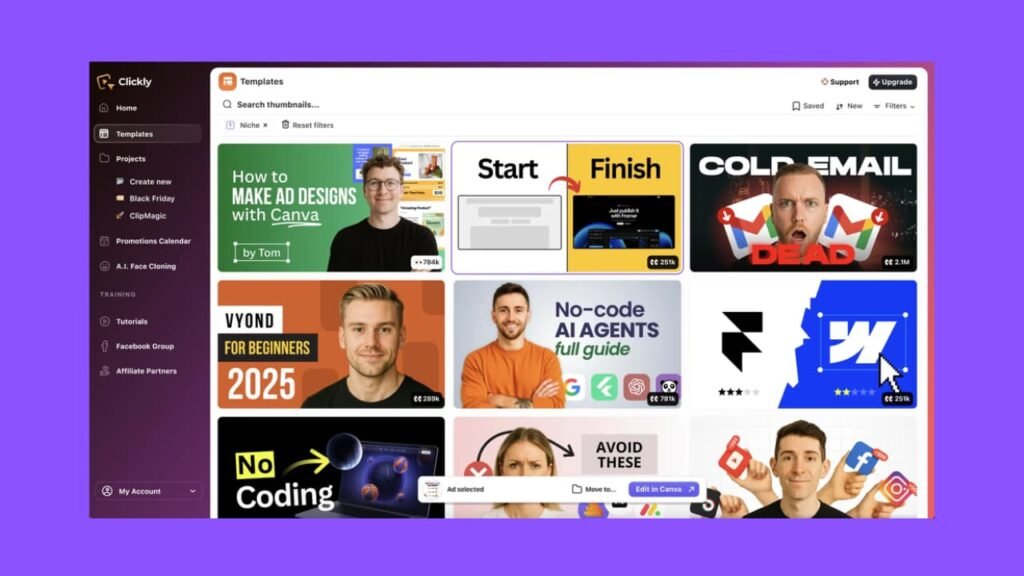
What Clickly Is and Who It’s Made For
Clickly is a thumbnail system that starts with one core idea: use layouts that already work.
Instead of guessing what looks good, Clickly pushes you toward thumbnail styles inspired from videos that already pulled strong views. The sales page calls out a minimum benchmark of 100,000 views for the designs it models.
Clickly feels built for:
- New creators who do not have design skills
- Creators who upload often and need speed
- Review channels, tutorial channels, faceless channels
- People who want a consistent “creator face” look without taking new photos each time
If you already have a designer and you love the process, Clickly may feel like a helper tool, not a full replacement. If you do your own thumbnails and hate wasting time, Clickly is closer to a daily tool.
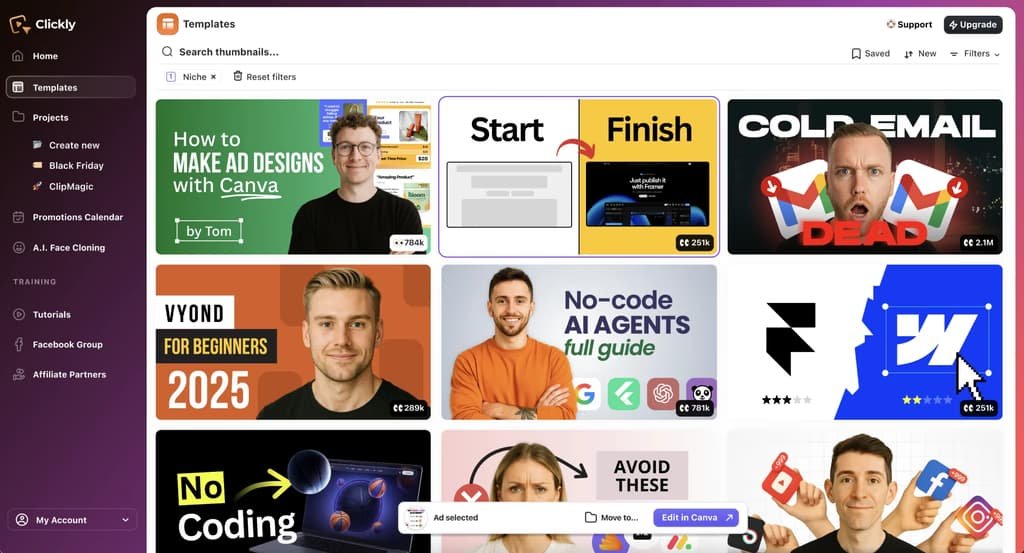
Clickly combines three things in one place:
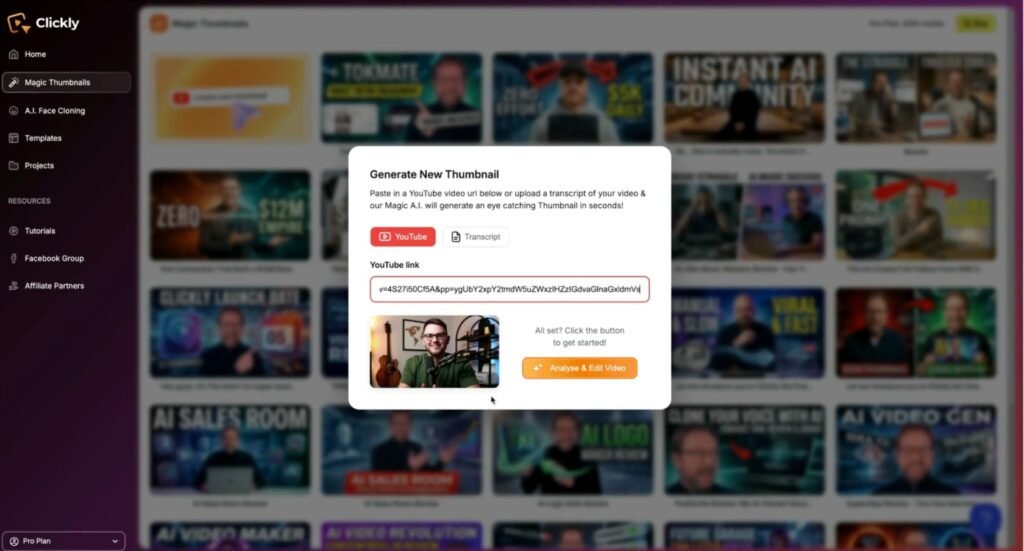
AI Thumbnail Generator That Uses Your Video Link
You paste your YouTube video URL, and the app generates thumbnail options fast. Clickly claims it analyzes the content and produces options in under 60 seconds.
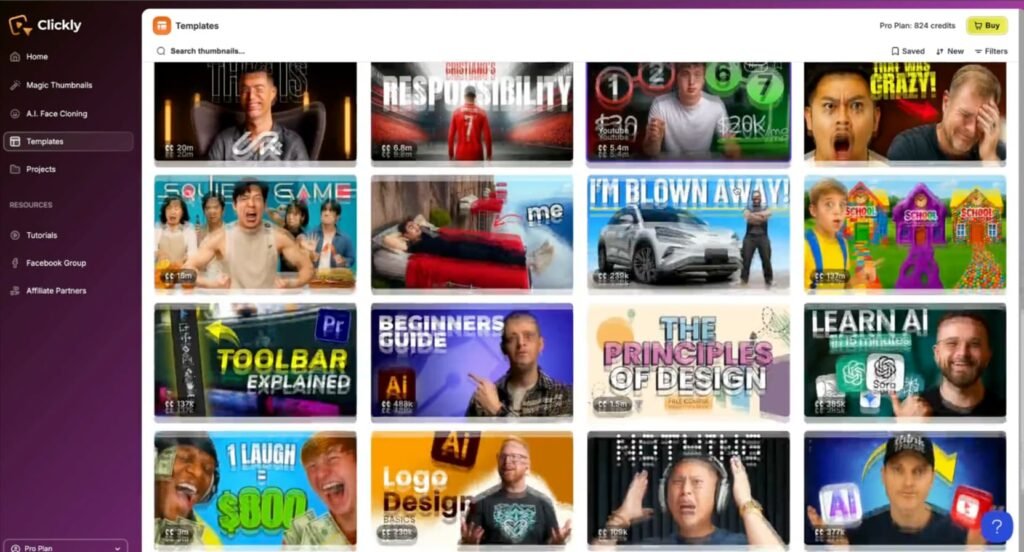
A Proven Thumbnail Template Library
You get access to a big library of thumbnail templates. The front-end pitch says 2,000+ templates, modeled after winners, with multiple variations per template.
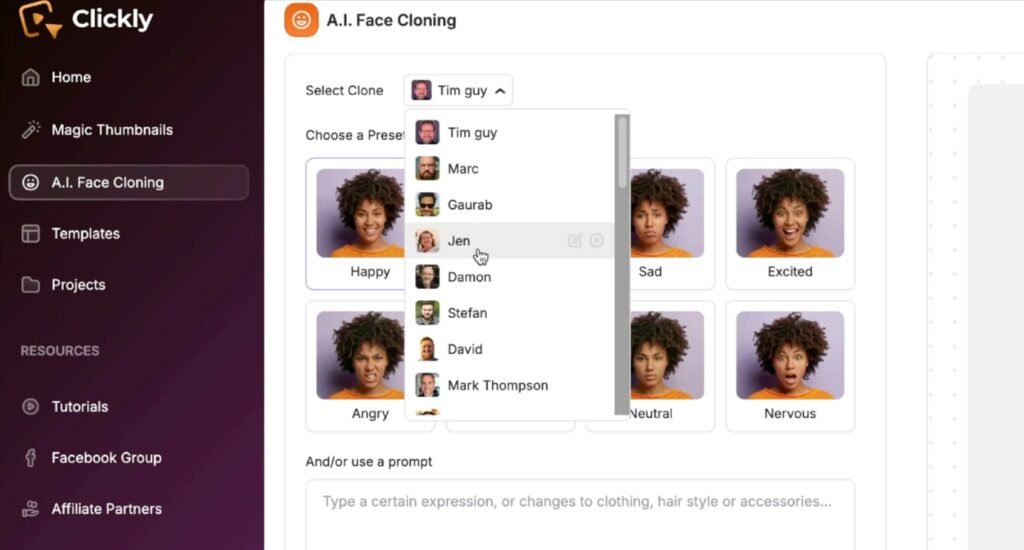
AI Face Cloning and Expression Generation
You can upload your face once, then generate new expressions and angles for future thumbnails. That helps you keep the “YouTuber face” style without taking selfies for every upload.
Then Clickly lets you export to Canva for final edits.
Clickly Design and Build Quality
This part matters more than people admit. A lot of “AI tools” feel messy. Menus are confusing. Results look random. You spend more time fixing than creating.
Clickly’s approach is cleaner because it starts from templates. Templates create structure. Structure creates speed. And speed is the whole point here.
A few quality notes that stand out from the way Clickly is presented:
Templates First, Not Blank Canvas
The platform keeps pushing you away from a blank design screen. That is good. When you start from zero, you overthink. When you start from a working layout, you finish.
Canva Editing Helps a Lot
Canva export is a big deal for normal creators. It means you can:
- Swap text fast
- Match your brand colors
- Move elements around
- Keep the same look across a series
Face Styling Claims
Clickly also claims the AI face can be matched to the thumbnail lighting and style, so it looks more natural inside the layout. That is one of those features that can save time if it works well.
Clickly Review: Demo Video
Clickly Pricing Breakdown (Front End + Upgrades)
Clickly is set up with a front-end offer for most creators, then a few optional upgrades if you publish a lot, want more credits, or want extra tools.
Clickly Front End ($47 One-Time)
This is the core Clickly platform and the one most people will start with. It’s built to help you make high-CTR YouTube thumbnails fast without design skills. You get:
- AI thumbnail generator based on real high-CTR designs
- 2,000+ proven thumbnail templates
- AI face cloning + expression generation
- 500 AI credits included
- Canva-editable thumbnails
- One-time purchase (no monthly fee)
Coupon: CLICKLY10 (10% off the front end)
Upsell 1: Clickly Pro ($97)
Clickly Pro is for creators who upload often and want more templates, more credits, and growth-focused training. Includes:
- 4,000+ total thumbnail templates
- Up to 50 thumbnails per week
- 1,000 extra AI credits
- Hook Vault (headline ideas)
- YouTube ranking guide (0–100K views)
Upsell 2: ClipMagic Pro ($147)
This one is not about thumbnails. It’s about repurposing videos into short clips for more reach. Includes:
- AI long-to-short clipper
- Auto captions + emojis
- Unlimited exports
- AI hook titles + descriptions
- Music library + CTA templates
- Social post pack + walkthrough training
Upsell 3: Creator Business in a Box ($97)
This upgrade is for monetization. You get rebrandable products you can use as lead magnets or sell. Includes:
- 9 rebrandable digital products
- Full resell rights
- Thumbnail packs, ad templates, hook scripts
- LUTs, presets, planners, automation tools
- Promo assets + training
Best Deal: Clickly Bundle ($247)
If you already know you want everything, the bundle stacks the front end plus all upgrades in one package:
- Clickly (FE) — $47
- Clickly Pro (OTO1) — $97
- ClipMagic Pro (OTO2) — $147
- Creator Business in a Box (OTO3) — $97
- Bonuses + tutorials/knowledge base included
Coupon: EARLY50 ($50 off the bundle)
Quick buying tip: If your goal is just better thumbnails fast, start with the $47 front end. If you publish a lot and want more templates/credits, Clickly Pro is the upgrade that makes the most sense.
If you also want short-form growth, add ClipMagic Pro. If you want to sell digital stuff or build a lead magnet stack, Creator Business in a Box is the one.
Vendor and Launch Dates for Clickly
Clickly is released by Tim Verdouw and Josh Ratta, two of the most trusted product creators on JVZoo. The launch window is limited:
Launch Start
- February 5 at 11:00 AM EST
Launch End
- February 12 at 12:00 AM (midnight) EST
After this launch ends, the price will go up, so the best time to lock in the lowest deal is during the launch period.
Clickly Bonuses (What You Get and How They Help)
Bonus 1: YouTube Thumbnail Pro
This bonus is a simple Chrome tool that lets you download or copy any YouTube thumbnail in one click. It sits right in your browser, so you do not need extra sites or messy steps. That makes it perfect for building a swipe file of winning thumbnails you want to study.
You can save images fast, drop them into a folder, and spot patterns like text size, face zoom, color contrast, and layout. It’s also great for making an “inspo board” before you generate new ideas in Clickly. If you do reviews or tutorials, this bonus alone saves you a lot of time each week.
Bonus 2: YouTube Reply Assistant
If your channel gets comments, this bonus helps you reply faster without sounding like a robot. You connect it with your own OpenAI API key, then you can generate replies with one click or a shortcut. You can set the tone (friendly, funny, short, or more detailed), decide how many emojis to use, and even save reply templates so your responses stay consistent.
This is useful because replies push engagement, and engagement helps videos keep moving. It’s also handy when a video starts popping off and you suddenly have 100 comments to handle. Instead of ignoring them, you can reply in minutes.
Bonus 3: Strategic YouTube Campaign Creator
This is a step-by-step guide for setting up YouTube ads with a plan, not guesses. It walks you through choosing your goal first (leads, sales, views, or channel growth), then picking the right ad format for that goal. You also learn how to set a budget that makes sense, how to target the right people, and how to track what’s working.
The best part is the “improve over time” mindset, because most people quit ads too early or change too many things at once. If you ever want to push a product review, an affiliate offer, or a lead magnet, this guide gives you a clear path.
Bonus 4: The YouTube 5-Second Formula
Most YouTube ads fail in the first few seconds because people skip fast. This guide focuses only on what matters most: the first 5 seconds. You get hook frameworks that are built to grab attention right away, plus simple psychology so you know why certain openings work.
It also covers how to match visuals, sound, and emotion so the hook feels real, not forced. You also get a test method so you can try a few hooks and keep the winner. If you plan to run ads, this bonus can save you a lot of wasted spend.
Bonus 5: The 6-Day YouTube Accelerator
This is a done-for-you 6-day email course you can upload into your autoresponder and use as a lead magnet. You can place the link under your YouTube videos and offer it as a free mini course. Each email teaches something practical about YouTube ads, targeting, and optimization, so people feel like they got real value.
That matters because it grows your list with the right audience, not random freebie hunters. Over time, this helps you build trust and gives you a clean way to promote your tools, services, or offers later.
Bonus 6: How to Set Up YouTube Campaigns
This one is a checklist you follow step-by-step so you do not miss setup details. It covers the full flow: goal selection, targeting, ad settings, and testing. Checklists sound basic, but they prevent the small mistakes that kill results, like wrong objective, bad placements, or no test plan.
It’s also nice if you want a simple “do this next” guide while you build your first campaign. If you hate ads because they feel confusing, this bonus makes the process clearer.
Bonus 7: How to Scale with YouTube Ads
Once you have one campaign that works, scaling is where the real money is, but it’s also where most people break things. This guide shows you how to scale in a controlled way, so you grow results without blowing up your costs. It covers how to structure campaigns for scale, how to make videos that convert while building trust, and how to use targeting smartly instead of going too broad too soon.
You also learn how to track performance, test changes, and turn views into long-term customers. If your goal is growth, this bonus is the “what to do after it works” playbook.
Clickly Features Deep Dive and How Each One Helps
This is where Clickly can either save you hours… or feel like “just another tool.” So let’s break it down in plain terms.
AI Thumbnail Generator That Starts With a YouTube Link
When you paste a video URL, Clickly says it analyzes the content and generates thumbnails aligned with the topic. Why this helps:
- You stop writing long prompts.
- You stop guessing what the thumbnail should show.
- You get options fast, which helps you post on schedule.
Real use case: If you make product reviews, you can paste the link, pick a proven review-style layout, and get a thumbnail set in minutes. Then you tweak the text in Canva and publish.
Proven Winning Thumbnail Library With 2,000+ Templates
Clickly sells the library as the “brain” of the app. It claims:
- 2,000+ templates
- Based on real winners with at least 100,000 views
- Many niches
- Search and filtering so you find styles that match your topic
Why this helps:
- You stop testing random looks.
- You stop copying a big creator manually.
- You get a repeatable system for your channel.
My take: Even if AI generation is not perfect every time, a solid template library alone can pay off if you upload weekly. Templates turn “I need a thumbnail” into “pick, edit, post.”
Multiple Variations Per Thumbnail Design
Clickly says each design comes with 3–4 variations. Why this helps:
- You can choose the best one fast.
- You can test two versions across similar videos.
- You can keep variety without changing your brand style.
Simple way to use this: Pick two variations, keep text the same, change only the face or background, then track which style wins on your channel over time.
AI Face Cloning and Expression Generation
This is one of Clickly’s most attractive ideas: upload your face once, then generate expressions later. Why this helps:
- You stop taking photos every upload.
- You keep a clean, consistent look across thumbnails.
- You can match “shock,” “confused,” “excited,” “serious” without doing a photo shoot.
Also, Clickly is clear that it wants your face to look like you, unlike generic image tools that often change facial structure.
The sales page even compares ChatGPT-style image prompts to “gambling” because outputs can look nothing like you and require full re-generates for small edits.
Faceless Thumbnail Option
Not everyone wants their face on thumbnails. Clickly supports faceless thumbnails using text-driven, proven layouts. Why this helps:
- Great for channels that focus on clips, facts, tutorials, or niche news
- Great for creators who value privacy
- Great for people who hate “face thumbnails” but still want high CTR layouts
One-Click Export and YouTube-Ready Output
Clickly highlights export and publish-ready thumbnails. Why this helps:
- Less file stress
- Less resizing mistakes
- Faster upload workflow
Credits and the “Pay Once” Deal
Clickly’s front-end pitch says you get 200 AI credits included and a one-time price at launch.
Here’s what I always tell people with credit-based tools: treat credits like fuel. Use them for the parts that save time (face, variations, fast drafts). Then do final edits inside Canva without burning more credits.
Also, read the refund rules. Clickly’s Terms say if you use all or a “substantial portion” of included AI credits, they can treat the purchase as fully delivered and refuse a refund, even inside the 30-day window.
That does not mean “don’t buy.” It means test smart. Don’t burn all credits on day one if you think you may refund.
Clickly vs Other Thumbnail Tools
You do have options. So here’s how I see Clickly next to common choices.
Clickly vs Canva Templates Alone
Canva has tons of templates and also promotes AI thumbnail tools. But Canva templates are generic. You still do the “what should this look like?” thinking. Clickly tries to skip that step with proven layouts and video-link input.
If you already love Canva and you are good at picking layouts, you may not need Clickly. If you struggle with thumbnail ideas, Clickly can speed up decisions.
Clickly vs Photoshop (or Photopea)
Photoshop is powerful, but slow if you are not a designer. Photopea is a free option that many small creators use. The trade-off is time. You can make great thumbnails with these tools, but you pay with hours.
Clickly is built for speed and repeatable layouts. It is less flexible than full design tools, but faster for most creators.
Clickly vs Generic AI Image Tools
Generic AI image tools can create cool images, but thumbnails need:
- Clean layout
- Clear message
- Bold text that reads on mobile
- A face that looks like you (if you use face thumbnails)
Clickly’s pitch is that random AI results are hard to edit and not built for CTR work.
Even if you like AI art tools, Clickly can still make sense as a thumbnail-only workflow.
Clickly vs Other AI Thumbnail Apps
There are other AI thumbnail tools that focus on scoring, testing, or generation. Tools like ThumbnailAI-style services often talk about “AI-driven insights” or ratings.
Clickly is more of a build-and-export tool with templates and face options, plus the video link workflow. The best choice depends on what you need more: creation speed, testing, or deep design control.
Clickly Pros and Cons
Pros
- Fast workflow: paste link, pick style, export, done
- 2,000+ template library for quick starts
- 3–4 variations per design for easy testing
- Face cloning and expression options can save lots of time
- Canva export makes edits simple
- Works for face channels and faceless channels
- One-time front-end offer is appealing for creators on a budget
Cons
- Credit-based AI use means you need to manage usage (or upgrade later)
- Refund rules can depend on credit use, so you must test with care
- If you want full creative freedom, templates can feel limiting
- Results still need human judgment. A tool can suggest, but you still pick what fits your channel.
What People Say in Public Reviews and Comments
I looked at public write-ups and creator videos discussing Clickly. The overall tone is consistent: people like the speed and the template-first approach, and they like the idea of face cloning for quick “creator style” thumbnails.
I also noticed a common pattern in creator discussions around AI thumbnails in general: many small YouTubers say AI can be fine when you do not have design skills, as long as the thumbnail looks good and matches the video.
The biggest caution I see people mention around tools sold on marketplaces is support and refunds depend on the vendor, not just the platform. Some JVZoo customer service reviews mention mixed experiences when vendors do not respond fast, while the platform says it can help route support requests.
My take: Clickly’s concept makes sense. Still, the real win comes from how you use it: pick the right template style, keep text simple, and stay consistent.
Tips and Tricks to Get the Most From Clickly
Use a “series look” for more clicks over time
Pick one strong layout style for a series (same font style, same color vibe, same face crop). Viewers start to spot your videos faster.
Keep text short and bold
Aim for 2–4 words. If you need a full sentence, the thumbnail is doing too much.
Test one change at a time
If you test variations, change only one thing:
- Face expression, or
- Background, or
- Big keyword text
That way you learn what caused the win.
Let Clickly handle the first draft, then finish in Canva
Use Clickly for the base layout and face work. Use Canva for the final polish. That keeps your workflow fast and helps you avoid wasting credits.
Match the thumbnail “promise” to the first 15 seconds of your video
If your thumbnail says “I tried X,” open your video showing the result or a quick teaser. That boosts watch time, which helps the video keep getting shown.
Clickly FAQ for Buyers
Do I need design skills to use Clickly?
No. The platform is built for beginners. You can still edit in Canva if you want to tweak text or colors.
Does Clickly work for any niche?
The platform claims it works across niches and supports topic filtering, plus a large template library.
Can I use Clickly without showing my face?
Yes. Clickly supports faceless thumbnails using proven layouts.
Is Clickly a one-time payment or monthly plan?
The front-end is positioned as a one-time payment offer during launch. The Terms also mention subscriptions can exist, so upgrades may add limits or recurring plans, depending on what you pick later.
What does “lifetime access” mean?
Clickly’s Terms define “lifetime” as the life of the product, not your life, and it gives an estimate of around 15 years.
What is the refund policy?
The Terms say the 30-day refund applies to lifetime license purchases, with limits tied to “material use.” If you use all or a substantial part of included AI credits, they can refuse a refund, even inside 30 days.
Will my face uploads be used for outside model training?
Clickly’s Privacy Policy says operational content data, including face images, is not used for external model training or marketing, and is used to deliver the service.
Final Verdict: Should You Buy Clickly?
Here’s my simple take in this Clickly review.
Clickly is not trying to be Photoshop. It is not trying to be an “AI art” toy. It’s trying to be a CTR tool that helps you ship better thumbnails fast, using proven layouts, quick variations, and face options that keep your channel look consistent.
The drawbacks are real, but clear:
- You need to manage AI credits
- You should read the refund rules before you burn through the included credits
If you upload often, hate designing, and want a faster way to get solid thumbnails without guessing, Clickly is a strong fit. I’d point it most toward beginners, busy creators, and anyone running review or tutorial channels where speed matters and consistency wins.
If you love full custom design and you already get strong CTR, Clickly may still help, but it won’t feel as big.
If you want, tell me your niche (gaming, reviews, fitness, finance, faceless, etc.) and I’ll suggest 5 thumbnail “styles” you should start with inside Clickly so you get wins faster.