


Hi guys, this is Darius, and welcome to my Claw Brand AI review.
If you’ve ever tried to create brand mockups from scratch, you know the pain. You need Photoshop skills, time, and either a budget for a designer or weeks of learning on your own.
Most small businesses and creators just skip it and end up with inconsistent, low-quality visuals. That costs them, customers.
Claw Brand AI fixes that. It’s an AI-powered platform that takes your logo and turns it into photorealistic marketing visuals in under 60 seconds. No design skills. No freelancers. No expensive software. Just upload, pick a template, and you’re done.
In this review, I’ll walk you through everything — what it is, how it works, who it’s for, and whether it’s worth your money.
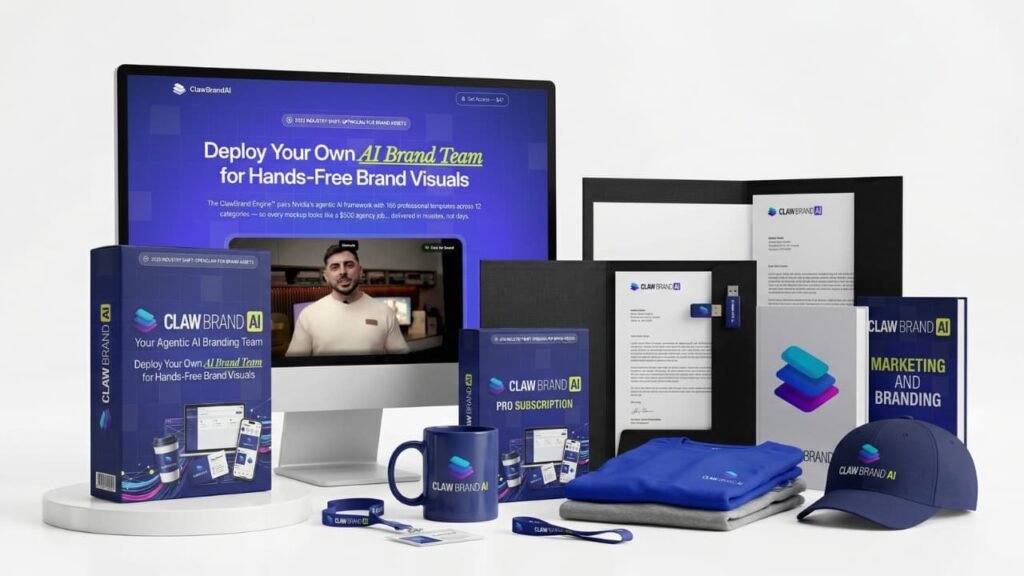
What Is Claw Brand AI? The Mockup Tool That Does the Heavy Lifting
Claw Brand AI is a cloud-based mockup generation platform built for creators, marketers, and businesses.
You give it your logo and it generates ready-to-use brand visuals across more than 166 templates — from social media posts and ads to packaging, apparel, signage, and more.
The engine behind it is called the ClawBrand Engine. It’s an agentic AI system — meaning it uses multiple AI agents working together to understand your brand identity, match your colors and fonts, and apply consistent styling across every visual it generates. You don’t have to touch a single design setting if you don’t want to.
Beyond the mockup generator, you also get a brand kit system where you store your logo, colors, and tagline. Every new mockup pulls from that kit automatically. So every asset you create looks like it came from the same brand — because it did.
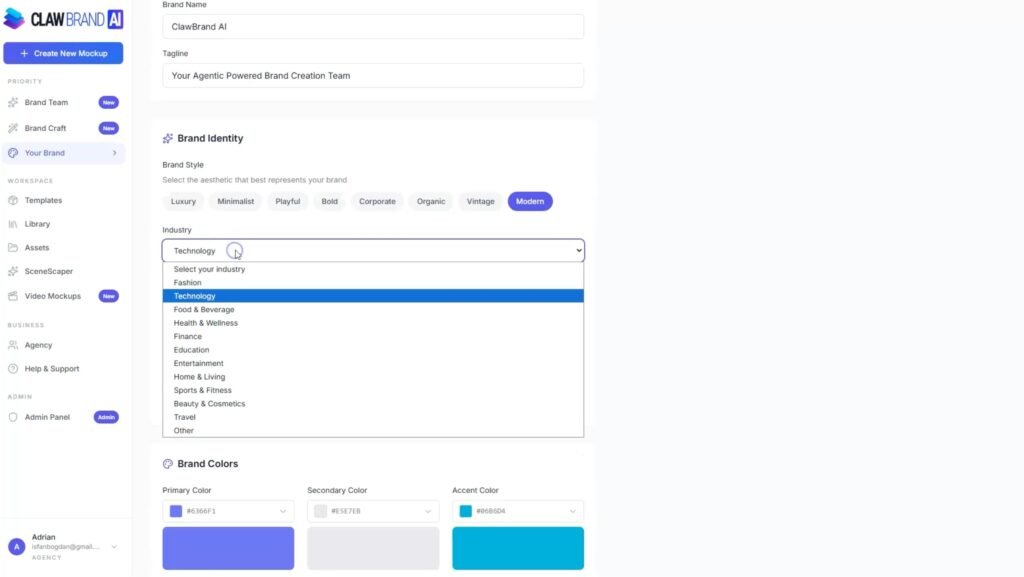
Output Quality: Does It Actually Look Professional?
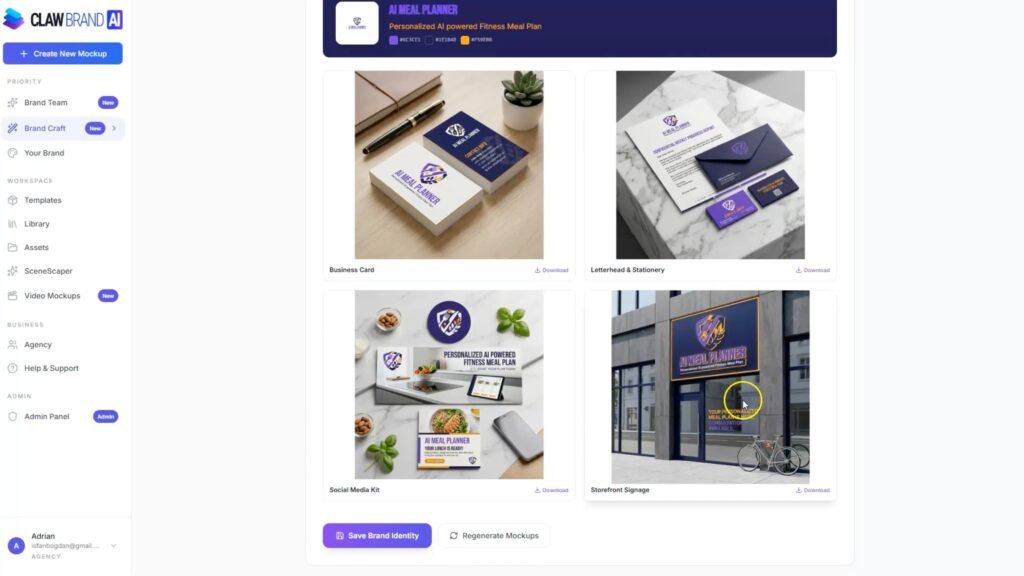
Short answer: yes. The mockups look great. The AI handles lighting, shadows, reflections, and placement automatically.
So instead of a flat logo slapped on a blank background, you get a realistic scene — your logo on a coffee cup, a hoodie, a billboard, a phone case, or an ad banner.
The platform exports in high resolution, so you can use the visuals for both web and print. That matters if you’re creating assets for client work or any kind of print marketing.
The interface itself is clean and easy to navigate. You don’t need a tutorial to figure it out. Upload your logo, browse the templates, click generate — that’s it. The whole thing takes under 60 seconds per mockup.
Claw Brand AI Review: Demo Video
Claw Brand AI Pricing: Which Plan Is Right for You?
Claw Brand AI uses a one-time pricing model — no monthly fees. Here’s a breakdown of every option so you can pick the right fit.
Front End — $37 to $67
This is the core platform. You get the ClawBrand Engine, 118 standard templates, the brand kit system, asset manager, background removal, full customization controls, high-res exports, and a commercial use license. It comes with 275 generation credits. Good starting point for individuals and small businesses.
Professional Upgrade (OTO1) — $97
This unlocks 48 premium Pro-Scene templates, the SceneScaper AI custom scene generator, the BrandCraft AI logo creation tool, advanced AI image generation models, priority rendering, and 500 extra credits. Worth it if you want higher-end cinematic mockups or need to create logos from scratch.
Template Club (OTO2) — $67/year
A continuity upgrade that drops fresh templates every month — seasonal, trending, and niche-specific packs. You also get early access to new categories, the ability to request templates, and 225 extra monthly credits. Good for agencies and creators who need variety on an ongoing basis.
Agency Upgrade (OTO3) — $197
This turns Claw Brand AI into a client service tool. You get unlimited client profiles, team access for up to 10 users, white-label exports, a client onboarding kit, agency pricing guide, stats dashboard, and 1,100 generation credits. Built for freelancers and agencies selling mockup services.
Reseller License (OTO4) — $297
The Reseller upgrade lets you sell Claw Brand AI as your own product and keep 100% of profits. You get 100 reseller accounts, a custom sales page template, reseller dashboard, buyer onboarding sequence, marketing kit, and commercial hosting included. Designed for marketers and product sellers.
Full Bundle — $297 (Best Value)
Get everything in one shot — Front End plus all four upgrades. That’s the full platform, all premium templates, agency tools, reseller rights, and all bonuses.
Claw Brand AI Bonuses: What You Get for Free on Top of Everything Else
On top of the platform itself, Claw Brand AI comes with a set of bonuses included with your purchase. These aren’t filler add-ons — they’re genuinely useful for getting up and running fast and getting more out of the tool.
Bonus #1 — Pro Scene Template Vault (Value: $297)
You get 48 premium lifestyle and cinematic scene templates. Think trade show booths, luxury packaging, editorial spreads, and artisan cafe scenes. These are high-end visuals that make your brand look like it has a full creative team behind it. Included free.
Bonus #2 — Brand Launch Visual Playbook (Value: $197)
A step-by-step guide to building a complete visual brand launch kit. It walks you through creating sales page mockups, ad visuals, social media graphics, and email headers — all in one go. Great if you’re launching a new product or rebranding and need a clear visual roadmap. Included free.
Bonus #3 — SceneScaper AI Prompt Library (Value: $297)
Over 200 pre-written prompts for the SceneScaper AI tool, organized by niche — ecommerce, SaaS, coaching, restaurants, real estate, fitness, and fashion. So instead of figuring out how to prompt the AI yourself, you just pick the niche and go. This one alone saves hours of trial and error. Included free.
Bonus #4 — Agency Client Onboarding Kit (Value: $197)
Ready-to-use templates for onboarding design clients. You get intake forms, brand asset checklists, service package templates, and pricing guides. If you’re planning to offer mockup services to clients, this kit gives you a professional process right out of the box. Included free.
🔥 Fast-Action Bonus — SceneScaper Masterclass (First 200 Buyers Only)
This is the one to move fast on. The first 200 buyers get access to an exclusive video training covering advanced SceneScaper techniques, prompt engineering secrets, and how to create scenes that look like professional photography. There are only a handful left.
Claw Brand AI Key Features Breakdown
AI-Powered Mockup Generation
The core feature. Upload your logo and Claw Brand AI places it into photorealistic scenes. It handles all the visual details — lighting, shadow, perspective, reflection — so the mockup looks like it was shot by a photographer. You can generate mockups for social media, ads, websites, packaging, apparel, and more.
ClawBrand Engine (Agentic AI)
This is the brain of the platform. Multiple AI agents work together to analyze your brand, apply your style, and ensure every mockup stays consistent with your identity. It’s not just a template filler — it actively adapts the output to match your brand’s look and feel.
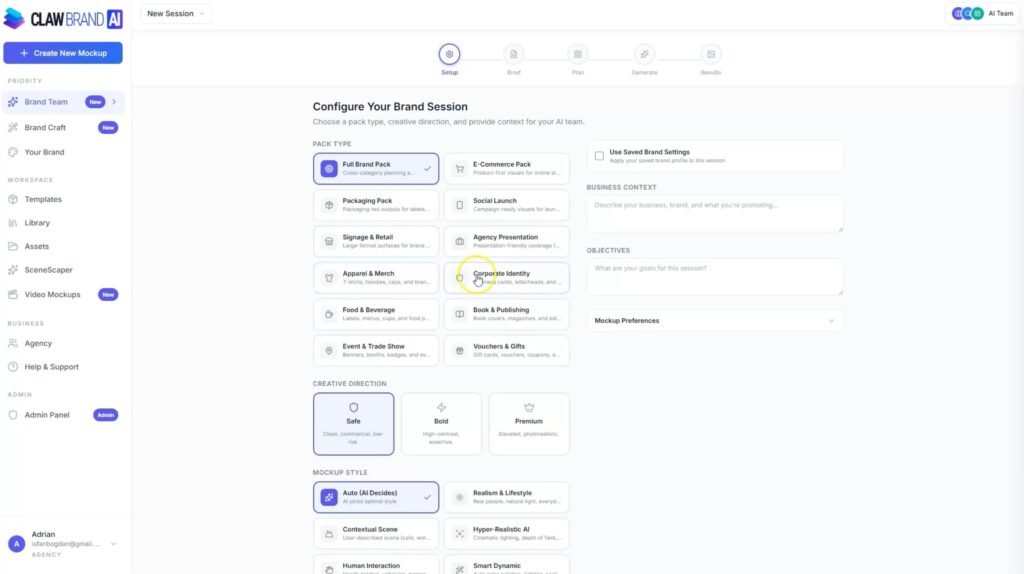
166 Professional Templates Across 12 Categories
You get templates for digital ads, apparel, packaging, books, signage, lifestyle, and more. That’s a lot of variety. Whether you’re launching a clothing brand, a coffee shop, or a digital product, there’s something here for you.
Brand Kit Storage
Store your logo, brand colors, and tagline once. From that point on, every mockup you create pulls your brand details automatically. No need to re-upload or re-set your colors each time.
Asset Manager
Upload and organize logos, graphics, and brand elements. Reuse them across mockups with a one-click workflow. This keeps your process fast and your files organized.
AI Background Removal
Need a clean logo without a background? The platform handles that automatically. No need to open a separate tool or pay for a service like Remove.bg.
Full Customization Controls
You can adjust shadows, reflections, gloss, embossing, gradients, and aspect ratios. If you want more control over the final look, it’s there. But you can also just leave the defaults and get great results.
High-Resolution Exports
Download your assets at full quality for both web and print. Perfect for landing pages, ads, packaging, or client deliverables.
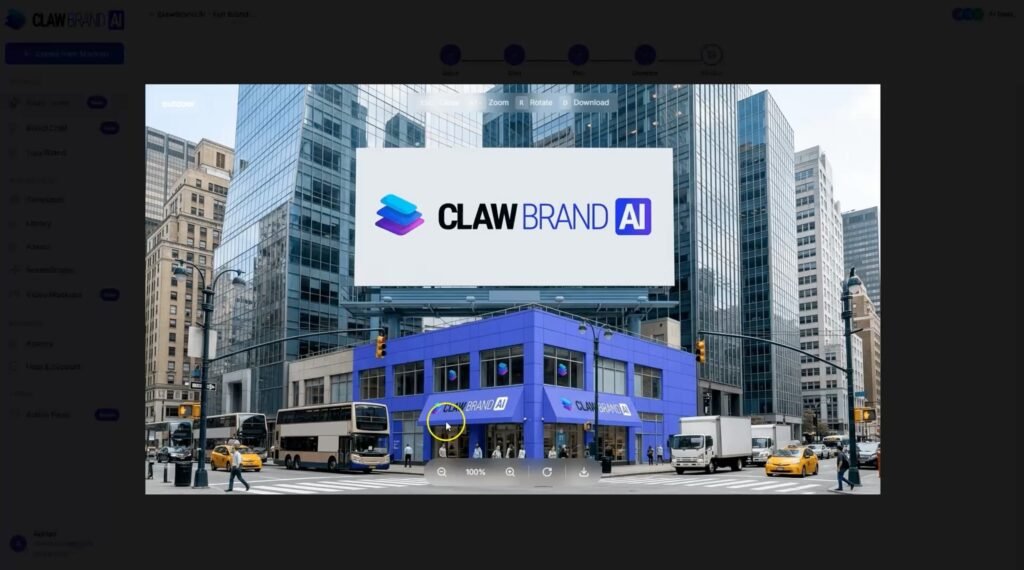
Saved Mockup Library
All your generated mockups are stored in a searchable library. So you can come back, download, or remix old designs without starting from scratch.
Commercial Use License
Every mockup you create comes with a commercial license. That means you can use the visuals for client work, sell design services, or use them in paid ads and campaigns. No restrictions.
Claw Brand AI vs. Competitors: How Does It Stack Up?
There are other mockup tools out there — Placeit, Smartmockups, and Canva’s mockup feature being the most common. Here’s how Claw Brand AI compares.
Placeit has a massive template library and is well-known, but it’s subscription-based and doesn’t have an agentic AI engine. You’re still doing most of the brand matching manually.
Smartmockups is similar — great output, but no real automation. Canva is excellent for design in general but its mockup options are limited compared to a dedicated tool.
Claw Brand AI stands out because of the ClawBrand Engine. The auto-matching of colors, fonts, and brand style is something the competitors don’t do at this level.
And the one-time pricing model for the front-end version makes it more affordable long-term than a monthly subscription.
The trade-off is that Claw Brand AI is newer, so it doesn’t have the same template volume as Placeit yet. But 166 templates across 12 categories is still solid for most use cases.
Claw Brand AI Pros and Cons: The Honest Breakdown
| ✅ Pros | ❌ Cons |
| No design skills required | Credits system limits generation volume |
| Fast 60-second mockup workflow | Newer platform vs. established tools |
| 166 templates across 12 categories | Template count lower than Placeit |
| Auto color and font matching | Advanced features locked behind upsells |
| Commercial use license included | No offline version — cloud only |
| Brand kit for consistent assets | |
| High-res exports for print and web | |
| One-time pricing option available | |
| Built-in background removal |
What Real Users Are Saying About Claw Brand AI
From what I’ve seen across online reviews and early user feedback, the reception has been positive — especially from small business owners and freelancers.
A lot of users mention how fast the workflow is. They were able to go from a logo file to a full set of polished mockups in one sitting. That’s a big deal for people who were previously spending hours in Canva or paying a designer every time they needed a new asset.
Freelancers and agency owners are also excited about the Agency and Reseller upgrades. A few have shared that they’re already using it to deliver mockup packages to clients as part of their service offering — without needing any additional design tools.
The brand kit feature gets a lot of positive mentions. Users love that they only have to set up their brand once, and every mockup after that stays consistent. That alone saves a lot of time when managing multiple brands or client accounts.
The main criticism I’ve seen is around the credit system. Some users want to generate a high volume of mockups and burn through credits faster than expected. The upsells address this, but it’s worth knowing upfront.
Tips and Tricks: How to Get the Most Out of Claw Brand AI
Set Up Your Brand Kit First
Before you generate a single mockup, go to the brand kit and add your logo, colors, and tagline. This one step ensures every mockup you create from that point forward is consistent. Skip it and you’ll be tweaking manually every time.
Use the Asset Manager to Stay Organized
If you’re working with multiple clients or multiple brand variations, use the asset manager to tag and organize your files. It saves a lot of time when you need to pull up a specific logo version or brand element.
Start with the Template Categories That Match Your Goal
Don’t browse all 166 templates at once. Filter by category first — packaging, digital, apparel, signage, etc. — based on what you actually need. This speeds up your workflow and helps you find the best fit faster.
Use Customization Controls for Final Polish
The auto-generated mockups are already good. But if you want to take it up a notch, spend a few extra minutes adjusting shadows, gloss, and reflections. Small tweaks make the final result look even more professional.
Export in High-Res Every Time
Always export at full resolution, even if you’re just using the asset for social media. You never know when you’ll need a larger version for print or a client presentation. Better to have it and not need it.
Save Everything to the Mockup Library
Don’t just download and forget. Save your mockups to the library so you can come back, remix, or re-download at any point. This is especially useful when a client wants a variation of something you made months ago.
Claw Brand AI FAQ: Your Questions Answered
Do I need design skills to use Claw Brand AI?
No. The platform is built for people with zero design experience. You upload your logo, choose a template, and the AI does the rest. The ClawBrand Engine handles colors, lighting, placement, and styling automatically.
What kinds of mockups can I create?
You can create mockups for social media, digital ads, packaging, apparel, books, signage, websites, lifestyle shots, and more. The platform includes 166 templates across 12 categories.
Can I use the mockups for commercial work?
Yes. Every mockup comes with a commercial use license. You can use the visuals for your own business, in paid ads, for client work, or as part of a design service you sell.
How fast is the generation process?
Most mockups are ready in under 60 seconds. Upload your logo, select a template, click generate, and download. That’s the full workflow.
What’s included in the bundle deal?
The $297 bundle includes the front-end platform plus all four upgrades: Professional, Template Club, Agency, and Reseller. It’s the best value if you plan to use the platform at scale or offer it as a service.
Is the brand kit shared across all templates?
Yes. Once you set up your brand kit with your logo, colors, and tagline, Claw Brand AI applies that information automatically to every mockup you generate. You only set it up once.
Final Verdict: Is Claw Brand AI Worth It?
Yes — and especially at the current launch pricing.
Claw Brand AI solves a real problem. Creating professional brand mockups used to require design skills, expensive tools, or a hired designer. Now you can do it yourself in 60 seconds with results that actually look good.
The ClawBrand Engine is what makes it different from other mockup tools. The auto-matching of colors, fonts, and brand identity means you’re not just placing a logo on a template — you’re getting a brand-consistent visual every time.
The 166 templates cover a wide range of use cases. The commercial license means you can use it for client work right away. And the brand kit system keeps everything consistent without extra effort.
The credit limits are worth watching, and some advanced features are behind upsells. But for the base price of $37 to $67, it’s a strong entry point. The $397 bundle is the better deal if you’re planning to use it seriously.
Who Is Claw Brand AI Best For?
- Freelancers and agencies who need fast, consistent client mockups
- Small business owners who want professional visuals without a design budget
- Creators and e-commerce sellers who need social media and product mockups
- Marketers running ads who need quick visual assets
- Anyone who’s been relying on expensive design tools or freelancers
Bottom line: if you need polished brand visuals and you don’t want to spend hours learning design software or money hiring a designer, Claw Brand AI is worth trying. The one-time pricing removes the ongoing subscription risk, and the output quality is genuinely good.