


Hi, this is Darius, and welcome to my UGC Studio AI review.
User-generated content videos work well right now. People trust a face talking to the camera more than a glossy brand ad. The problem is that real UGC is hard to produce on demand. You need creators, scripts, filming, editing, and a budget.
That is why UGC Studio AI caught my attention. It promised human-style UGC videos without cameras, actors, or editing skills.
So I wanted to see if this is just another AI promise, or a real tool that can help you make ads, reviews, and social clips faster.
After spending time with it, I found that UGC Studio AI is built for marketers, eCommerce owners, agencies, and creators who need a lot of short videos, often in many styles and languages.
In this review, I will walk you through what it is, how it works, where it shines, and who should actually buy it.
UGC Studio AI Explained: What This Tool Actually Does
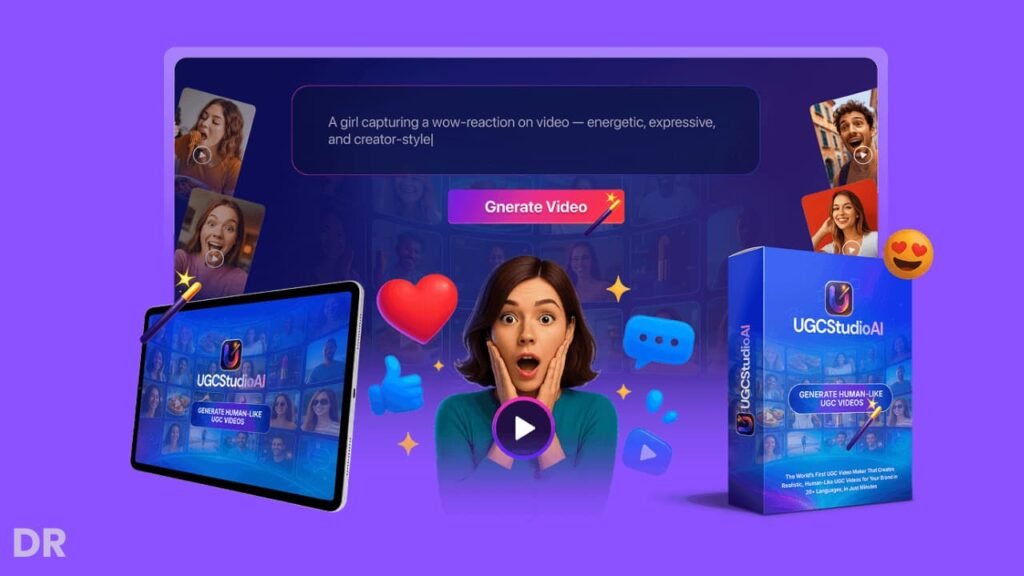
UGC Studio AI is a web app that creates realistic, human-like UGC videos from simple prompts. You do not need a camera or microphone. You do not need to record yourself or hire actors.
You tell the tool what you want:
- A product review
- An unboxing
- A testimonial
- A “TikTok style” ad
- A demo walking through features
Then the app builds a full video with:
- Human-style presenters and body language
- AI voiceovers (male, female, or cloned voices)
- Captions and hooks
- Backgrounds and scenes
- Music and sound effects
- Timed scenes for Reels, Shorts, or TikTok
It also supports more than 20 languages, bulk creation, and one-click exports for platforms like TikTok, Instagram, YouTube Shorts, and Facebook.
So in simple terms: you turn a product idea into multiple UGC videos without filming a single frame.
Design, Layout, And Ease Of Use
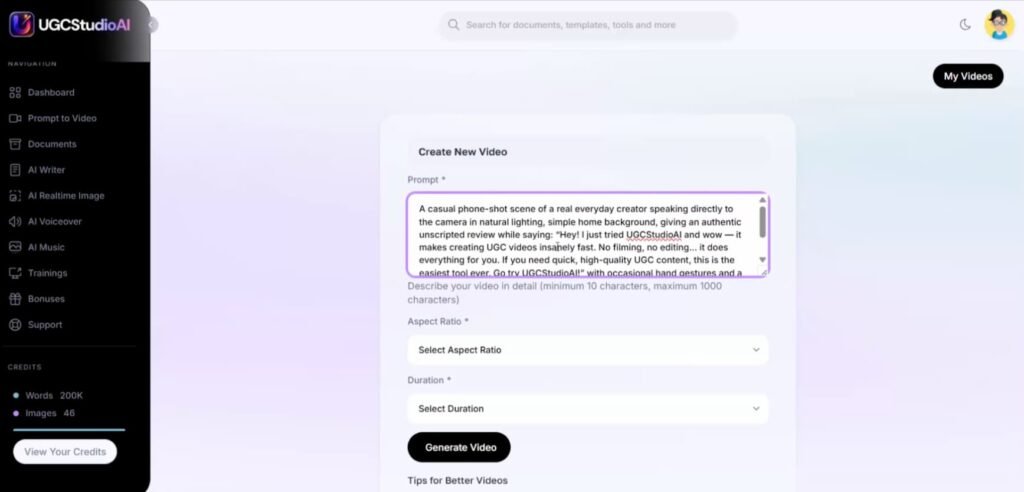
Simple Cloud Dashboard
UGC Studio AI runs in the cloud, so there is nothing to install. You log in and land in a clean dashboard with your projects, templates, and assets. Navigation is straight to the point:
- “Create New Video”
- “Bulk Create”
- “Images / Visuals”
- “Scripts”
- “Exports”
If you are used to tools like Canva, you will feel at home. Everything sits in the left sidebar and opens in panels. So you do not get lost in hidden menus.
Guided Flow For Each Video
When you create a new project, the app takes you through a set of steps:
- Choose the video type (review, testimonial, demo, unboxing, etc.).
- Pick the format (TikTok / Reels / Shorts / square / landscape).
- Enter your product, angle, and key benefits.
- Let the AI suggest a script and scenes.
- Customize voice, background, and music.
You can edit each part without touching a timeline. So if you hate video editors with tiny tracks and keyframes, this will feel much simpler.
Quality Of The Visual Output
The “human style” part is what matters. The AI adds:
- Natural facial expressions
- Small head movements
- Hand gestures
- Camera framing that feels like a phone recording
Is it 100% the same as a real person? No. But for ad scroll-stoppers, quick reviews, and social proof, it looks close enough to pass as real content at a glance, especially on mobile.
UGC Studio AI Review: Demo Video
UGC Studio AI Pricing, Plans, and Best Value Options
When I looked at UGC Studio AI, I liked that it runs on a one-time payment model instead of a monthly subscription.
You can start with the main version and then add upgrades based on how deep you want to go with visuals, audio, content, and stock assets.
UGC Studio AI Commercial (Front End) – $37 One-Time
The front-end plan is the main UGC Studio AI package. For a one-time payment of $37, you get the full AI UGC video creation suite with commercial rights. So you can use it for your own brand or client work.
With this plan you can:
- Turn text into full UGC-style videos
- Animate images into short videos
- Re-animate existing clips to refresh content
- Build slideshow and storyboard-style videos
- Add basic AI voiceovers with noise cleaning
- Use a basic AI image generator and photo studio
- Create starter-level product photos
- Convert speech to text with basic minutes
- Work from a cloud-based dashboard from any device
You also get a Commercial License, which means you can sell the videos you create and keep all the profit.
There is a launch coupon: UGCVIP. Use it at checkout to shave $5 off the front-end price.
UGC Studio AI Pro Creative Suite (Upsell 1) – $67 One-Time
The Pro Creative Suite is for people who care a lot about visual polish. This upgrade focuses on higher-end images, better upscaling, and longer, smoother videos.
With this add-on you get:
- An advanced AI photo studio
- Inpainting, outpainting, and “search and replace” edits
- Sketch-to-image and structure-to-image tools
- More advanced product photography options
- Multi-angle mockups and lifestyle scene presets
- Conservative and creative upscale tools for sharper media
- Longer video limits
- Priority rendering so your projects finish faster
I see this as a good fit if you work with clients, run ads, or need your visuals to look more “premium” than basic AI outputs.
UGC Studio AI Audio Mastery Suite (Upsell 2) – $47 One-Time
This upgrade focuses on sound. If your content depends on strong voiceovers, custom music, and clean audio, this pack makes sense.
It adds:
- Unlimited premium AI voiceovers
- A voice cloning module so you can match your voice or a brand voice
- An AI music generator for songs, jingles, and background tracks
- Pro-level speech-to-text and translation tools
- Audio mixing and mastering tools
- Creative sound effects and audio enhancements
This is great for ad creatives, YouTube channels, and agencies that deliver finished, polished videos with strong sound design.
UGC Studio AI Content & SEO Domination Pack (Upsell 3) – $47 One-Time
If you want to go beyond video and build a full content system around your brand, this upgrade helps a lot. It turns UGC Studio AI into a writing and SEO tool as well.
You can:
- Create ebooks and flipbooks
- Use an AI writer with 50+ templates
- Generate long-form articles with a guided wizard
- Rewrite content to refresh existing posts or scripts
- Use an SEO toolkit to optimize content for search
- Produce content in multiple languages
For bloggers, affiliates, and agencies that offer content plus video, this pack helps you build full funnels around your UGC videos.
UGC Studio AI PixaStudio Upgrade (Upsell 4) – $67 One-Time
This upgrade brings in a huge stock media library that plugs right into your workflow inside UGC Studio AI.
You get:
- Over 22 million searchable stock assets
- 15 million+ images and 500K HD images
- 3 million+ stock videos
- 2.5 million+ GIFs and memes
- Icons, stickers, and vector graphics
- Editable graphics and animated GIFs
- A Photoshop-style editor
- 10 GB of cloud storage
- A collection of viral quote graphics
- Commercial rights to use the assets in client projects
If you often search for stock photos and clips on separate sites, this upgrade can save a lot of time and extra subscriptions.
UGC Studio AI Bundle – $267 One-Time (Best Value)
The bundle is the “all-in” option. Instead of picking each upgrade one by one, you get everything in one package for a single payment.
The bundle includes:
- UGC Studio AI Commercial (Front End) – normally $37
- UGC Studio AI Pro Creative Suite (OTO1) – normally $67
- UGC Studio AI Audio Mastery Suite (OTO2) – normally $47
- UGC Studio AI Content & SEO Domination Pack (OTO3) – normally $47
- UGC Studio AI PixaStudio Upgrade (OTO4) – normally $67
- All bonuses are tied to the front end and each OTO
- Tutorials and a knowledge base
There is also a bundle coupon: UGBUNDLE, which lets you knock $50 off the bundle price.
If you know you want strong visuals, pro audio, content tools, and a full stock library, the bundle gives you the best price per feature and sets you up to serve clients at a high level without extra tools.
My Exclusive UGC Studio AI Bonus Stack
When you grab UGC Studio AI through my link, you do not only get the main software. You also unlock a bonus stack that helps you drive traffic, get leads, and turn those new UGC videos into real sales. Here is what you get and how each bonus helps.
Super Exclusive Bonus #1: AppBlendX – 10-in-1 AI Marketing Suite
AppBlendX is an AI-powered marketing suite that replaces a bunch of tools with one simple dashboard. Instead of paying for separate apps for emails, funnels, social posts, and more, you can run many core tasks from one place.
Here is how AppBlendX helps you:
- Automate key marketing tasks so you spend less time on manual work
- Manage multiple campaigns from a single login
- Cut down on monthly software costs
- Support your UGC Studio AI videos with pages, follow-ups, and promos
You can use UGC Studio AI to create thumb-stopping UGC videos, then plug them into AppBlendX campaigns to warm up leads, send people to offers, and keep your funnels active without extra tools.
Super Exclusive Bonus #2: VidStudioAi Commercial License – Extra Video Power
VidStudioAi is an AI platform that creates pro-quality videos with human-like voiceovers from simple inputs. You add images and keywords, and the system turns them into a ready-to-use video in any niche and language.
This works well with UGC Studio AI because:
- UGC Studio AI handles human-style UGC clips for ads, reviews, and testimonials
- VidStudioAi lets you build more “explainer” and “presentation” style videos for your channel, sales pages, and training areas
- You can keep the same AI voice across both tools to build brand consistency
- You do not need to record yourself or hire voice talent
So you end up with two strong engines: UGC Studio AI for UGC-style content and VidStudioAi for broader video needs, all covered under a commercial license.
Super Exclusive Bonus #3: QuizStudio Commercial License – Interactive Leads And Sales
QuizStudio is a platform for creating video quizzes, polls, and surveys. These interactive elements are great for engagement and lead generation.
Here is why this matters when you use UGC Studio AI:
- You can send viewers from your UGC videos straight into fun quizzes
- Quizzes and polls help you segment your audience and ask what they want
- You collect emails while people answer questions
- You can start a mini “lead generation agency” service for other businesses
For example, you run UGC ads made with UGC Studio AI, then send people into a QuizStudio quiz that recommends the right product. That simple flow can raise conversions and make your content feel more personal.
Super Exclusive Bonus #4: Link Cloaker – Clean Links And Better Tracking
Link Cloaker turns long, messy URLs into neat, branded short links. You can track clicks, see which devices people use, and route traffic based on country or device.
Key ways this helps your UGC Studio AI campaigns:
- Make your links look clean and trustworthy in descriptions, captions, and bios
- Track which videos, hooks, and platforms send the most clicks
- Use geo and device targeting to send visitors to the best offer for them
- Run a mini “smart link” service for clients who want better tracking
You also get a full link-shortening script with tools for memberships, a dashboard, and CMS features. So you can build your own link hub that supports all the UGC content you create with UGC Studio AI.
Together, these bonuses turn UGC Studio AI from a stand-alone video tool into a full growth stack.
You create UGC videos with UGC Studio AI, run campaigns and funnels with AppBlendX, produce extra video content with VidStudioAi, capture leads with QuizStudio, and track every click with Link Cloaker.
Key Features And How They Help You
AI-Powered UGC Video Generator
The core feature is the prompt-based video generator. You type a concept like:
“30-second TikTok ad for a skincare serum. Target: women 25–40. Focus on ‘before and after’ and ‘gentle on sensitive skin’.”
The tool builds:
- A hook in the first 3 seconds
- A short benefit-driven script
- Matching scenes with a human presenter
- Text on screen and captions
- Voiceover timed to scenes
This saves you from:
- Writing scripts from scratch
- Hiring people to film themselves
- Editing clips together in an editor
If you run paid ads, you can quickly test different hooks and angles without extra production cost.
Built-In Voice Generator
UGC Studio AI includes AI voices with different genders and tones. You can also use AI-cloned voices if your plan supports that.
Why this matters:
- You keep the same “brand voice” across many videos.
- You can speak to different markets (US, UK, EU, Latin America, etc.).
- You avoid recording voiceovers yourself every time.
You just choose the voice, pick a language, and the app syncs it with the scenes.
Royalty-Free Music And Sound Effects
You get a built-in library of music and sound effects. So you do not need another subscription for stock audio.
You can use:
- Light background music for testimonials
- Punchy tracks for TikTok ads
- Sound effects for transitions and call-to-action moments
This helps your clips feel more alive and scroll-worthy without extra editing work.
AI Script And Caption Writer
UGC Studio AI does not only make videos. It also writes:
- Hooks for ads
- Captions for social posts
- CTAs for landing pages
- Short ad copy lines
You can tell it which platform you want to post on, and it shapes the text for that channel. This cuts a lot of time from your content workflow, since you do not have to jump to another AI writer.
Smart Prompt Assistant For Better Scripts
If you are not good at prompts, the built-in assistant helps. You can type something simple like “video promoting my new phone case for moms” and the assistant turns that into:
- A structured UGC script
- Natural dialogue
- A clear story flow with intro, problem, solution, and CTA
So you do not need to be a copywriter to get scripts that feel like real people talking.
UGC Image And Video Creator
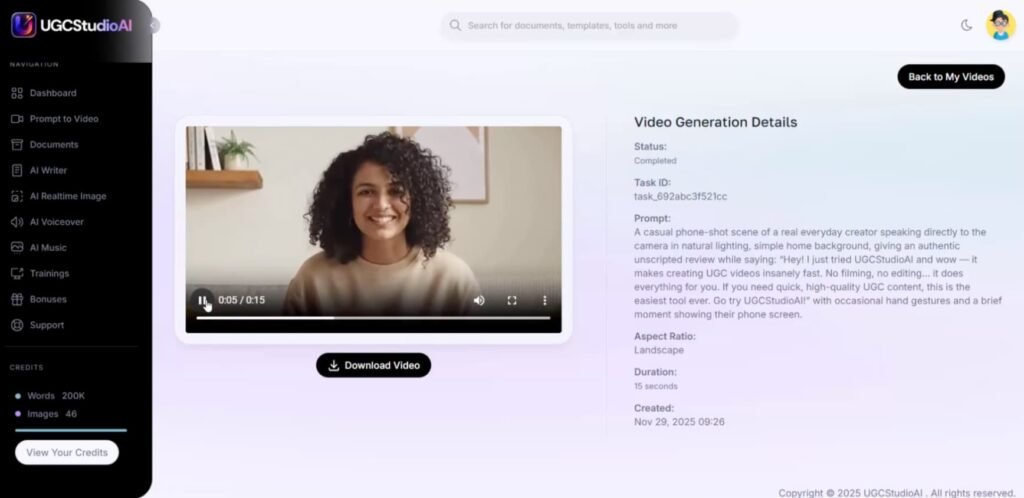
Besides videos with virtual presenters, the tool can also generate:
- Product photos
- Thumbnails
- Social visuals for ads
This is useful for eCommerce owners who need quick product images for listings, emails, or social posts.
Platform-Optimized Video Formats
UGC Studio AI outputs the right size for:
- TikTok
- Instagram Reels
- YouTube Shorts
- Facebook feeds and stories
No manual resizing, cropping, or re-exporting. You just select the format at the start and the app builds around that canvas.
Background And Scene Customization
You can change:
- Backgrounds (home, office, studio, outdoors, etc.)
- Lighting mood
- Colors and style
This helps you match each video to a different audience or brand style. For example:
- Cozy home background for skincare
- Office background for B2B SaaS
- Minimal studio look for tech products
Multi-Language And Accent Support
With support for more than 20 languages and regional accents, you can:
- Run the same ad in English, Spanish, French, German, etc.
- Talk to local markets in their own language
- Reuse the same script and angle across many countries
This is a big win for global brands and agencies with international clients.
Bulk Creation Mode
Bulk mode lets you create many variations at once:
- Different hooks
- Different CTAs
- Different lengths
- Different thumbnails
You can set up a batch of ideas and let the app generate all versions. This is perfect for A/B testing in ad accounts.
One-Time Payment And Commercial License
UGC Studio AI is sold with no monthly fee during launch. You pay once and get access to the features in your plan. You also get a commercial license, so you can:
- Sell videos to clients
- Build UGC packages for brands
- Keep 100% of what you charge
If you run an agency, this alone can cover the cost fast.
UGC Studio AI Vendor And Launch Dates
Who Is Behind UGC Studio AI?
UGC Studio AI is created and launched by LogicBeam, a well-known software vendor on JVZoo. I have seen their past launches, and they have a strong track record for:
- Delivering working products, not just hype
- Providing fast support through helpdesk and email
- Keeping platforms updated after launch
LogicBeam is seen as one of the more trusted vendors on JVZoo, which matters a lot when you are buying a tool you plan to use in your business.
For me, this gives more confidence that UGC Studio AI will stay supported, get fixes when needed, and not vanish a month later.
UGC Studio AI Launch Schedule And Price Increase
The UGC Studio AI launch runs for a limited time with special pricing.
- Launch starts: 12th of December at 11:00 AM EST
- Launch ends: 18th of December at midnight EST
During this launch window, you can lock in the one-time pricing and use the discount coupons the vendor provides. After the 18th of December, the launch deal closes and the price goes up.
So if you already know you want UGC Studio AI for your own brand or client work, it makes sense to grab it during this period, while the front-end and bundle are still at their lowest cost.
How UGC Studio AI Compares To Other Options
Versus Hiring Real UGC Creators
Hiring real creators gives you true human faces and real phones. But you deal with:
- Casting and outreach
- Contracts and payments
- Late deliveries
- Re-shoots when you need changes
UGC Studio AI trades that for:
- Fast production
- Full control over script and angle
- Unlimited revisions inside the app
Real creators are still great for hero campaigns. For volume, testing, and low-budget brands, UGC Studio AI is far cheaper and faster.
Versus Doing Everything Manually
If you record yourself or your team, you need:
- Camera or phone setups
- Lights, mic, and background
- Editing time in tools like Premiere or CapCut
You also have to feel good on camera. Many founders and marketers do not.
UGC Studio AI lets camera-shy people still ship UGC-style videos at scale. You lose some raw personality, but you gain speed and consistency.
Versus Other AI Video Tools
Most generic AI video tools focus on:
- Talking head explainer videos
- Slides with voiceover
- Stock-style visuals
UGC Studio AI is shaped for UGC ads and social content. Features like:
- Realistic human gestures
- Short vertical formats
- Hooks and social-style captions
make it a better fit for ad creatives and product showcases than many generic tools.
UGC Studio AI Pros And Cons
Pros
- No camera, actors, or editing skills needed
- Makes realistic UGC-style videos on demand
- Built-in AI voices, music, captions, and scripts
- Supports 20+ languages and accents
- Bulk creation for A/B testing and ad scaling
- Cloud-based dashboard, easy to access from anywhere
- One-time payment during launch, no monthly fee
- Commercial license lets you sell videos to clients
Cons
- Visual style may feel “AI-made” in some niches if you push it too far
- You still need a good marketing angle; the AI will not fix a bad offer
- Render times can take a bit when you create many videos at once
- Best results come when you tweak scripts, not when you accept the very first draft
What Real Users Are Saying Online
From public review videos and social posts, people mention a few common points about UGC Studio AI:
Positive feedback often highlights:
- Speed: reviewers like how fast they can turn a product idea into a ready video, without going back and forth with creators.
- Ease of use: many find the interface simple enough to use on the first day.
- Variety: people enjoy testing different hooks, voices, and backgrounds with very little extra work.
- Value: some reviewers point out that a single client project can pay for the one-time license.
On the downside, a few users mention:
- They still tweak AI scripts because some lines feel too generic.
- They see better results when they mix AI UGC with some clips from real customers.
- They want even more presenter styles and “faces” in future updates.
Overall, most public reviewers seem to see UGC Studio AI as a strong tool for ad creatives and social videos, not as a full replacement for real customers on camera.
Tips And Tricks To Get The Most Out Of UGC Studio AI
Here are some practical ideas that help you get better results.
Start With A Clear Angle
Do not just type “make a video for my product.” Tell the AI:
- Who the viewer is
- What problem they have
- One main benefit
- One clear call to action
Example: “Busy moms who want faster skincare, focus on ‘2 minutes and done’, call to action: shop link in bio.”
Use Bulk Mode For Hooks
Keep your main script, but use bulk mode to test:
- Different opening lines
- Different first 3 seconds visuals
- Different CTAs
Run these in your ad account and keep the top winners.
Mix AI UGC With Real Social Proof
You can:
- Use AI UGC as the main explainer
- Add screenshots of real reviews
- Overlay short quotes from real customers
This gives you the best of both worlds: speed and trust.
Localize Your Best Winners
When a video works in one language, clone it:
- Switch to another language
- Keep the same structure and visuals
- Change currency and local references if needed
This is an easy way to expand to new markets.
Build Packages For Clients
If you run an agency, set up:
- A “5 UGC ad pack”
- A “launch bundle” with videos + images + captions
Use UGC Studio AI to produce everything inside those offers, and price based on value, not time.
UGC Studio AI FAQ
What Is UGC Studio AI And Who Is It For?
UGC Studio AI is a platform that creates realistic UGC-style videos, voiceovers, images, and ad creatives from prompts. It is made for:
- Marketers and media buyers
- eCommerce and dropshipping owners
- Agencies and freelancers
- Content creators and influencers
Anyone who needs engaging video content fast can use it.
Do I Need Actors, Cameras, Or Editing Skills?
No. The app generates human-like videos from your text prompts. You do not have to record yourself, hire creators, or edit clips in a timeline.
Is There A Monthly Fee?
During launch, UGC Studio AI is sold for a one-time price. You get access to the features in your plan without recurring monthly charges.
Can I Sell The Videos To Clients?
Yes. The frontend includes a commercial license. You can create and sell:
- UGC ads
- Testimonials
- Product demos
- Social content
and keep all the revenue.
Which Languages Does It Support?
UGC Studio AI supports more than 20 languages and regional accents. This lets you produce localized campaigns for many markets from one dashboard.
How Long Does It Take To Make A Video?
It depends on length and settings, but simple 30–60 second clips can be ready in minutes, not hours. Bulk rendering will take longer, but you do not have to sit and watch it.
Final Verdict: Is UGC Studio AI Worth It And Who Should Buy It?
After testing UGC Studio AI, I see it as a strong tool for anyone who needs high volumes of UGC-style videos without the pain of filming, hiring, or editing.
The strongest points are:
- Realistic human gestures and expressions that feel natural enough for social feeds
- Fast script-to-video flow with built-in voices, music, and captions
- Multi-language support and bulk creation for serious marketers and agencies
- One-time pricing with a commercial license, which is rare for this kind of tool
It is not perfect. If you want raw, messy, “real phone” content from actual customers, you should still collect real UGC. But as a workhorse for ad creatives, product reviews, demo clips, and constant social posts, UGC Studio AI does a solid job.
I would recommend UGC Studio AI if:
- You run paid ads and need many UGC variations each week.
- You sell products online and want quick reviews, unboxings, and demos.
- You manage clients and want to offer UGC packages without hiring a big team.
- You want to reach global audiences in many languages without extra production cost.
If you see yourself in those groups and you like the idea of prompt-based UGC production with no monthly fee during launch, then UGC Studio AI is worth serious consideration.