


I did not grab Viral Influencer AI just to play with a new toy. I run pages that need fresh short videos every week. Reels, Shorts, TikToks, story clips. All that content eats time, energy, and money.
I also work with clients who want daily video content but do not want to sit under lights and repeat lines into a camera.
So I was hunting for a tool that could give me believable faces, clear voices, and ready-to-post videos without turning my life into a full-time editing job.
Viral Influencer AI promises something simple. You create AI influencer faces, you feed them scripts, the app adds a voice, and you get short vertical videos that look like real creator content.
The focus here is not fancy film style. The focus is speed, volume, and sales.
In this review, I will walk through what the product does, how it looks and feels, what works well, where it falls short, and who I think will actually make money with it.
What Viral Influencer AI Actually Is
Simple Summary Of Viral Influencer AI
Viral Influencer AI is a cloud video platform that lets you create talking influencer-style videos from images and scripts. You log in through your browser, set up an AI face, pick or write a script, choose a voice, and render videos in vertical or horizontal format.
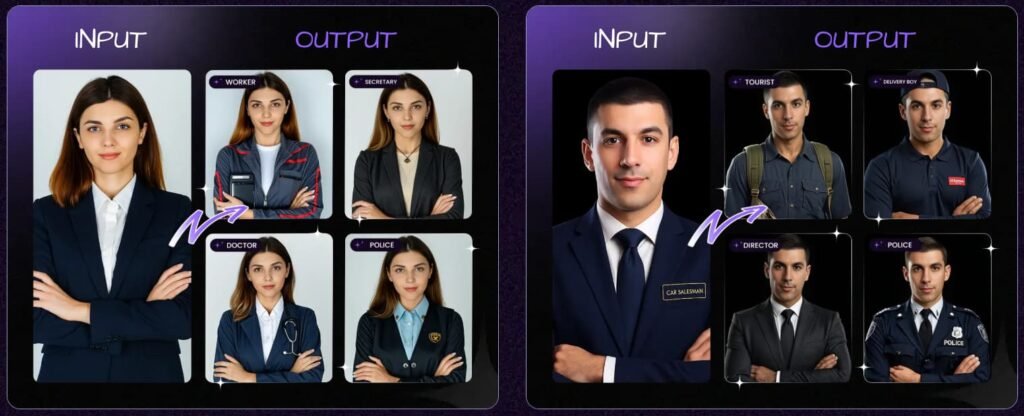
You can use stock-style faces, faces you create with prompts, or real photos that you upload with permission. From there the app syncs lip movement with the voice and turns a static face into a talking short-form clip.
The tool comes with:
- AI face and avatar creation
- Script writer for short hooks and tips
- Text-to-speech voices and voice cloning
- Video builder for Reels, Shorts, TikTok and more
- Basic posting and schedule tools
- Lead capture and campaign tools in higher plans
Viral Influencer AI is built for:
- Faceless YouTube and TikTok pages
- Coaches and experts who want regular talking clips
- Agencies that sell social video packages
- Local shops that want a “face” without hiring talent
So the big promise is this: one tool for faces, scripts, voices, and videos, with the goal of growing reach and sales.
Design, Dashboard, And Ease Of Use
First Impressions With The Interface
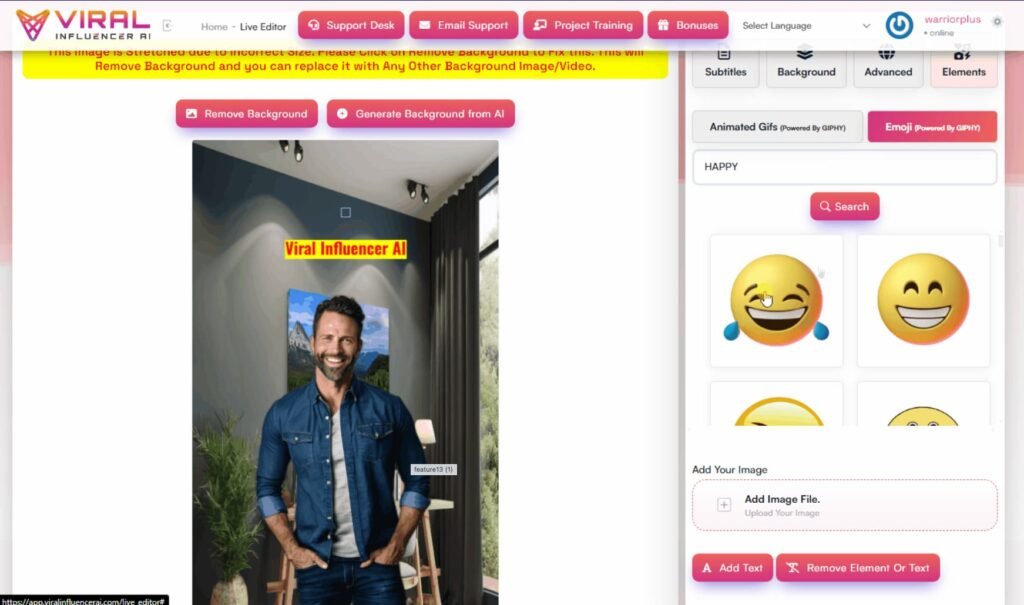
When I logged into Viral Influencer AI, the layout felt clean. The main menu sits on the left with clear labels. I could see options for influencers, scripts, voiceovers, videos, campaigns, and the content calendar.
The dashboard gives a quick view of recent projects and some tutorials. I did not feel lost. I could move from one step to the next without hunting through hidden menus.
Build Quality And Workflow
The design has a practical style. Buttons respond fast, pages load without lag, and the steps follow a simple order:
Create or pick a face → Write or paste a script → Choose a voice → Set the format → Render the video.
I never had to jump into extra apps to finish the basic workflow. That simple flow makes the tool feel like a real part of my daily stack, not something I test once and forget.
Viral Influencer AI Review: Pricing, Upsells, And Best Value Picks
Front-End: Viral Influencer AI Main Software ($37 One-Time)
The front-end copy of Viral Influencer AI costs $37 as a one-time fee. This gives you full access to the main app, where you create AI influencer faces, scripts, voices, and videos.
You can start running faceless channels, test niches, and sell basic content packages to clients without extra upgrades.
If you only want to test the platform or run one or two channels for yourself, this base offer is enough to get moving.
OTO 1: Viral Influencer AI Unlimited ($57)
The Unlimited upgrade raises the ceiling on everything. You can create unlimited AI influencer videos, custom voices, faces, and backgrounds. You also unlock unlimited lead storage and broadcasts, so you can build large lists and send as many campaigns as you want.
This plan also includes full social scheduling and auto-posting across platforms, plus pro design tools for background removal, AI art, and voiceovers.
On top of that, you get a commercial license and automation training, so you can package all this into client services.
If you are serious about using Viral Influencer AI for client work or multiple brands, this is the upgrade I see as most useful.
OTO 2: Template Expansion Pack ($57)
The Template Expansion Pack focuses on speed. You get a big library of done-for-you templates built for engagement, leads, and sales. Instead of designing each video from a blank screen, you plug scripts into layouts that already work.
These templates give your clips a studio-style look without design stress. If you create content for several clients or post daily, this upgrade helps you move far quicker with a more polished feed.
OTO 3: VSL Creator Pro ($77)
VSL Creator Pro turns Viral Influencer AI into a sales letter machine. It uses AI to create high-converting video sales letter scripts with proven frameworks like AIDA, PAS, hook–story–offer, and more.
You can set emotion and brand tone, write scripts in many languages, and generate unlimited VSL drafts.
These scripts send straight into the video creator, so you can go from idea to full sales video in one flow. With full commercial rights, you can also sell VSL copy as a service.
If you sell courses, coaching, or software, this upgrade makes sense because it removes the hardest part of the funnel: long-form sales copy.
OTO 4: AI Transcriber ($77)
The AI Transcriber upgrade flips old content into fresh assets. You drop in audio or video and get clean text out. From there you can turn that text into blog posts, social captions, scripts, or email content.
It supports many languages, includes summaries, and gives export options in several formats. With commercial rights, you can offer transcription and repurposing as a client service.
I like this add-on for anyone who has lots of old content that still holds value but needs a new life.
OTO 5: Ad Copy Creator ($67)
Ad Copy Creator focuses on short, sharp sales messages. It creates ad copy, short video scripts, and written sales letters using proven frameworks.
You can pick from many emotions and brand voices, write in many languages, and generate unlimited scripts.
The best part is how well it fits with the main app. You can write hooks, ads, and short sales scripts, then send them straight into the video builder. For agencies and media buyers who test many angles, this upgrade saves a lot of time.
OTO 6: Agency Upgrade ($197)
The Agency upgrade is for people who want a full influencer video agency. You get an agency site, branding, proposals, contracts, and sales materials.
You can add up to 100 team members, manage clients inside one dashboard, and bill them with the built-in payment system.
You can also brand all videos and templates with your agency name, which helps you charge higher retainers. With the commercial and agency license, you can deliver projects at scale without extra platform costs each month.
If your main goal is to build a real agency around Viral Influencer AI, this is the upgrade that sets you up with assets, systems, and tools.
OTO 7: Logo Suite ($12.97/Month)
Logo Suite runs on a low monthly fee and focuses on branding. You can use AI to create logos and brand assets, then plug those into influencer-style videos.
This fits people who want one place where branding and promo content meet. Agencies can use it to create full identities for clients, then promote those brands with AI influencer clips.
OTO 8: SaaS Builder Upgrade ($97)
The SaaS Builder upgrade is for people who want to launch their own AI apps. You use a no-code builder to create AI SaaS tools, then use Viral Influencer AI videos to promote those tools.
This upgrade turns the platform into a full business launcher. You can build products, create promo content, and grow user bases without touching code.
Viral Influencer AI Bundle ($397)
COUPON CODE: VIAI15 FOR $150 OFF.
The Viral Influencer AI Bundle rolls all the upgrades into one offer. You get Unlimited, Agency, VSL Creator Pro, Ad Copy Creator, Template packs, the Transcriber, and more for a single price.
This removes limits on videos, templates, scripts, and client work. You also get every key feature you need for content creation, automation, scheduling, client management, and scaling.
If you plan to use Viral Influencer AI for a serious agency or multi-brand setup, the bundle gives the best value overall, since you do not have to grab each upgrade on its own.
Viral Influencer AI Bonuses – My Exclusive Bonus Stack
If you decide to grab Viral Influencer AI through my link on this page, I want you to have more than just another tool in your account. I want you to have a clear plan to turn AI influencer videos into real traffic and sales.
So I put together a custom bonus stack that fits Viral Influencer AI perfectly. You get extra guides, systems, and case studies that show you how to turn short videos into income, how to build faceless brands, and how to use AI to do more with less effort.
Bonus #1 – GPT Store Exposed: Turn Simple AI Tools Into Income
This guide shows you how to set up small AI tools that make money without hard selling. You can use Viral Influencer AI to create short promo videos, explainers, and quick demos for these tools.
The idea is simple: let AI handle the copy and content, then follow this system to pull in traffic, clicks, and buyers with less stress and less manual work.
Bonus #2 – $102,016.16 in 27 Days Case Study
Here you see how “Anonymous AI” was used to pull in over $102K in under a month. You get to see the traffic paths, offers, and content structure they used.
You can plug the same style into your Viral Influencer AI videos. Keep your face hidden, use your AI influencer as the front person, and still build a strong income stream behind the scenes.
Bonus #3 – AInfluencer: Build AI Influencers Without Showing Your Face
This bonus is a perfect match for Viral Influencer AI. It walks you through how to build AI influencers in any niche, even if you never want to be on camera.
Viral Influencer AI handles the talking videos. AInfluencer shows you how to shape the persona, tone, content themes, and posting routine so that your AI “character” becomes an asset that works 24/7 for your brand.
Bonus #4 – Recurring AI: Simple Offers For Ongoing Payments
Here you learn how to set up simple offers that pay you again and again, like paid text files, small memberships, private chats, and other low-effort products.
You can use AI to write the content, FAQs, and support material, then use Viral Influencer AI to create promo videos that warm people up and send them straight into your recurring offers. The goal is to build a base of steady monthly income, not just one-time sales.
Bonus #5 – AI Agents Exposed: Let AI Handle The Busy Work
This bonus shows you how to use “AI agents” to build sites, run social accounts, and create content while you focus on higher-level tasks.
Think of Viral Influencer AI as your video engine. AI agents help you handle the rest: posting, repurposing, simple outreach, and funnel tasks. When you put both pieces together, you get a system that runs with far less manual effort from you.
Bonus #6 – Instant Cash Dash: Fast Methods For Daily Cash
If you need quick wins, this bonus is for you. It gives you fast ways to pull in $5, $10, or $20 a day using simple offers and easy traffic paths.
Viral Influencer AI helps you create quick videos that show the offer, answer one pain point, and point people to your links. This is great for testing new ideas without big budgets or long setups.
Bonus #7 – Skooolify: Earn Recurring Commissions From Skool
Skool is a hot platform right now, with active communities and buyers. This bonus teaches you how to get paid for sending people to Skool groups, even if you never run your own community.
You can use Viral Influencer AI to make short review clips, tips videos, and “here’s what you get inside” walk-throughs that send viewers to your affiliate links for Skool communities.
Bonus #8 – Slide Cash Loophole: Use Simple Slides For Free Traffic
This bonus shows you how to turn simple slide decks into free traffic on platforms that reward educational content. Since you already have scripts and hooks from Viral Influencer AI, you can flip them into slide decks very fast.
Now your content works in two formats: talking-head AI influencer videos and slide-style presentations. That means more reach with almost no extra writing.
Bonus #9 – Secret Platform Digital Product System
Here you see how to sell easy digital products on a hidden platform that already has plenty of buyers. You learn what sells, how to structure your offers, and how to write strong but honest product pages.
You can use AI to create the actual products and use Viral Influencer AI to record short promo clips that funnel traffic to your listings. This is a simple way to stack extra income streams around your video content.
Plus: All Vendor Bonuses From Yogesh Agarwal
On top of my custom bonuses, you still get every bonus that Yogesh Agarwal includes with Viral Influencer AI. Most people just pass on the vendor bonuses and stop there.
I wanted to give you more than that, so you have real support, real systems, and real examples that help you turn the software into content, traffic, and sales.
How To Claim Your Bonuses
Once you buy Viral Influencer AI through my link, these bonuses will be delivered to you inside your JVZoo account. You do not need to email me or fill in forms.
Just grab Viral Influencer AI, log into your buyer area, and you will find your bonus access ready for you.
Key Features And How They Help Real Users
AI Influencer Faces That Fit Different Niches
The first part I played with was the face system. Viral Influencer AI lets you:
- Generate faces for different niches like fitness, finance, beauty, gaming, and more
- Upload your own face shot if you want the influencer to look like you
- Create many looks from one base face, with other outfits and styles
This gives you a lot of control over brand feel. For one finance page I made a calm, clean-cut host. For a side gaming page I went with a more fun and casual style. Both came from the same core tool, so I did not need any outside design help.
The clear win here is speed. Instead of planning photo shoots or hiring actors, you can test ideas fast. If a face does not match the niche, you just make another one.
AI Script Writer For Hooks, Tips, And Calls To Action
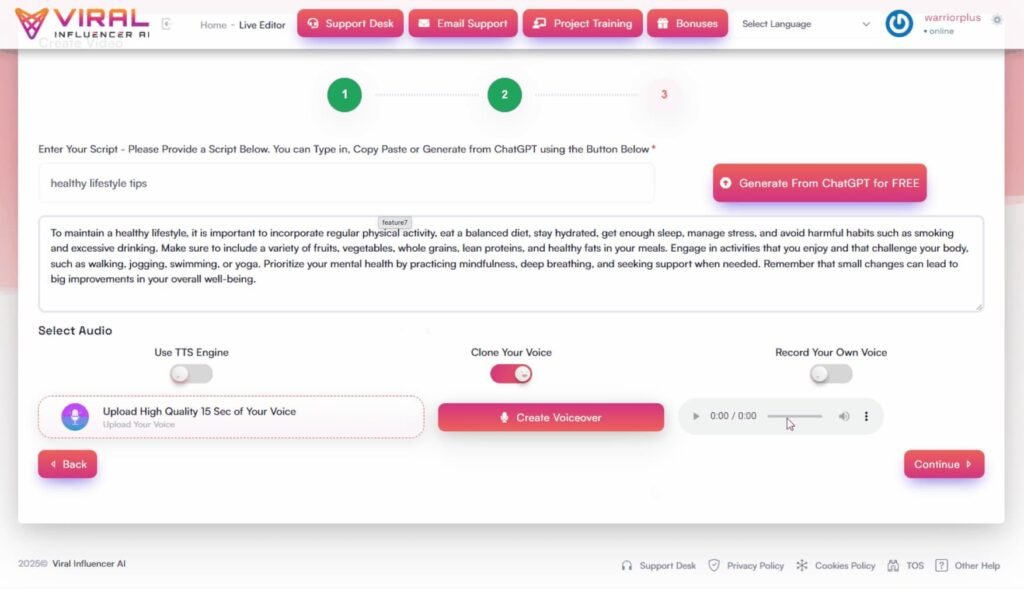
Next I used the script writer. You enter a topic, a niche, and a rough direction. The tool then creates a short video script with a hook, a main point, and a call to action.
I like this for two reasons. First, it kills “blank page” stress. Second, it follows short-form patterns that already work on social apps, like hook lines, myths, quick tip lists, and strong closes.
I almost always edit the scripts so they sound like me. Still, starting from a draft cuts my writing time in half. For client work this matters because it keeps projects moving.
AI Voices And Voice Cloning
Viral Influencer AI comes with a range of male and female voices in many accents. You can pick calm, bold, friendly, or more serious tones. There is also an option to upload voice samples so the app can build a voice that sounds like you.
On a phone speaker, the voices feel natural enough for Reels and TikToks. Mouth sync lines up well in most clips. Some long sentences feel a bit stiff, so I learned to keep lines short and clear. That also helps with viewer retention.
For personal branding, the voice clone feature is huge. I can keep my real face private, but still let viewers hear a voice that sounds like me. That gives a sense of presence without camera stress.
Video Builder For Short Content At Scale
The video creator lets you choose size, caption style, background, and basic effects. You can make vertical clips for shorts platforms or standard wide videos for other sites.
You can add:
- Subtitles that match the script
- B-roll clips and photos as cutaways
- Simple transitions and overlays
- Call-to-action text or arrows
This is not a full film studio. You will not replace high-end editors with this alone. Still, for short social clips that run under one minute, the tool does the job.
It is fast enough that I can create a full batch of 10 to 20 clips for a campaign without a long edit grind.
Lead Capture, Campaigns, And Calendar
Higher plans unlock tools for lead pages, simple funnels, and a content calendar. You can link your AI influencer videos to opt-in pages, offers, or bookings.
This shifts Viral Influencer AI from “views only” into a sales tool. Now the influencer clips can push people into email lists, DMs, or sales pages. I use this setup for simple “tips plus link in bio” style campaigns and it works well for low ticket offers.
About The Vendor And Limited-Time Launch Dates
Who Is Behind Viral Influencer AI?
Viral Influencer AI is created and launched by Yogesh Agarwal. I have seen his name on many marketing and software releases over the years, mostly in the video, traffic, and automation space. So when I saw his name on this, I knew it was not a random one-off project.
Yogesh tends to build tools that help marketers, agencies, and solo creators do things faster with less manual work. Viral Influencer AI follows the same pattern.
The whole setup feels built for people who want to turn AI into actual content and clients, not just play with tech for fun.
For me, the vendor does matter. When I buy software, I want someone who understands launches, support, and long-term updates.
Yogesh has a track record in this space, so I feel more relaxed using this tool for real client work and not just for a weekend test.
Launch Window, Price Rise, And Why Timing Matters
The Viral Influencer AI launch starts on the 29th of November at 11am EST and runs until the 5th of December at midnight. During this window, you get the lowest price for the front-end copy and the main upgrades.
After the 5th of December, the plan is for the price to go up. So if you know you want to build faceless channels, sell AI influencer videos to clients, or stack the bundle for agency use, this early launch window is the best time to lock it in.
When I look at deals like this, I always ask myself a simple question:
“Will I actually use this in the next 30 days?”
If the answer is yes, then grabbing it during the launch makes sense, because I get full use while others pay more later. If the answer is no, I wait.
With Viral Influencer AI, the limited-time pricing adds a clear push to decide, instead of putting it off and paying a higher rate down the line.
How Viral Influencer AI Compares With Other AI Video Tools
Viral Influencer AI vs Talking Head Avatar Tools
I also use classic talking head avatar tools that turn text into videos with a static presenter. Those tools often feel stiff and more like corporate training.
Viral Influencer AI feels more like short-form creator content. Faces have more style options. Scripts focus on hooks and stories. You can also adjust scenes to look like Reels or TikTok clips instead of plain slides.
Viral Influencer AI vs Manual Filming And Editing
When I film myself with a real camera and edit in a full editor, I get more control and more depth. That kind of content still wins for long YouTube videos.
But for daily short clips, Viral Influencer AI saves time and cuts stress. I do not need to set up lights, fix my hair, watch the clock, or scrub through audio. For many niches, that trade off is worth it. Slightly less “real” but far more consistent.
Viral Influencer AI vs Cheap Template Apps
There are many low-cost apps that make quote videos or simple slides with stock footage. Those tools work for basic posts but rarely hold attention for long.
The strength of Viral Influencer AI is that you get a face and voice that feels like a host. Viewers connect better with a human-style guide than pure text on screen. That small shift can help boost watch time and clicks.
Pros And Cons Of Viral Influencer AI
What I Like
- Easy to learn and use even if you are new to video
- All in one place for faces, scripts, voices, and videos
- Strong fit for faceless channels and camera-shy creators
- Good mix of voices and accents
- Quick way to test new niches and angles without new shoots
- Lead and campaign tools give a clear path from views to sales
- Fair value for the launch price, especially for agency use
What Could Be Better
- Long scripts sometimes feel stiff, so you must edit them
- Render times can rise during heavy use hours
- Not a full editor for complex long-form videos
- Some faces look slightly off in rare frames, so you should preview before posting
- You need strong hooks and offers; the software does not fix weak ideas
Real User Feedback And My Own Results
What Other Users Say Online
From online feedback I read, many users praise the simple interface and the speed of content creation. They like that they can launch faceless channels in days, not months. Agency owners share that clients are happy to have daily clips without studio visits.
Some users felt the faces still look a bit AI in certain niches, like luxury fashion or high-end beauty. Others wanted deeper editing tools inside the app so they did not need outside editors for every change.
There were also comments about support. Most users said they got replies, though some wanted faster answers during heavy launch weeks.
My Experience After Real Use
On my side, I used Viral Influencer AI for three main projects:
- A faceless YouTube Shorts channel in a finance niche
- TikTok clips for a local service client
- Promo videos for a low-ticket digital product
The finance channel gained views faster than my older slide-style clips. Watch time rose because the AI host held attention better than plain stock footage.
For the local client, the “AI spokesperson” helped them feel present online even on busy days with no time for filming.
For the product promos, results depended on the offer. Clips with strong hooks and clear calls to action pulled clicks and sales.
Clips with weak scripts did not perform well, even with a nice AI face. So the tool is strong, but you still need real marketing sense.
Tips And Tricks To Get The Most From Viral Influencer AI
Practical Tips From My Use
Here are some things that helped me:
- Keep scripts short and punchy. Short lines sound better with AI voices.
- Use patterns that already work: “Do this, not that”, myths vs facts, simple hacks.
- Stick to one or two influencer faces per brand to build trust.
- Test different voices until you find one that fits your niche tone.
- Batch content. Plan one hour where you create many scripts, then another session where you render all the videos.
- Always add strong calls to action. Tell viewers what to do next.
- Link videos to real funnels or offers, not just random pages.
Viral Influencer AI FAQ
Is Viral Influencer AI good for beginners?
Yes. If you can type simple prompts and follow clear steps, you can use it. The app has training, and the flow from face to video is clear.
Do the videos look real enough for clients?
For short social clips, yes. On a phone, most viewers accept the AI host as “close enough” to real. For high-end brand ads, I still suggest real shoots.
Can I use my own face and voice?
You can upload your face shot and samples of your voice. The tool can then build a talking version that sounds and looks like you without new footage.
Does Viral Influencer AI replace editors?
Not fully. It replaces many simple short projects. You still may want a human editor for long videos, advanced effects, or strict brand rules.
Can I sell these videos to clients?
Yes. The license lets you create and sell content packs, campaigns, and retainers. For agencies, this is where the real profit sits.
Final Verdict: Who Should Buy Viral Influencer AI?
After using Viral Influencer AI on real projects, I see it as a strong tool for volume content. It shines when you need many short clips each week and you do not want to live on camera.
It works best for:
- Faceless YouTube Shorts and TikTok channels
- Coaches and experts who need daily presence without filming each time
- Agencies that offer “daily social video” services
- Local businesses that want a steady online host without hiring staff
If you expect perfect human faces and film-level polish, you may feel a bit let down. If you want a simple and fast system for AI influencer clips that can send people to offers and links, Viral Influencer AI gives solid value.
For me, the tool paid for itself as soon as I closed a basic monthly package for a client who wanted daily clips. So if you plan to use it to make content for more than one brand, or to sell videos as a service, I feel comfortable recommending it.