


Hi, this is Darius, and welcome to my Webira review.
I spend a lot of time building websites, and I’ll be honest… it usually turns into a grind. I pick a template, tweak colors, write copy, search for images, and then redo half of it because it still feels off.
So when I saw Webira, an AI website builder that creates a full multi-page site from a short business description, I was curious right away. The promise is simple:
- You describe your business.
- You choose a theme.
- Webira creates the layout, text, images, and branding.
No code. No design skills. No plugins. Just a ready site you can edit with a visual drag-and-drop editor. That sounded perfect for beginners and for people like me who want speed without giving up quality.
In this review, I’ll walk you through what Webira is, how it works, what it does well, where it has limits, and who I think will get the most value from it. I’ll keep things simple, honest, and straight to the point. 😊
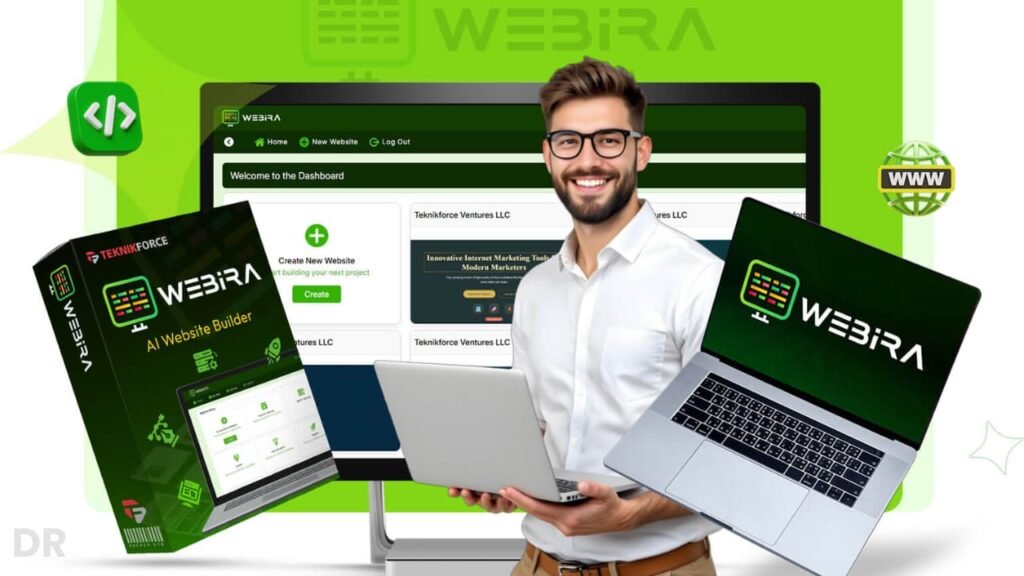
What Is Webira and Who Is It For?
Webira is an AI-powered website builder that creates complete, multi-page websites from a short description of your business. You tell it what you do, pick a style, and it builds:
- A full structure with pages like Home, About, Services, Contact
- All the written copy for those pages
- Custom images that match your niche
- Branding elements such as colors and basic design style
You don’t start with a blank canvas. You start with a full site that already looks professional, and then you edit what you want.
Webira works well for:
- Beginners who have never built a site before
- Small business owners who need a site fast
- Freelancers who want to deliver sites without heavy coding
- Agencies who want to speed up client projects and still keep quality high
The tool uses several AI engines for writing, coding, and images. That means it doesn’t just fill text into a template. It actually builds the structure, sections, and visuals around your business niche.
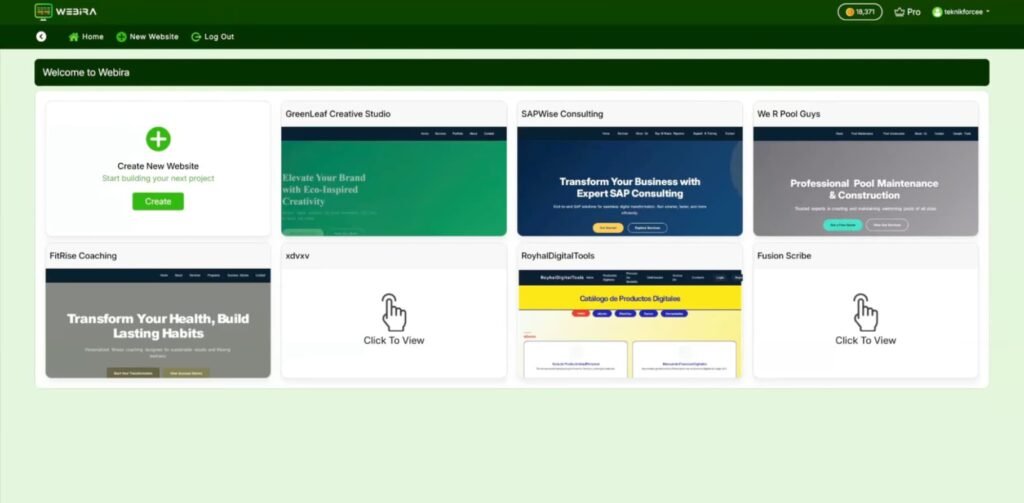
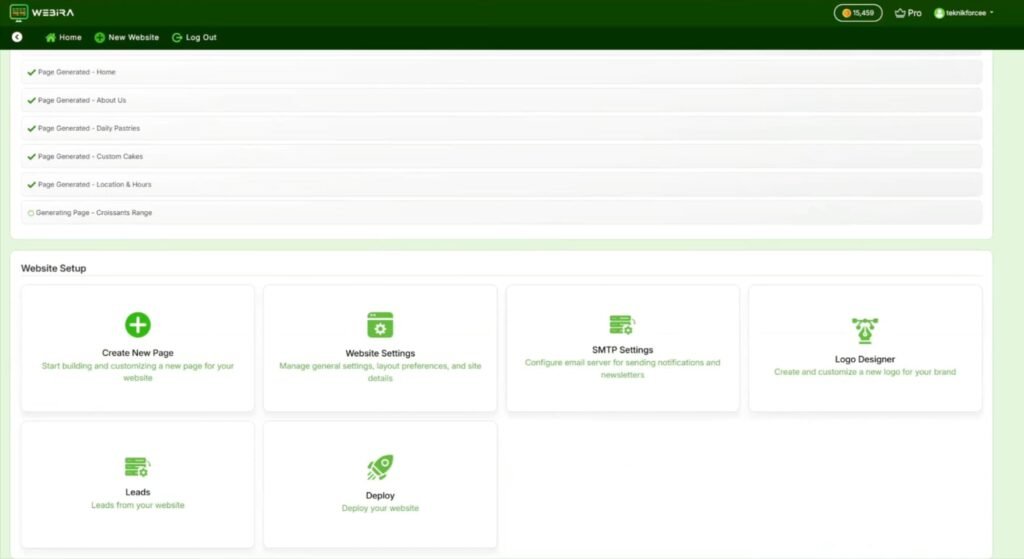
When I first used Webira, the thing that stood out was how clean the interface feels. You don’t have to dig through hidden menus or guess what to click next. The main options sit where you expect them to be:
- Main site view in the center
- Settings and controls on the side
- Clear buttons for AI actions like “regenerate” or “rewrite”
The design it creates is modern and neat. Sections line up well, spacing looks natural, and the typography feels readable. It doesn’t look like an old, clunky theme.
For someone who hates messy builders, this is a relief. I didn’t feel lost, and I didn’t need a long learning curve just to move one button or tweak a heading.
Overall, the quality of the output feels high enough for real clients, not just “toy project” level. You can launch a normal business site without feeling embarrassed about how it looks.
Webira Review: Pricing and Funnel Explained 💰
Now let’s talk money, because this is where a lot of people decide if Webira is worth it or not.
What I like about Webira is that you can start small with the front end, or go all in with the full bundle if you’re serious about using this as a real business tool. Here’s how the pricing breaks down and how I look at each option.
Webira All-Inclusive Bundle – $267 (Best Deal If You Want Everything)
The Webira Bundle is the “all-in-one” offer. For a single payment of $267, you unlock:
- Webira Elite (Front End)
- Webira Pro (OTO1)
- Webira Reseller (OTO2)
- Tarantula SEO Crawler Pro (OTO3)
- Articalize Pro (OTO4)
- All bonuses for every level
- Tutorials and knowledge base
So instead of picking upgrades one by one, you just grab everything in one shot.
This makes sense if:
- You want to use Webira for clients
- You plan to resell access
- You care about SEO and content at scale
- You hate paying for upsells one at a time
On top of the bundle, there are a few order bumps you can add:
- Extra 40,000 AI credits for $47
- 140 extra reseller licenses for $99
- Seller’s Pack (sales pages, ads, creatives) for $29
The bundle is clearly aimed at agency owners, power users, and people who want Webira not just for one site but as a full income tool. For someone like that, paying once for the full stack makes more sense than cherry-picking later.
There’s no active coupon listed right now, so the price you see is the price you pay.
Front End: Webira Elite – $47 (Best for Personal and Starter Use)
Webira Elite is the front-end version at $47. This is the entry level and it’s built for people who mainly want to build sites for themselves. With Webira Elite, you get:
- Create up to 2 new websites per week
- 20,000 AI credits included
- Full access to the AI Website Builder
- Access to the visual editor and AI content tools
- Personal-use license only (no client work allowed)
If you’re just starting out, or you only need a site for your own business, this plan is enough to get going. You can still enjoy the AI builder, the drag-and-drop editor, and the content tools.
There are also order bumps on the front end:
- Extra 40,000 credits for $47 (good if you plan to generate a lot of copy and images)
- 1-Year high-quality hosting for $47 (handy if you don’t want to think about hosting at all)
- All-Inclusive Deal (all OTOs from OTO1 to OTO4) for $199 (a mini version of the full bundle from inside the front-end checkout)
Again, no active coupon is listed for the front end either.
If you only need a couple of sites and you’re not working with clients, Webira Elite is the cheapest way to get the core builder and see if the tool fits your style.
Upsell 1: Webira Pro – $67 (Best for Freelancers and Agencies)
Webira Pro is where Webira turns from “personal site tool” into “client work machine.” For $67, this upgrade unlocks:
- Unlimited website creation
- 50,000 credits
- Ability to build sites with contact forms
- High-end AI graphics generation
- Commercial license (you can sell sites to clients)
- Team access
- 2 years of free upgrades
This is the level I see as the sweet spot for freelancers and agencies. Once you add unlimited sites and commercial rights, you can use Webira to build and sell websites as a real service.
If you know you want to build more than a couple of sites, or you want to charge others for sites, Webira Pro is almost a must. The extra credits and the team access also help if you plan to grow your workload.
Upsell 2: Webira Reseller – $197 (Turn Webira Into Your Own Product)
Webira Reseller is a different kind of upgrade. Instead of just using Webira to build sites, this level lets you resell Webira accounts as if it were your own software.
For $197, you get:
- 70 reseller licenses
- Full Webira access for your customers
- Full sales rights (you keep all the revenue)
- Webira team handles support and setup
There are also order bumps here as well:
- 140 extra reseller licenses for $99
- Seller’s Pack (sales pages, ads, creatives) for $29
This upgrade makes sense if you want to:
- Sell Webira as part of your own software line
- Bundle Webira access into your agency packages
- Offer Webira as a bonus or upsell in your own funnel
You’re not stuck doing support, which is a big plus. You just sell the licenses, and Webira handles the heavy lifting behind the scenes.
Upsell 3: Tarantula SEO Crawler Pro – $67 (SEO and Audit Power Add-On)
Tarantula SEO Crawler Pro is an AI-powered SEO tool offered as a $67 upgrade. It’s made for scanning websites and pointing out SEO issues and fixes.
You get:
- Crawl unlimited websites
- Unlimited data capturing from Google Analytics
- Support for sitemaps of any size
- 3 licenses
- 120,000 AI credits
- Commercial rights
- White label SEO audit reports
- API connection with Google Search Console
This one is great if you:
- Want to sell SEO audits
- Want to improve your own websites’ search visibility
- Run an agency and want a simple SEO upsell for your clients
You can use the white label reports as part of your services, which helps you look more professional.
Upsell 4: Articalize Pro – $67 (AI Content Expansion for Traffic and Blogs)
Articalize Pro is another $67 upgrade that focuses on content creation. It’s built to create articles from different sources and help you grow traffic through content.
You get:
- Unlimited article creation from unlimited sources
- 50,000 AI credits
- Advanced AI image models
- Multi-language support
- 1-click publishing
- Team access with 3 licenses
- Ability to publish on unlimited blogs
- Commercial rights
- 2 years of free upgrades
This is ideal if you:
- Want to build blogs or content sites
- Need extra written content for SEO, social posts, or email
- Run content services for clients
When you pair Articalize Pro with Webira sites, you can build the website and then keep feeding it with fresh articles, which is great for long-term traffic.
Bonus Suite: Reseller Rights to Extra Traffic and Keyword Tools 🎁
Now let’s talk about something I really like about this offer—the bonuses. With Webira, you’re not just getting an AI website builder. You also get reseller licenses to several proven keyword and video tools.
That means you can use them yourself and sell access to them as your own offers, which is great if you want extra income or more value for your clients. Here’s what each bonus does for you.
Resellers License to Tube Reaper Jeet 🎯
Tube Reaper Jeet helps you find long tail video keywords for YouTube and other video platforms.
You can:
- Pull broad and very specific keyword lists in your niche
- Source thousands of video keyword ideas in minutes
- Target search terms that real viewers are using
This is perfect if you want to rank more videos, plan a content calendar, or give your clients a simple list of profitable keywords. With the reseller license, you can also offer Tube Reaper Jeet as a paid add-on or bonus in your own packages.
Resellers License to Vidwords Jeet 🔍
Vidwords Jeet is built to find fresh, untapped keywords and even new segments inside your niche.
You can use it to:
- Discover new topics to create videos around
- Find keyword angles that other creators are not using yet
- Grow your reach with less competition
Because Vidwords pulls from a special source, you get keyword ideas that are not already “burned out” or overused. And since you have reseller rights, you can sell access to Vidwords Jeet to your audience, clients, or students as its own product.
Resellers License to SEO Harvester Jeet 📈
SEO Harvester Jeet helps you find ultra-targeted keywords for your blogs, websites, and content campaigns.
You can:
- Build precise keyword lists for SEO articles and landing pages
- Plan content that matches what people search for
- Improve the value of your content packages if you work with clients
It’s fast, easy to use, and very handy if you care about ranking your Webira sites or any other site you run. With the reseller license, you can package SEO Harvester Jeet as part of a “traffic bundle” or sell it as a standalone SEO helper.
Resellers License to Keywords Goldmine Jeet 🥇
Keywords Goldmine Jeet does one simple but very useful thing: it checks which keywords have videos on page 1 of Google and which ones don’t.
This helps you:
- Spot keywords where there is no video yet on Google page one
- Create videos that can rank faster with less effort
- Plan content that stands out in search results
If you do YouTube or video SEO, this tool is a nice shortcut to find “easy win” keywords. With reseller rights, you can sell Keywords Goldmine Jeet as a special tool for video creators who want to break into Google search results.
Resellers License to Tube Chimp 🐵
Tube Chimp is another video keyword research tool, focused on YouTube.
You can use Tube Chimp to:
- Harvest highly relevant keywords for your YouTube channel
- Find top-ranking videos for those keywords
- Study what already works and model your content around it
This is great if you or your clients are serious about YouTube and want to grow faster. With the reseller license, you can also offer Tube Chimp as a bonus or upsell to your own audience, turning it into a revenue source, not just a tool you use.
Meet the Mind Behind Webira and Key Launch Dates 🗓️
I always like to know who is behind a product before I trust it, so let’s talk about the vendor for a second. Webira is created by Cyril Gupta, a well-known software developer and marketer who has launched many tools in the online business space.
He has a long track record of building apps that focus on real use, not just hype, and that gives me more confidence when I test something like this.
Cyril’s products usually focus on automation, quality features, and clear training, and Webira follows the same pattern.
You also get tutorials and a knowledge base, so you’re not left alone to figure things out. For me, that support side matters a lot, especially if you’re new.
Now, about the launch itself. Webira goes live on November 20th at 11:00 AM EST. From that moment, you can grab the front end, the bundle, and all the upgrades at special launch pricing.
The launch window runs until November 26th at midnight. After that, the price is set to go up.
So if you’re thinking about using Webira for your own sites or for client work, this launch period is the best time to lock in the lower cost. Once the launch ends, you’ll likely pay more for the same features.
Key Webira Features and How They Help You
AI Website Builder: Full Site From a Simple Description
This is the heart of Webira. You enter a short description of your business, such as:
“I run a local fitness studio that helps busy adults get in shape with small group classes and personal training.”
Webira then creates:
- A homepage with hero section, services, benefits, and call to action
- About page that explains your story and mission
- Services page with detailed service blocks
- Contact page with form, map, and key info
You don’t need to think about structure. That alone saves hours. Instead of planning every section, you react to what Webira gives you and only adjust what feels off.
Smart Content Creation With Multiple AI Models ✍️
Webira uses several AI content models such as Claude, Gemini, Deepseek, ChatGPT-style engines, and Grok. Here’s what that means in real life:
- You get natural, human-style copy that doesn’t feel stiff
- You can adjust tone from friendly to more formal
- You can ask it to rewrite, expand, or shorten any text
For example, you can highlight a paragraph and say:
- “Make this friendlier”
- “Make this more professional”
- “Explain this in simple language”
The text updates in seconds. You don’t need to stare at a blank page or worry about how to phrase every sentence. The AI gives you a strong base, and you just polish it.
Coding AI That Handles Layout and Structure 🧩
Under the hood, Webira uses AI to generate the actual structure and code. It handles HTML, CSS, and layout decisions for you.
That means:
- Sections line up correctly
- Spacing and alignment stay consistent
- You don’t have to touch code at all, unless you want to
For users who know a bit of CSS, there is also a live CSS editor. So if you want a special style, custom spacing, or a different look for a block, you can adjust it inside the tool instead of editing files elsewhere.
AI Image Generation for On-Brand Visuals 🖼️
Webira doesn’t just throw random stock photos at your site. It uses several image models like Flux, Ideogram, GPT Images, Seedream, Google Imagen, and Qwen to create visuals that match your niche.
You can:
- Generate new images that fit your brand
- Change colors, backgrounds, or style
- Create more versions of an image that you like
For example, if you run a coffee shop, you can create cozy shop images, latte photos, or team shots that feel close to your brand vibe. This helps your site feel unique instead of looking like every other stock-photo-filled page.
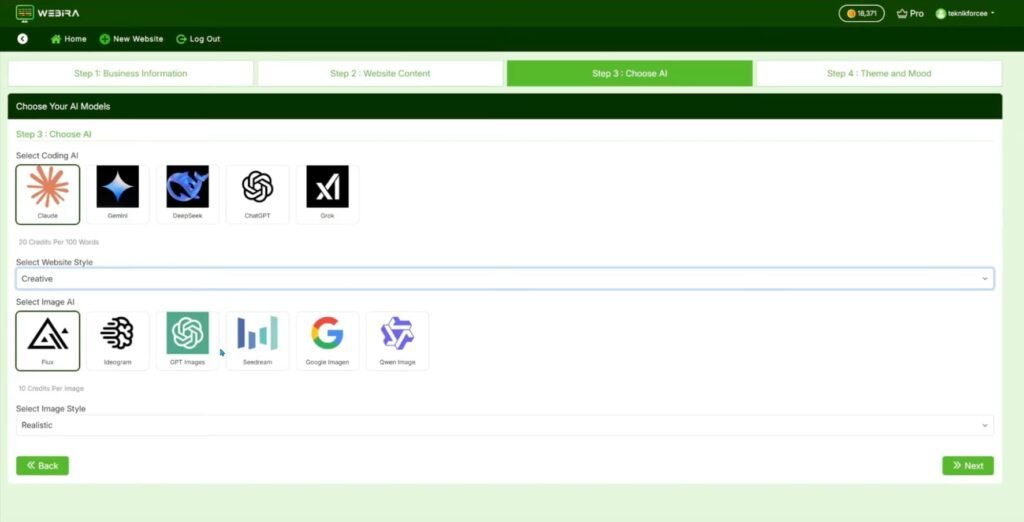
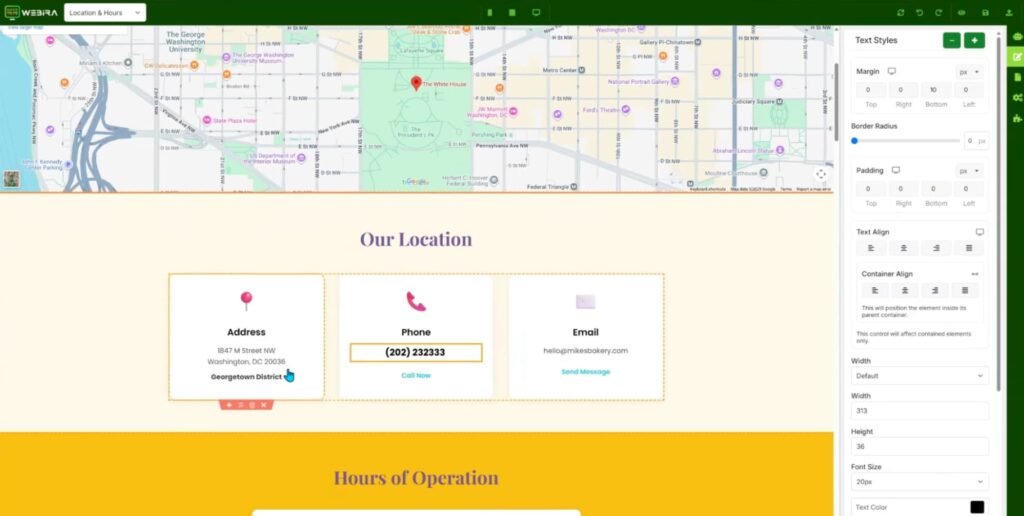
Visual Drag-and-Drop Editor and Live CSS 🧱
Once Webira builds your site, you can tweak it with a WYSIWYG visual editor. You just click on sections and elements, then:
- Move them up or down
- Change text, fonts, or colors
- Edit images
- Adjust buttons and layouts
You see changes right away. There is no need for code, and no confusing file system. For advanced users, the live CSS editor adds one more layer of control. You can push branding even further when needed.
Branding Tools: Logo Designer and Matching Theme 🎯
One thing I like is the built-in logo and branding support. You can:
- Describe your ideal logo and let Webira create one
- Upload an existing logo and let Webira build a matching color palette and theme around it
This keeps your site consistent. Fonts, colors, and visuals feel aligned with your brand, which makes the site look more polished and professional with less effort.
SEO, Forms, Leads, and Email 📧
Webira doesn’t stop at design. It also helps with the “behind the scenes” parts that many beginners skip.
You get:
- Auto-generated meta titles and descriptions
- Keywords for basic SEO
- Favicon for branding
- Contact forms that feed leads into your email system through SMTP
So you can not only show information. You can also collect leads, answer inquiries, and send follow-up messages. For local businesses and service providers, this can turn a simple site into a real sales tool.
Publishing and Hosting Options 🌐
When your site is ready, Webira gives several ways to publish it:
- Host on Webira’s own hosting
- Connect a custom domain
- Upload through FTP or cPanel
- Download a ZIP and host wherever you like
- Push to popular hosting services such as GoDaddy and Hostinger
This gives you a lot of freedom. You can keep things simple on Webira’s side, or use your own hosting stack if you already have one in place.
How Webira Compares With Other Website Builders
Webira vs Classic Drag-and-Drop Builders
With classic builders, you usually:
- Pick a template
- Replace all the dummy text
- Replace the images
- Adjust layout, forms, and SEO
That process can still take many hours. You handle most of the work yourself.
With Webira, you start from a full site already made for your business type. Content, images, and structure come ready to go. You spend more time editing and less time building from zero.
For people who want speed, this difference is huge. You can create more sites in the same time span, or finally launch that “one day” project you never got around to finishing.
Webira vs Hiring Freelancers or Agencies
Hiring a designer, a developer, and a copywriter can give an amazing site, but it also costs a lot and takes weeks. You need calls, drafts, edits, and more edits.
Webira gives a strong middle ground:
- You pay far less
- You get something ready in minutes
- You still control the final look and text
For big brands, a full custom team may still make sense. For solo creators, small businesses, and new agencies, Webira feels like having that full team inside one tool without the heavy price tag.
Pros and Cons of Webira AI Website Builder
What I Liked 👍
- Full sites from a short description save a ton of time
- Text, images, and layout stay consistent across pages
- Visual editor is easy to use, even for non-tech users
- AI image generation helps avoid generic stock photos
- Built-in SEO and lead features turn the site into a real asset, not just a brochure
- Live CSS gives power users more control
- Multiple hosting options make it flexible
During the launch, you can also get it for a one-time low price, which adds strong value, especially if you plan to build multiple sites. On top of that, you get access to bonuses inside the member area, which sweetens the deal even more.
What Could Be Better 👎
- AI text still needs human review; sometimes it feels a bit generic if you don’t tweak it
- Users who love full manual control over code may feel slightly limited at first
- Very complex sites with advanced custom features may still require custom work outside Webira
For standard business sites, though, these downsides don’t hurt much. You can still get a strong result with simple edits.
Real User Experiences and Social Proof
What Other Users Say About Webira
From the feedback I’ve seen, a lot of users mention the same main point: speed. They like how fast they can go from “idea” to “live site”.
Common notes from users include:
- Agencies saving days on each project
- Beginners launching their first site without stress
- Local businesses getting a clean, modern site without hiring a team
Many people also highlight the AI rewriting tool. They start with the text Webira generates, then use the “make this friendlier” or “make this more professional” commands until the tone feels exactly right.
Overall, user comments suggest that Webira delivers well for simple to mid-level sites, especially when time and budget are tight.
Tips and Tricks To Get the Most From Webira
My Personal Workflow for Faster, Better Sites ⚙️
Here’s the simple process that worked best for me:
- Start with a clear business description
I write two or three short paragraphs about who the site is for, what they offer, and what makes them different. The clearer this part is, the better the AI output. - Let Webira generate the full site
I allow it to create all pages without interruption. I just watch how it structures things. - Fix the homepage first
I treat the homepage as the “master” page. I adjust headlines, hero section, main offer, and calls to action until they feel strong. - Use AI rewrite on weaker sections
Instead of rewriting everything myself, I highlight weak spots and ask the AI to rework them. This keeps the speed advantage high. - Generate niche-specific images
I replace any generic visuals with ones that feel closer to the actual brand, using the built-in image tools. - Set up forms and leads
I connect email through SMTP, test the forms, and make sure leads go to the right inbox. - Check SEO basics
I review meta titles and descriptions, adjust them to include clear keywords, and then publish.
With this flow, a site can go from zero to ready in a very short time, without feeling cheap or rushed.
Webira AI FAQ
Short Answers To Common Questions ❓
Q: Do I need coding skills to use Webira?
No. You can build and edit everything with the visual editor. Code access is there only for users who want extra control.
Q: Can I use my own domain?
Yes. You can connect your own custom domain so your site runs under your brand name.
Q: Can I host the site somewhere else?
Yes. You can use Webira hosting, push to services like GoDaddy or Hostinger, or download a ZIP and host on your own server.
Q: Does Webira help with SEO?
Yes. It creates meta titles, descriptions, and keywords for you. You can edit them whenever you want for better targeting.
Q: Is Webira good for agencies?
Yes. If you build sites for clients, Webira can help you deliver faster and handle more projects without burning out.
Conclusion: Is Webira AI Website Builder Worth It?
After testing Webira, I see it as a strong tool for people who want real websites without the usual struggle. The mix of AI content, AI design, AI images, and simple editing makes it feel like you have a designer, writer, and developer in one place.
Is it perfect? No. You still need to review the copy, adjust sections, and make sure the site fits your brand. Complex custom projects may need extra work.
But for:
- Small business owners
- Freelancers
- New agencies
- Creators who want quick landing pages or service sites
Webira can save huge amounts of time and money.
If you want a fast way to get a professional, multi-page site online, without code, without stress, and with AI doing most of the heavy lifting, Webira is worth a serious look.
And with the current one-time pricing and extra bonuses, it becomes even more attractive if you plan to build more than one site. 🚀