


Hi, this is Darius, and welcome to my GPT Apps Engine Gamma review. Let me start simple. GPT Apps Engine Gamma is a no-code platform that helps you create, brand, and sell AI-powered apps without writing a single line of code.
You log in, pick from 270+ ready-made templates, plug in your content, set the tone of the AI, add your logo, and you’re done.
You can then embed the app on any site with one line of code, or sell it as a SaaS product, or use it inside your own business.
Here’s what I like right away:
- It saves a ton of time compared to hiring developers
- It lets you brand everything as your own
- It can be trained on your data, so it sounds like you
- It comes with ready-to-launch SaaS setups and a full AI media suite
So, if you are a coach, agency, freelancer, or small business owner who wants AI tools but hates tech headaches, this platform gives you a direct lane. You focus on ideas and offers, and the software handles the build part. 💻✨
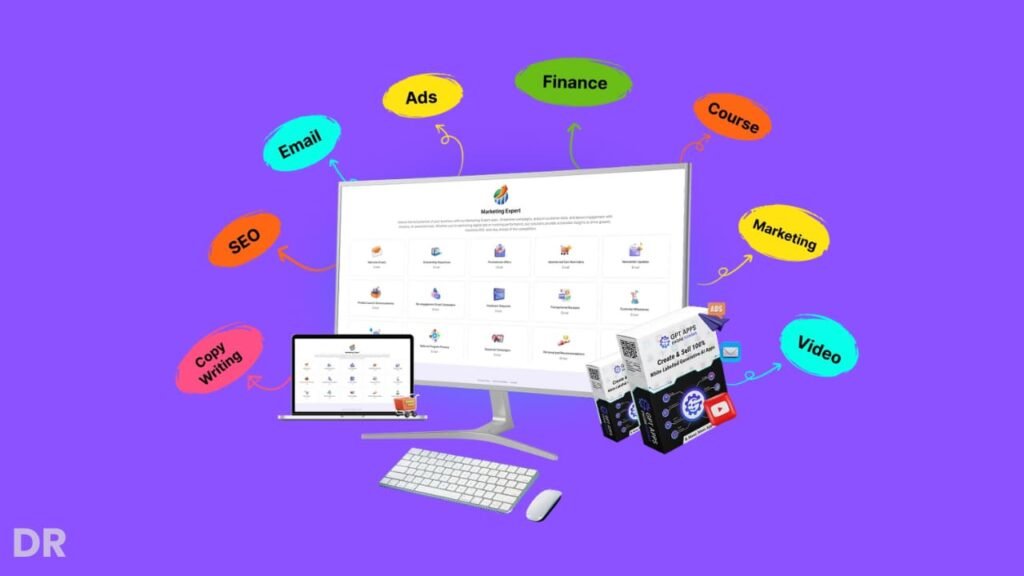
What Is GPT Apps Engine Gamma Exactly?
GPT Apps Engine Gamma is a cloud-based no-code AI app builder. You use it to create different types of AI tools, such as:
- Chat assistants
- Marketing copilots
- Customer support bots
- Product finders and quizzes
- Learning assistants and tutor bots
- CRM helpers and sales assistants
- “Super apps” that mix several tools in one
The key thing is: you don’t need to know how AI APIs, servers, or databases work. You just choose what you want, fill out forms, upload your content, adjust a few settings, and the platform does the heavy lifting.
You can also:
- Use GPT-3.5, GPT-4, GPT-4 Turbo models
- Build apps in multiple languages
- Train the AI with PDFs, URLs, FAQs, documents
- Sell apps to clients with a commercial and agency license
So the platform is not just a “toy chatbot builder.” It’s built for people who want real offers and real clients, but don’t want the dev bill that comes with custom builds.
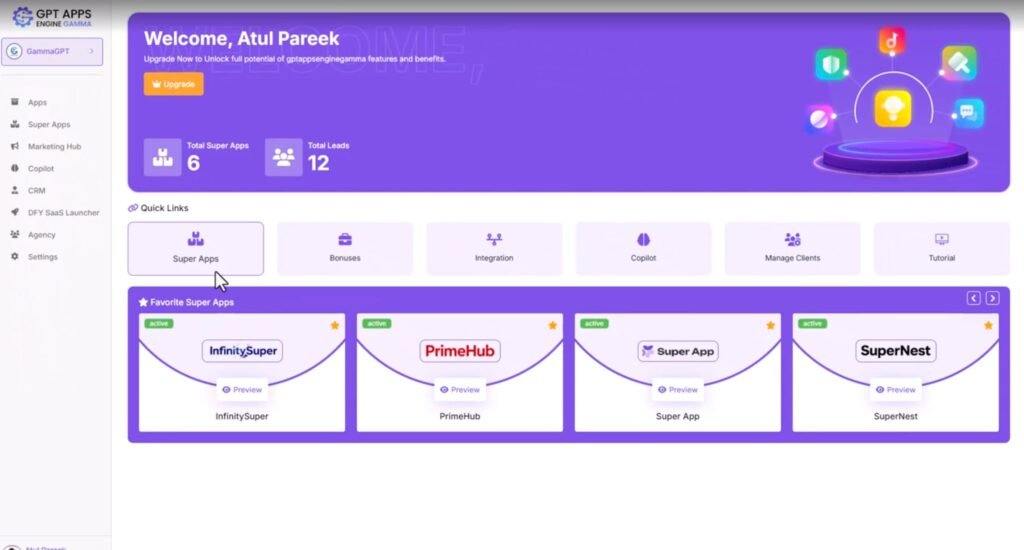
Now, I always look at the interface first. If the dashboard feels messy, I lose interest fast. Here, the layout is clear and goal-focused. You get sections for:
- Apps
- Super apps
- Copilots
- Workspaces
- Media tools (image, graphics, video)
The menus make sense, and the main actions are easy to see. You can tell it’s made for non-tech users. Buttons are labeled in plain language. Settings are grouped in a way that feels logical: prompt, data, tone, branding, publish.
The no-code page builder is also clean. You drag sections, text blocks, buttons, and media where you want them. You can create:
- App landing pages
- Client dashboards
- Login or member pages
- Simple funnels for your AI tools
I didn’t run into confusing design choices. Things are where you expect them. So you spend your time thinking about what the app should do, not trying to understand the system.
Demo Video
What’s New In GPT Apps Engine Gamma?
GPT Apps Engine Gamma is not just a small update. It adds a lot of new tools that make building and selling AI apps much faster and easier, especially if you’re a beginner or agency owner.
First, Gamma gives you 270+ done-for-you app templates across 45+ niches. The older version had fewer options.
Now I can jump into almost any market, pick a ready-made template, tweak the content, and ship an app in minutes. This helps a lot when I want to test ideas without starting from scratch each time.
Second, you get 5 ready-to-launch SaaS businesses. These are full setups that come with the structure, logic, and offer idea already mapped out.
I don’t have to figure out “what to sell” from zero. I can brand one of these, plug in my details, set my pricing, and start taking payments much faster.
Third, the new no-code page builder is a big help. I can build app pages, dashboards, and client areas with simple drag-and-drop.
No coding, no design stress. This means I can keep everything inside one platform instead of jumping between page builders and extra tools.
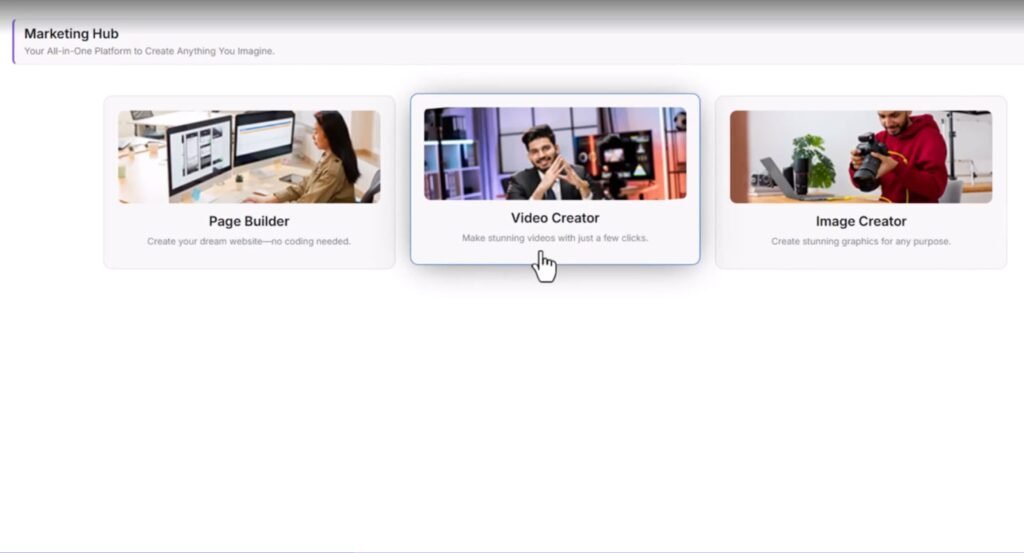
Fourth, Gamma now includes a full AI media suite: an AI image creator, an AI graphic creator, and an AI video creator. With these, I can make app graphics, social posts, ads, and promo videos right inside the dashboard.
So I can design the app, create the visuals, and prepare launch content without opening other software.
Finally, Gamma adds 5 “Super App” templates. These let me combine several tools and copilots into one strong product. For example, I can bundle a copywriter, a funnel helper, and a support bot into one panel and sell it as a premium AI bundle.
This helps me stand out and charge more, because I’m offering full solutions, not just single bots.
So, the Gamma update takes GPT Apps Engine from a simple AI app builder to more of a full AI app business kit. I can build, brand, market, and sell inside one system, which saves time and keeps everything neat and easy to manage. 🚀
GPT Apps Engine Gamma Review: Pricing & Upsells
Let me walk you through the pricing, because the funnel has a few layers and it helps to see who each one is for.
Front End: GPT Apps Engine Gamma Commercial – $37 (Use Coupon EARLY5)
The front-end is the main version, and it’s enough to get real work done. With this plan, I can:
- Create hundreds of AI apps using done-for-you templates
- Build custom copilots and embed them with one line of code
- Use ready-made templates in popular niches
- Manage client or project work using separate workspaces
- Collect leads and check stats with the built-in analytics dashboard
- Use the latest ChatGPT API models (GPT-3.5, GPT-4, GPT-4 Turbo)
- Ship mobile-ready apps with 128-bit SSL security
- Sell apps with the commercial license and get 24/5 support
There’s also a coupon EARLY5 that gives $5 off the front end, which makes it even more friendly if you just want to test the system.
Upsell 1: GPT Apps Engine Gamma Elite – $97
Elite is for users who want no limits. With this upgrade, I can:
- Create unlimited workspaces, apps, copilots, and clients
- Embed apps on unlimited sites and pages
- Unlock 125 extra skill areas for more use cases
- Add 50+ extra languages
- Move or copy apps between workspaces
- Use self-updating copilots that learn from chat history
- Get full encryption and chat privacy
- Receive alerts for every new lead
If you run an agency or plan to serve many clients, this is the level that really opens things up.
Upsell 2: GPT Apps Engine Gamma Enterprise – $67
Enterprise is all about smarter training and deeper data control. With this one, I can:
- Train copilots using multiple PDFs, URLs, and FAQs
- Remove or update single training sources when things change
- Set custom welcome and thank-you messages
- Collect feedback and ratings from users
- Activate advanced ChatGPT API models
- Use color themes and multilingual options
- Track user replies and measure lead quality
- Work with an enterprise license for unlimited clients
This is the upgrade I’d pick if I need detailed AI training and better insight into user behavior.
Upsell 3: GPT Apps Engine Gamma Traffic – $67
Traffic is built to bring eyeballs and leads to the apps. It lets me:
- Drive unlimited traffic and leads
- Use social share tools and engagement aids
- Auto-register people to webinars through GoToWebinar
- Connect with 20+ autoresponders
- Plug into Pabbly Connect and CRMs
- Export leads in XLSX format
- Add pop-up lead forms and thank-you messages
- Collect feedback, reviews, and bookings
If you struggle with traffic and list growth, this one helps turn the apps into a real funnel.
Upsell 4: GPT Apps Engine Gamma Agency – $97
The Agency upgrade is for people who want a full agency model around AI apps. With it, I can:
- Use an agency license for unlimited clients
- Create team accounts and assign workspaces
- Add custom branding and logos across the dashboard
- White-label the Super App header, footer, and GDPR policy
- Track and manage all client activity from one place
- Use the cloud platform with no extra hosting or domains
- Get priority agency support
This is the offer that makes the whole thing feel like a ready agency backend.
Bundle: GPT Apps Engine Gamma Bundle – $367 (Best Deal With SAVE100)
If you want everything, the Bundle gives you the full stack in one shot:
- Front End Commercial ($37)
- Elite OTO1 ($97)
- Enterprise OTO2 ($67)
- Traffic OTO3 ($67)
- Agency OTO4 ($97)
- All bonuses, tutorials, and knowledge base
With the SAVE100 coupon, the bundle drops by $100, which makes it the best value if you know you’ll use the platform for clients and want all features from day one.
GPT Apps Engine Gamma Bonuses – Extra Tools To Boost Conversions, Traffic, And Profits 🎁
When you grab GPT Apps Engine Gamma during launch, you don’t just get the app builder. You also get a full stack of bonuses that help you turn those AI apps into real traffic, leads, and sales. Here’s what each bonus adds on top of the main software.
Bonus #1 – Conversion Genius
This bonus helps you make your pages and AI apps more persuasive. You learn how to speak to visitors in a way that feels personal, lowers resistance, and gently guides them to take action. Great if you want more sign-ups, bookings, or sales from the same traffic.
Bonus #2 – 300+ Ways To Make Money With GPT
Here you get over 300 ideas, methods, and tips on how to make money with GPT and AI tools. It gives you ready angles for services, offers, and content so you’re not stuck wondering how to profit from the apps you build.
Bonus #3 – Blogging Traffic Mantra
This one shows you how to pick topics, create blog posts, and customize content that brings steady traffic. Pair this with GPT Apps Engine Gamma and you can use your AI apps to support those blog readers, capture leads, and push them into offers.
Bonus #4 – Digi Product Launch Lab
This bonus guides you through creating, launching, and selling digital products. It fits nicely with GPT Apps Engine Gamma, because you can use your AI apps as bonuses, upsells, or even full products inside your launch.
Bonus #5 – LeadGen Accelerator
Here you learn how to build clear lead generation systems for any kind of business. This helps you turn your AI apps into front-end lead machines that feed sales teams, service offers, or coaching programs.
Bonus #6 – Internet Marketing Kickstart
This is a starter pack for building and growing online projects. It walks through the basics of getting an idea off the ground, promoting it, and driving early momentum, which is ideal if GPT Apps Engine Gamma is your first serious tool.
Bonus #7 – Traffic Beast
Traffic Beast gives you strategies for content creation, SEO, analytics, social media, link building, guest blogging, and email. You can plug these tactics into your AI app funnels so you’re not just building tools—you’re actually getting people to use them.
Bonus #8 – Funnel Optimization Secrets
This bonus helps you build and improve funnels around your AI apps. You learn how to check each step, fix weak points, and tweak pages, emails, and offers so more visitors turn into buyers and repeat clients.
Bonus #9 – List Building Profit Kit
Here you get a clear plan to grow and monetize your email list. Since GPT Apps Engine Gamma already collects leads, you can plug those leads straight into the email strategies in this kit to build a long-term income channel.
Bonus #10 – Content Rocket Fuel: 30-Day Plan to Success
This is a 30-day action plan for content marketing. It shows you how to put your own voice into your content, so your brand feels real and not robotic. You can mix this with your AI apps to create a steady flow of posts, emails, and promos.
Bonus #11 – AI For Productivity
This bonus shows you how to use AI to get more done in less time. You learn how to plug AI into your daily work, clear tasks faster, and keep your projects on track. Perfect if you want GPT Apps Engine Gamma to be part of a more efficient workflow.
Bonus #12 – Business Traffic Maximizer
This one focuses on local business growth. It shows how to mix online and offline marketing, use social media, PR, sponsorships, direct mail, and other tactics to pull more people through the door. You can position your AI apps as part of that traffic and lead system, which makes your services more valuable to local clients. 🚀
GPT Apps Engine Gamma Vendor & Launch Dates
GPT Apps Engine Gamma is created and launched by Dr. Amit Pareek, a well-known name in the online software and marketing space.
I like that he focuses on tools that non-tech users can still handle, and this platform follows the same idea: make AI app creation simple, sellable, and scalable without needing a developer on speed dial.
The official launch starts on 15th of November at 11:00 AM EST and runs until the 20th of November at midnight.
During this launch window, you get access to the full GPT Apps Engine Gamma system at a special launch price, along with the discounts and bundle deals tied to this period.
After the 20th of November, the price goes up. So if you already know you want to build and sell AI apps, this launch window is the best time to lock in the lower one-time price and secure all the bonuses while they’re still included. 🚀
Key Features Of GPT Apps Engine Gamma And How They Help You ⚙️
This is where the platform really gets interesting. Let me walk through the big features and how they help in real life.
No-Code AI App Builder
You can create AI apps in minutes:
- Pick a template
- Set the goal and audience
- Adjust the prompt and tone
- Add your data
- Publish and embed
This means you can test new ideas very fast. Instead of thinking about an app for weeks, you can build a simple version in an afternoon and show it to clients right away.
270+ Done-For-You App Templates
You get 270+ templates across 45+ niches. That alone is huge, because it removes “blank screen syndrome.”
Some examples include:
- Agency lead gen copilots
- Real estate chat assistants
- E-commerce product helpers
- Course Q&A tutors
- Support bots for local businesses
Each template already has a structure and basic logic set up. You only need to tweak the content, instructions, and branding. This makes it easy to build offers for many markets without starting from zero every time.
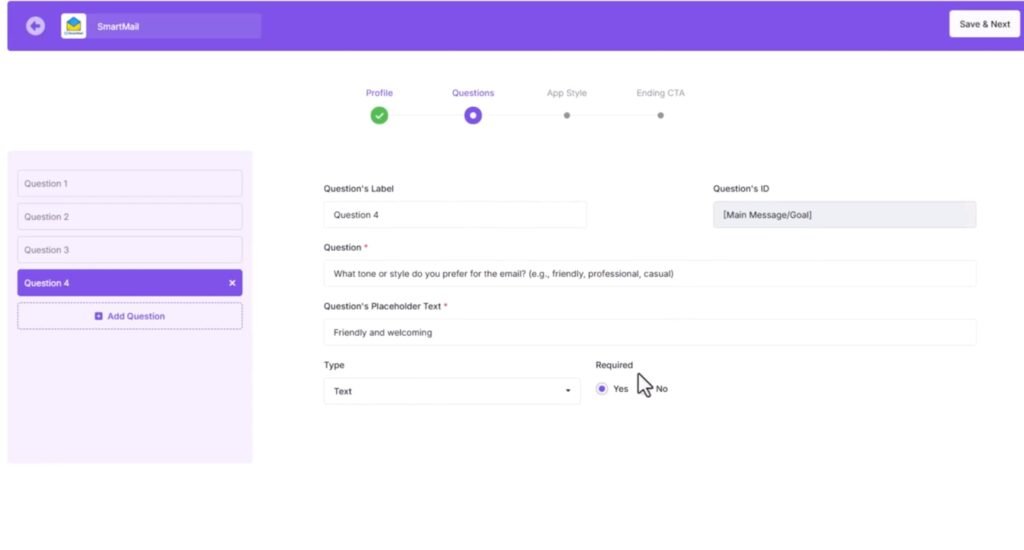
White-Label Branding
Every app can look like it’s 100% yours:
- Add your logo
- Set your colors and fonts
- Change app names and UI text
- Use your domain on pages and portals
For agencies and freelancers, this is huge. Your clients see your brand, not “some third-party tool.” That helps you charge more and build trust. It also makes the apps feel like part of your own product line.
Train AI Using Your Data
You can upload:
- PDFs
- URLs and blog posts
- Knowledge base articles
- FAQs
- Text documents
The AI then uses this data to answer. This helps you create apps that:
- Use your language and style
- Know your products and services
- Give answers that match your brand
- Reduce support tickets and back-and-forth emails
If you’re a coach, you can feed in your course material and turn it into a 24/7 helper. If you run an agency, you can build custom AI assistants for each client based on their docs.
1-Line Embed Code
When your app is ready, you get a single line of embed code. You can drop it into:
- Websites
- Landing pages
- Course platforms
- CRMs
- Client dashboards
You don’t need to mess with complex integration steps. Paste the code, save the page, and your AI app shows up. That makes rollouts quick and low-stress.
Custom Response Style And Tone Control
You can adjust how the AI talks:
- Friendly and casual
- Professional and formal
- Short and direct
- Longer and detailed
This matters more than people think. A local plumber and a law firm should not sound the same. Tone control lets you match the AI to your audience and to the brand voice you want.
Multilingual App Creation
You can build apps that work in many languages. This helps if you have:
- Clients in different countries
- A local audience that prefers a non-English language
- Online courses or products you want to offer to more regions
You can start in one language, then roll out more versions later without rebuilding from scratch.
Super App Builder
“Super apps” let you combine several tools into one product. For example:
- A marketer app that writes emails, ad copy, and hooks in one place
- A course assistant that answers questions, suggests lessons, and creates practice tasks
- A business assistant who handles FAQs, lead scoring, and script ideas
This is great when you want to sell a higher-ticket package. Instead of one small bot, you offer a full panel of AI helpers under one login.
Built-In AI Media Suite 🎨🎬
You also get:
- AI image creator
- AI graphic creator (banners, ads, social posts)
- AI video creator (promo and demo videos)
You can create:
- Thumbnails and covers for your apps
- Ads and social posts to promote your offers
- Short demo videos to send to clients
Since it’s all inside the same platform, you don’t have to jump around between other tools. That saves time and helps you keep branding consistent.
Commercial And Agency License
You can sell unlimited AI apps to:
- Local businesses
- Online coaches
- Agencies and consultants
- E-commerce stores
You keep 100% of the revenue, and you don’t pay extra per client. This opens up real agency models:
- Charge setup fees
- Charge monthly retainers
- Offer “AI as a service” packages
- Bundle apps with your current services
For me, this is where the platform moves from “tool” to “business engine.”
How GPT Apps Engine Gamma Compares To Other AI App Builders 🆚
Compared to most generic chatbot tools and low-level builders I’ve seen, GPT Apps Engine Gamma stands out in a few ways:
- More templates: 270+ is huge. Many tools offer 10–30 at best.
- Full white-label setup: Some platforms keep their brand visible. Here, you can hide the source and lead with your name.
- Super apps: Not many builders let you bundle several copilots into one big product.
- Built-in media tools: Most tools stop at chat. This one adds images, graphics, and video promo tools.
- Ready-to-launch SaaS setups: You can plug these in and start selling faster, instead of figuring out how to “package” your app.
There are more “raw” dev-style tools that offer deeper custom coding. But for non-developers and for people who just want to ship offers, GPT Apps Engine Gamma feels more friendly and focused on real use cases.
GPT Apps Engine Gamma Pros And Cons ✅❌
Pros
- No coding skills needed
- 270+ ready templates across many niches
- Strong white-label features for agencies
- AI trained with your own data and content
- Easy 1-line embed for quick deployment
- Super app builder for bigger offers
- Built-in AI media suite for branding and promo
- Commercial and agency license included
- Good fit for selling SaaS or client retainers
Cons
- There is still a learning curve for complete beginners
- You need your own ideas or offers to stand out in a busy AI market
- You still depend on external AI models, so usage costs can add up with heavy traffic
- Power users who want deep code-level control may find some limits
Real User Experiences And My Own Results 😊
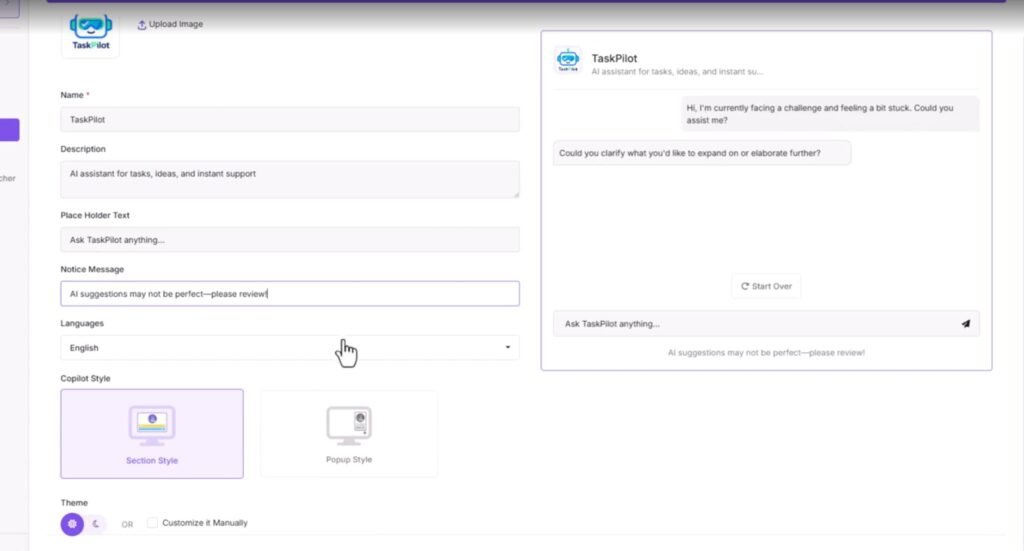
My own time inside the platform was smooth. I went from “blank” to a working branded chatbot in under an hour. The steps were clear:
- Chose a coaching assistant template
- Uploaded a PDF with content
- Set a friendly tone and short answer style
- Added my logo and colors
- Embedded the app on a test page
The replies felt on point with the content I uploaded. The app stayed on topic, used my phrases, and handled common questions well.
From what I’ve seen from feedback, users highlight:
- Speed from idea to live app
- Flexibility to serve many niches
- The value of having media tools built in
- How easy it is to show clients a working demo
Some people do mention that they needed a few days to fully understand all features, which makes sense with a system that does this much. But once the first project is done, the second and third apps feel much faster.
Tips And Tricks To Get The Most From GPT Apps Engine Gamma 💡
Here are some practical tips based on how I would use it long term:
- Start with one niche
Don’t try to build apps for everyone at once. Pick a niche you know (coaches, local gyms, real estate, etc.) and build a strong offer there first. - Use the templates as a base, not a final product
The templates are great, but always tweak prompts, data, and tone. That’s how you make your app feel unique. - Feed it clean, focused data
Upload well-structured PDFs and FAQs. Clear input leads to clear answers. If your docs are messy, your AI will sound messy too. - Set clear rules for the AI
Use the prompt area to tell it what it should and should not say. Set style, length, and role. This improves output a lot. - Bundle apps into offers
Instead of selling “one chatbot,” create packages like “AI lead gen system” or “AI support desk.” Super apps help a lot with this. - Use the AI media tools
Make promo images and short videos. Show your app in action. Clients understand visual demos faster than long text. - Track feedback and refine
Ask users what they like and what they don’t. Update prompts and data over time. Small tweaks can improve results a lot.
GPT Apps Engine Gamma FAQ ❓
Is GPT Apps Engine Gamma good for beginners?
Yes. If you can follow simple steps, click buttons, and upload files, you can build your first app. There is a bit to learn, but it’s not a developer tool.
Do I need my own OpenAI API key?
The platform is built around GPT models, so you may need a key or credits depending on how the access is set up in your plan. This is normal for serious AI tools and gives you more control over usage.
Can I use it for clients?
Yes. You get commercial and agency rights, so you can build and sell apps to clients, or include them in your service packages.
Can I use my own branding and domain?
Yes. You can add your logo, colors, and brand name, and you can connect your domain so apps and pages look like they belong to your brand.
What kind of apps can I build?
You can build chatbots, support bots, marketing copilots, quiz tools, learning assistants, and big “super apps” that combine many tools in one panel.
Does it work for non-English languages?
Yes. You can create apps in several languages. This helps if your audience is global or if you want to reach different regions.
Can I sell my apps as a SaaS?
Yes. The platform is set up to support ready-to-launch SaaS businesses, so you can build, brand, and sell access for a monthly fee or a one-time price.
Final Verdict – Is GPT Apps Engine Gamma Worth It And Who Is It For? ✅
So, after going through the features and actually using the platform, here’s my clear take.
GPT Apps Engine Gamma is a strong fit if:
- You want to sell AI apps or SaaS offers without coding
- You run an agency and want white-label AI tools for clients
- You are a coach, course creator, or consultant who wants smart assistants for students or leads
- You like the idea of launching many small AI tools in different niches
It saves time, keeps things simple, and still gives you enough control to shape the AI to your brand and your audience.
The mix of templates, super apps, branding, training with your data, and media tools makes it feel like a full business system, not just “another chatbot builder.”
If you already have strong tech skills and love to code, you may prefer raw dev tools. But if you want speed, branding, and a clear path to offers and clients, GPT Apps Engine Gamma is a solid pick.
For me, the biggest win is this: I can go from idea to working, branded AI app fast, then spend my time on sales, content, and client results instead of getting stuck on tech. And that’s what most of us really want from an AI platform. 🚀